
Agama, the next-generation Linux installer from SUSE’s YaST team, released version 21, with an improved desktop selection process. Since openSUSE distributions using Agama do not enforce a default desktop environment, users must select one during installation.
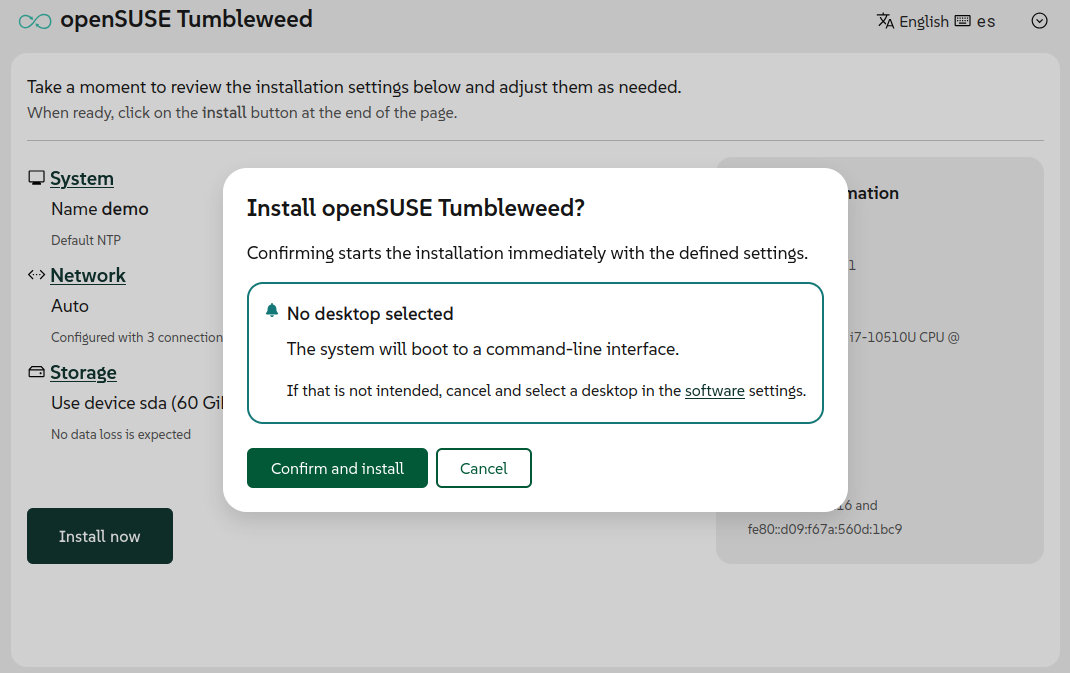
In light of this, the pattern selection form has been redesigned for consistency and clarity. For distributions such as openSUSE Tumbleweed, Slowroll, and Leap 16.1, the installer also displays a reminder in the confirmation dialog when no desktop environment is selected.
Network configuration in the web interface has been updated as well. Agama 21 features a redesigned form for creating and modifying network connections, enabling support for more connection types directly through the UI.
Previously, configuring network bonding, bridges, or VLANs required editing the JSON-based Agama configuration. In Agama 21, bonding and bridge connections can now be set up directly in the web interface. VLAN support is planned for a future release.
Moreover, storage handling now includes support for installing on existing LVM setups. The JSON format now allows operations on existing volume groups and logical volumes, such as expanding groups with new physical volumes, and mounting, formatting, or resizing logical volumes.
It also supports creating new thin volumes in a reused thin pool. In the web UI, users can select an existing volume group as the installation destination or as an additional device to create or reuse logical volumes.
Previously, on the bootloader side, Agama installed GRUB2 for all distributions. That has now changed. Agama 21 now supports selecting different bootloaders on supported EFI systems, including GRUB2, systemd-boot, or openSUSE’s GRUB2-BLS.
When systemd-boot or GRUB2-BLS is selected, Agama follows the UAPI Boot Loader Specification. The installer also adjusts partitioning and TPM configuration based on the chosen bootloader, including support for automatic unlocking of encrypted devices.
Importantly, for products that still use GRUB2, such as beta versions of openSUSE Leap 16.1 and SUSE Linux Enterprise Server 16.1, users can enable systemd-boot where supported by starting the installer with the inst.systemd_boot_preview=1 boot argument.
On top of that, Agama 21 introduces new NTP configuration options. Users can define NTP sources, including pools, servers, and peers, using the JSON configuration format. The installer also supports automatic conversion from the ntp-client section of an AutoYaST profile.
The web interface now also features a new “System” section for configuring the hostname and NTP sources. The installation media also supports the rd.ntp boot argument, enabling early NTP configuration during boot.
Finally, to improve security, a new boot option, inst.remote=0, lets users disable remote access to the installer. By default, Agama allows installation to be managed over the network from another device. Enabling this option restricts access to the local machine.
For additional details, see the announcement. Those curious to try the new openSUSE installer can download the ISO files here. The next version, Agama 22, will be released in approximately one month.
Image credits: openSUSE