
Agama, the next-generation Linux installer from SUSE’s YaST team, has released version 22. This version primarily refines the installer experience, beginning with a redesigned header and toolbar in the web interface.
The updated layout displays the product name and logo on every page, introduces improved breadcrumbs for easier navigation, and removes the “Review and install” button, which developers found redundant and confusing.
The toolbar now makes installer tools more accessible throughout the interface. The progress monitor is always visible, rather than appearing only during tasks. The log download tool now offers clearer information about its function and the status of data collection.
Additionally, the previous “Download config” option has been replaced with a “Show configuration” tool that presents the installer’s JSON configuration more clearly.
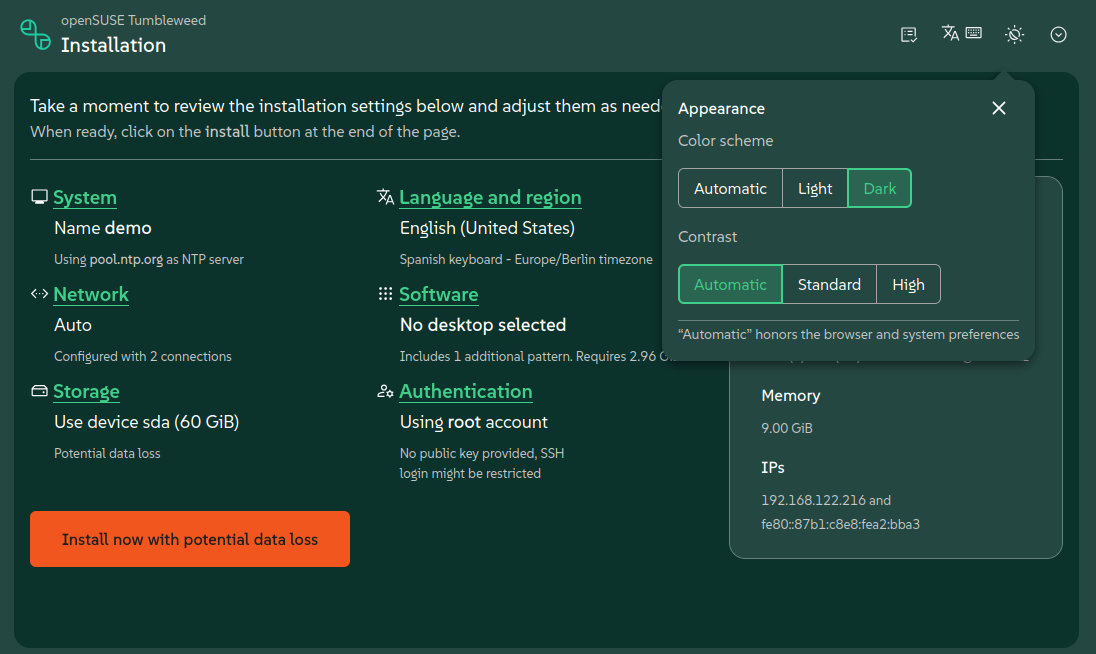
Agama 22 also introduces a new Appearance tool that lets users select contrast and color settings. Based on PatternFly 6.5, it offers light, dark, and high-contrast modes. The dark mode uses SUSE’s brand colors by default, while products can rebrand both light and dark themes using design tokens.
Storage configuration is improved, with the web interface now offering additional filesystem settings and revised sections for configuring disks, partitions, and logical volumes. These areas are now more consistent with the rest of the Agama interface and easier to use.
Importantly, networking now includes VLAN setup directly in the graphical web interface. Agama’s web UI can configure Wi-Fi, Ethernet, bridge, bond, and VLAN connections.
The command-line installer has been updated as well. Agama’s text-based monitor now answers installer questions interactively, benefiting commands such as agama config load that use the monitor to display results.
Finally, for unattended installations, Agama 22 introduces a new access section in its JSON configuration. Users can specify whether the installed system should be accessible via SSH or Cockpit after installation. Agama then enables the necessary service, opens the firewall port, and automatically applies the required adjustments.
For additional details, see the announcement. Those curious to try the new openSUSE installer can download the ISO files here. The next version, Agama 23, will be released in approximately one month.
Image credits: openSUSE