

KDE’s Dolphin file manager is getting back a feature that has been missing for 15 years. Developer Méven Car has announced the return of Columns view, also known as Miller columns, which allows users to navigate directories through multiple side-by-side columns instead of opening each folder in the same view.
The feature was originally available in Dolphin starting with KDE 4.0 but disappeared in 2011 when the file manager switched to the KItemViews engine for Dolphin 2.0. Despite years of user requests, the Columns view has never been restored.
Miller columns display each folder in a separate column. Selecting a subfolder opens its contents in the next column while keeping parent directories visible, making it easier to navigate deeply nested directories without losing track of the current location.
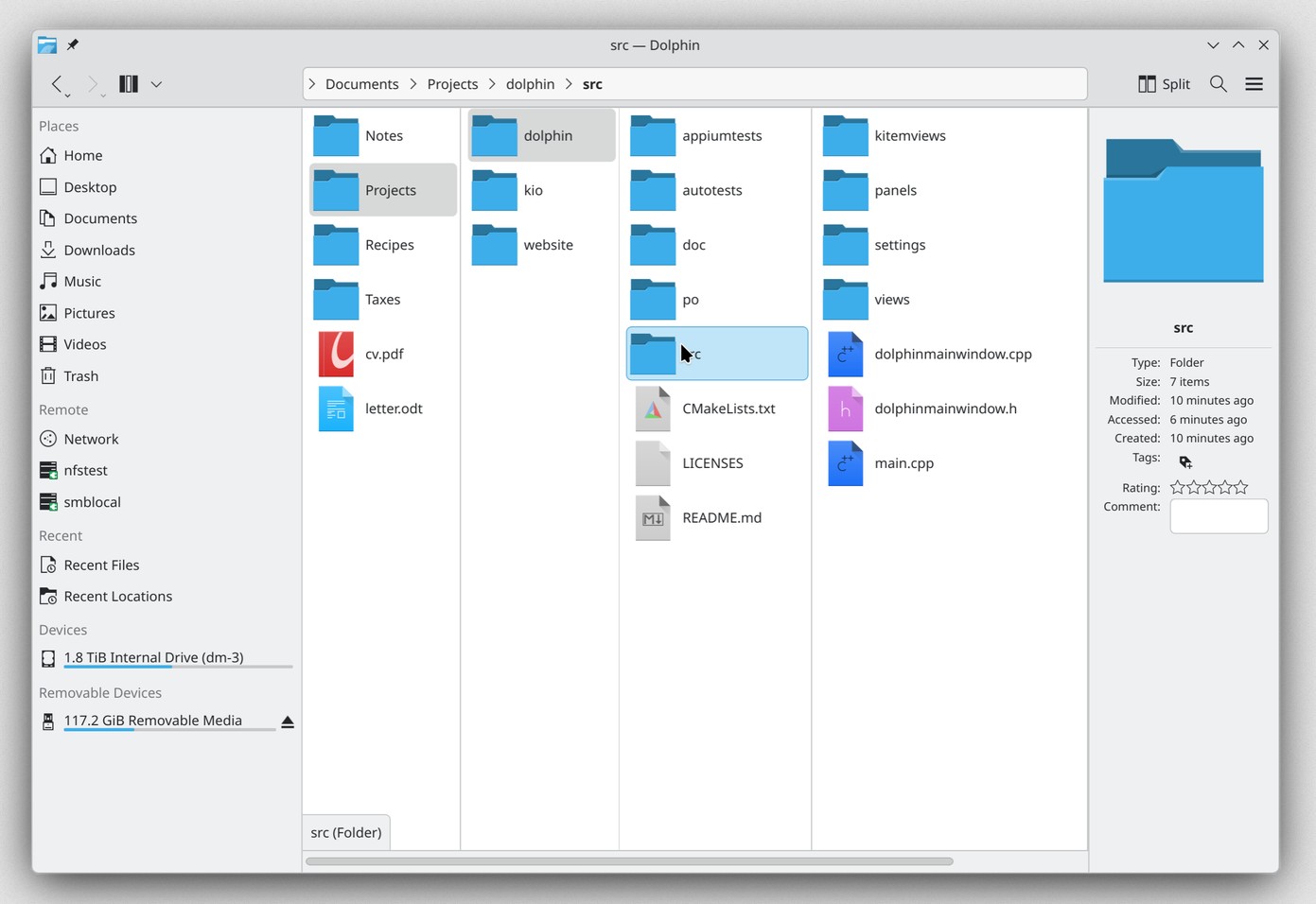
The new implementation supports keyboard navigation with the Left, Right, and Enter keys. Users can adjust column widths manually, let them fit their contents automatically, or set a fixed width. Existing Dolphin features like sorting, grouping, hidden files, zoom, and previews work across all columns.
The location bar, window title, file operations like creating folders and pasting files, and the integrated terminal follow the last column. Open columns are restored when Dolphin resumes a previous session.
Users can switch to the new view using the Ctrl+4 shortcut, while additional options are under Settings > View > Columns. For now, the feature is exclusive to Dolphin and not available in Konqueror or other applications embedding its file view.
As for availability, Columns view is not yet confirmed for Dolphin 26.12, scheduled for December. KDE developers have until November 12 to decide whether it is ready for inclusion. Otherwise, the feature will ship with Dolphin 27.04 in April 2027.
In the meantime, Arch Linux users can test it through the dolphin-git package from the AUR. Users of other distros can build the development version using kde-builder.
KDE devs encourage users to test the feature with everyday file operations, especially keyboard navigation, drag and drop, remote directories, and column resizing, and report any issues before the November 12 deadline.
For more information, see the announcement.
Image credits: KDE




Dolphin is really awesome