
PhotoSuite is a new, GPL-3.0-licensed, open-source desktop image editor taking a different approach from projects such as GIMP or Krita. Instead of building its own workflow, the project explicitly tries to reproduce the familiar experience of Adobe Photoshop while emphasizing native PSD and PSB compatibility.
The application is designed around the look and behavior of Photoshop from roughly 2020. According to the developer, panels are placed where experienced Photoshop users expect them, keyboard shortcuts follow the same conventions, dialogs show familiar options, and modifier-key behavior is intended to match closely.
More importantly, PSD is not treated simply as an import and export format. PhotoSuite uses PSD and PSB as native document formats and aims to preserve document structure when files move between PhotoSuite and Photoshop.
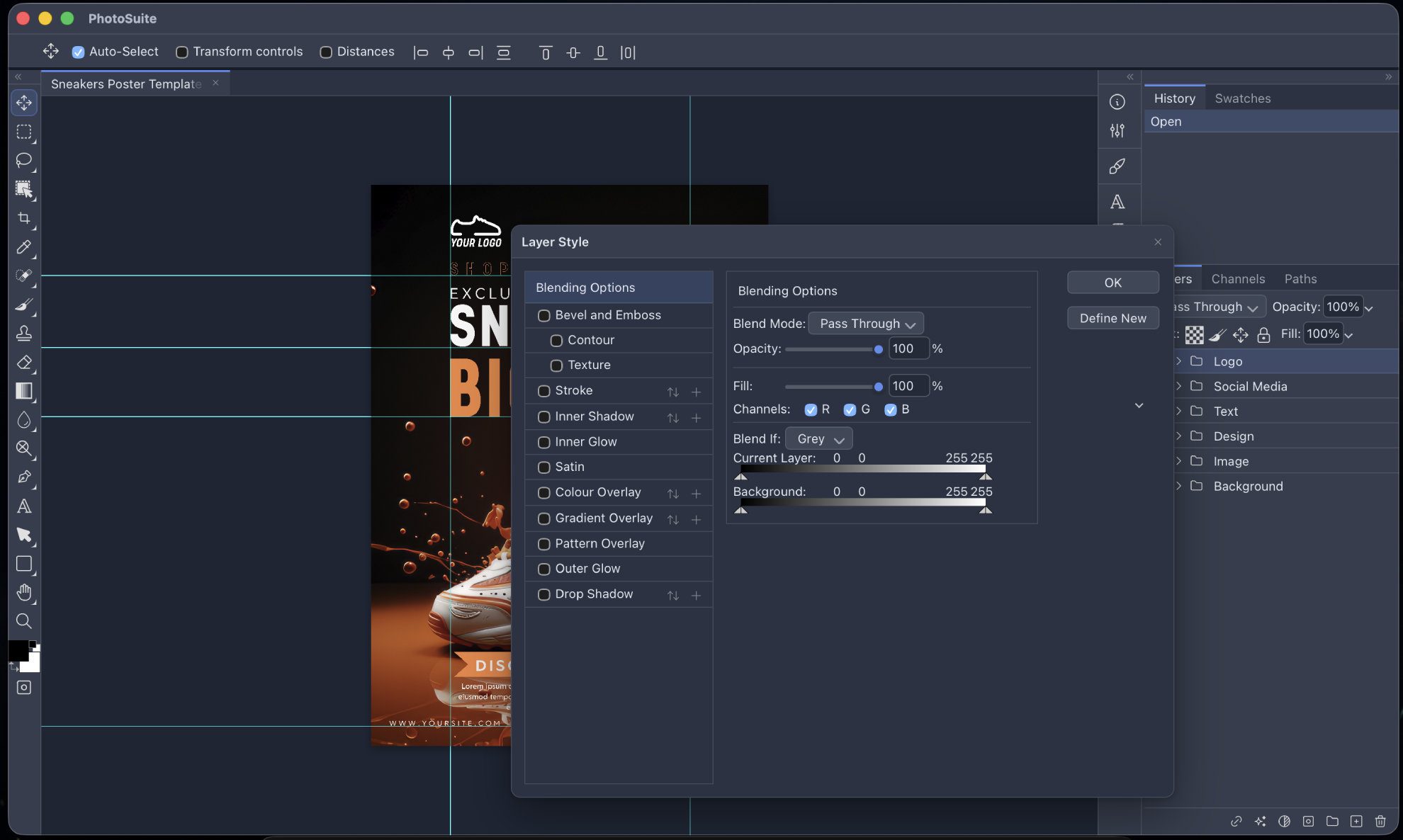
The developer says this includes layer records, masks, blending modes, channel data, layer effects, Smart Filter stacks, editable text information, vector paths, slices, and color profiles. Large Photoshop documents are also supported through the PSB format.
That is an ambitious claim worth treating with caution for now. The project describes its goal as 1:1 PSD/PSB compatibility, and the developer says extensive round-trip testing has been carried out with large files. However, PhotoSuite is still young, and its Photoshop compatibility has not yet been independently validated broadly.
Beyond PSD support, PhotoSuite already offers a surprisingly extensive editing toolset. It includes raster and vector layers, groups, clipping masks, layer masks, Smart Objects, non-destructive Smart Filters, and familiar layer styles such as Drop Shadow, Inner Shadow, Glow, Bevel and Emboss, overlays, and strokes.
The usual selection and editing tools are present as well, including Marquee, Lasso, Magic Wand, Crop, Brush, Clone Stamp, Healing Brush, Gradient, Eraser, Pen, Type, Shapes, Dodge and Burn, and Eyedropper tools.
More advanced functionality includes Liquify, Lens Correction using the Lensfun database, a Filter Gallery, canvas rotation, rulers, guides, a History palette with snapshots, vector Boolean operations, and fairly advanced typography.
For text rendering, PhotoSuite uses technologies including HarfBuzz and FriBidi, providing features such as complex text shaping, bidirectional text, OpenType ligatures, kerning, text-on-path, and text warping.
Automation is another area where the project goes beyond basic image editing. PhotoSuite includes a parser and playback engine for Photoshop Actions files, JavaScript and JSX scripting support, and a plugin system where extensions can be written using HTML, CSS, and JavaScript.
Format support is similarly broad. In addition to PSD and PSB, the application lists support for formats including PNG, JPEG, WebP, AVIF, TIFF, GIF, OpenEXR, SVG, PDF, EPS, Illustrator files, Adobe XD documents, Sketch, Figma, GIMP XCF files, and several camera RAW formats.
Affinity Photo and Designer files are also listed, although that support is explicitly marked as work in progress. The developer has said that the Affinity format handling is reverse-engineered, so expectations should be kept realistic there.
Under the hood, PhotoSuite is built as a Tauri 2 desktop application. Its editor runs using HTML5, WebAssembly, and WebGL inside the system webview, while a Rust-based host handles tasks such as filesystem access, native menus, dialogs, clipboard operations, and printing.
The application is designed to work entirely locally. According to the project, it requires no cloud component and no telemetry.
Linux users get prebuilt x86_64 packages in both DEB and RPM formats. Builds are also available for Windows and macOS.
What makes PhotoSuite worth watching is not simply that it is another free image editor. You know, Linux already has mature options for that. The more interesting part is its decision to target Photoshop users directly by preserving familiar workflows and focusing heavily on PSD interoperability.
Whether it can ultimately deliver the level of compatibility its developer is aiming for remains to be seen. But if PhotoSuite manages to keep complex Photoshop documents intact while providing a genuinely familiar desktop workflow, it could fill a gap that has remained difficult for open-source graphics applications for years.
For additional details, see the project’s GitHub repo.
Image credits: PhotoSuite
Update, October 5: After publication, Photopea creator Ivan Kutskir contacted Linuxiac with concerns about PhotoSuite’s origins. According to Kutskir, PhotoSuite is essentially a repackaged copy of Photopea (a browser-based image editor with a Photoshop-like interface and support for PSD files) created by taking the code from his web application and using AI to package it as a desktop app.
Kutskir points to what he describes as a 1:1 match in capabilities, along with a striking similarity in the interface.
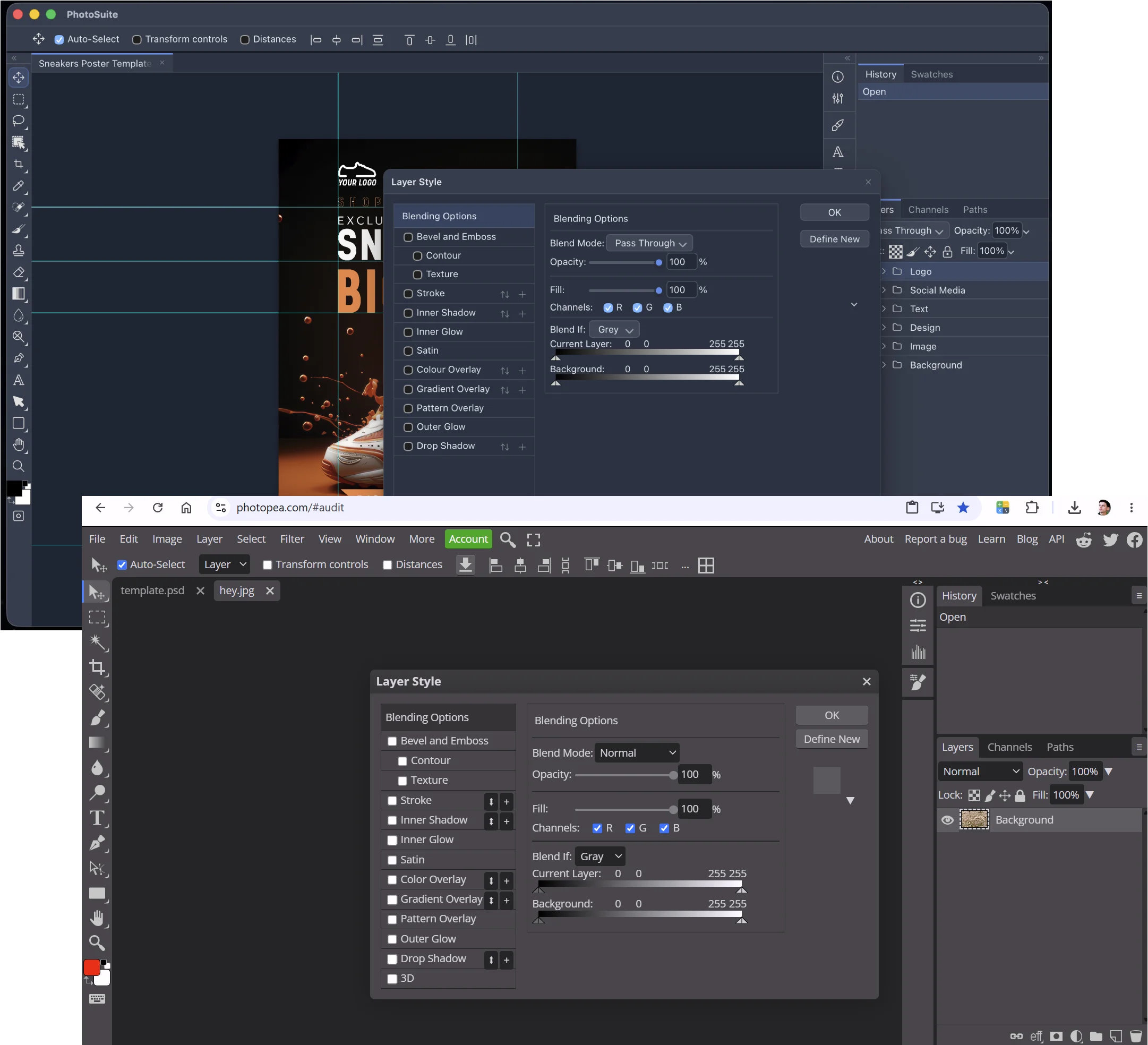
He also notes that the person behind the project remains anonymous and has not publicly disclosed their identity. We’re adding this update so readers are aware of his position regarding the project.



https://c-shop.org/
C-shop is a free native Rust with Vulcan GPU acceleration. It contains free deep learning tools like content aware fill, neural network based noise removal or depth estimation.
It also works natively with LLMs so CODEX or Claude CLI can use it as a tool performing tasks and “seeing” results as it’s CLI interface reports back the outcome in textual format.
Much more exciting than basic bland photoshop copies.
They literally stole Photopea code, if you want something not stolen use Patchy or wait for Phototux
I installed it via the deb file on Debian/Gnome. No thumbnails on the file picker or even a preview. Just tiny icons. Pinta works fine in this regard on Gnome tho not on KDE.
https://github.com/eolix/photosuite/releases/download/v0.9.15/PhotoSuite_0.9.15_amd64.deb
It all sounds wonderful but you haven’t left a way to download it. or where exact to find it
sudo dnf install webkit2gtk4.1 –setopt=fedora.baseurl=http://fedoraproject.org –setopt=updates.baseurl=http://fedoraproject.org –disablerepo=copr*
sudo dnf install –disablerepo=* /var/home/attrobhome/Downloads/PhotoSuite-0.9.15-1.x86_64.rpm
distrobox-export –app PhotoSuite
https://github.com/eolix/photosuite#downloads
Open Google Play Store inside Waydroid, log in, and download PhotoSuite from Google Play Store. Alternatively, use Bottles to run the old CD desktop version from the late 90s or early 2000s (e.g., PhotoSuite 4, 7, or 8).
I am still looking for something in Linux graphics to meet my needs. Something with more tools than image viewer, Mirage or mtPaint, but less complicated than GIMP or Krita. This sure doesn’t fill that hole in the graphics area.
That is the only downside for Linux at the moment. For Windows, that program is FastStone Image Viewer. The project is free, so it is strange that they do not want to release the code for Linux. I wrote to them many years ago but received no reply. XnView MP is probably the closest alternative right now. If you know of or are testing a program that is even closer to FSIV, please let me know via email.
Interesting, this makes it the third new Photoshop clone I’ve learnt of in the past few days, and they’re all using different technologies.
The other one is Patchy (C++ and Qt), and PhotoCraft (Rust and egui).
I’ve tried to find Patchy (C++ and Qt) and not found, where have you seen it?
Thank you!
Nice replacement for PS.
I use Photoshop version 2021 on Windows 10. Due to a hardware failure that required reformatting my system, I lost the application. The version of Photoshop I am currently using was installed from a non-official source, and some features are not working correctly. Can I install PhotoSuite—which is reportedly free—as a substitute without uninstalling the existing Photoshop? Also, can PhotoSuite be used without a Wi-Fi connection? Please let me know. Thank you.