Here’s a tool that can make working with containers easier, especially if memorizing all the commands isn’t your favorite thing. I’m talking about Kontainer.
Kontainer is a relatively new graphical frontend for Distrobox, aimed at KDE Plasma users who want to manage containers from a desktop interface rather than relying entirely on terminal commands.
It’s built with Qt/QML and Kirigami as a native KDE application for Distrobox container management. For readers unfamiliar with Distrobox, it lets users run other Linux distributions in containers while keeping them closely integrated with the host system.
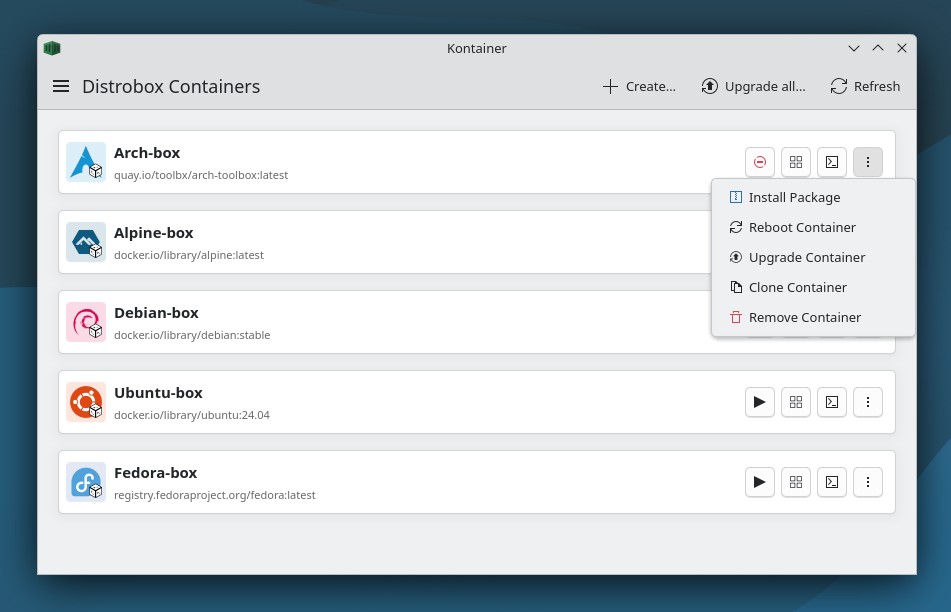
However, Kontainer goes beyond basic container controls. You can create, delete, clone, start, stop, and reboot containers, open terminal sessions inside them using your preferred terminal emulator, and install package files directly with automatic package manager detection.
The application also focuses on desktop integration. It can export and unexport applications from containers to the host desktop. Kontainer supports custom images, additional arguments, custom home directories, and volume mounting. It also imports container configurations from distrobox.ini manifest files through Distrobox Assemble.
Because it is built specifically for Plasma, Kontainer also provides native KDE integration and a color-coded container list organized by distribution, with optional container icons for easier visual identification.
It is important to understand that it does not replace Distrobox but adds a graphical management layer for users who prefer handling those environments from a KDE application instead of the shell.
If you’d like to give it a try, Kontainer is available on Flathub, but the Flatpak package still requires several host-side components. Users need Distrobox, Podman or Docker, and a terminal emulator installed on the system.
For more details, visit the project’s GitHub page.