Omarchy 4.0 “Quattro,” a preconfigured Arch Linux setup packaged as a distro that ships with a Hyprland tiling window manager and a curated set of defaults and developer tools, is now available as what the project describes as its biggest release to date.
The main highlight is the new desktop shell, now built on Quickshell. Omarchy 4.0 combines the bar, app launcher, menus, notifications, on-screen displays, control panels, lock screen, and Polkit authentication agent into one continuous shell process, instead of using separate components.
Because of this change, several tools that were part of the old setup, like Waybar, Walker, Mako, SwayOSD, hyprlock, hypridle, swaybg, and polkit-gnome, are no longer included by default. The new shell uses plugins and can be controlled through IPC, allowing for much deeper customization.
The new bar includes interactive widgets for workspaces, the active window, clock, weather, media playback, system tray, battery, keyboard layout, microphone, updates, Do Not Disturb, Night Light, screen recording, and more. You can move the bar to any edge of the screen and toggle transparency right from the interface.
You can now also install third-party bar widgets or even full replacement bars using the new plugin system with Git repositories. Moreover, you can enable, disable, clone, or remove plugins through Omarchy’s configuration interface.
The application launcher is now part of the main Omarchy menu, giving you a single searchable interface with Super + Space. It supports fuzzy and acronym matching and searches both apps and Omarchy commands. You can still access an apps-only launcher with Super + Alt + Space.
Importantly, notifications are now built into the new shell. You get Do Not Disturb mode, duplicate suppression, and a notification history that lets you replay the last ten notifications. Clipboard management and emoji selection are also now native features, replacing the old Walker-based tools.
Audio, Bluetooth, networking, display settings, and power management now each have their own graphical panels. You can also add widgets for services like Tailscale and Dropbox, and there’s a panel for weather information at a location you choose.
Behind the scenes, the shell no longer checks the system at regular intervals. Instead, status indicators, network state, monitor changes, and backgrounds now update only when events happen, which helps the desktop use less CPU when idle.
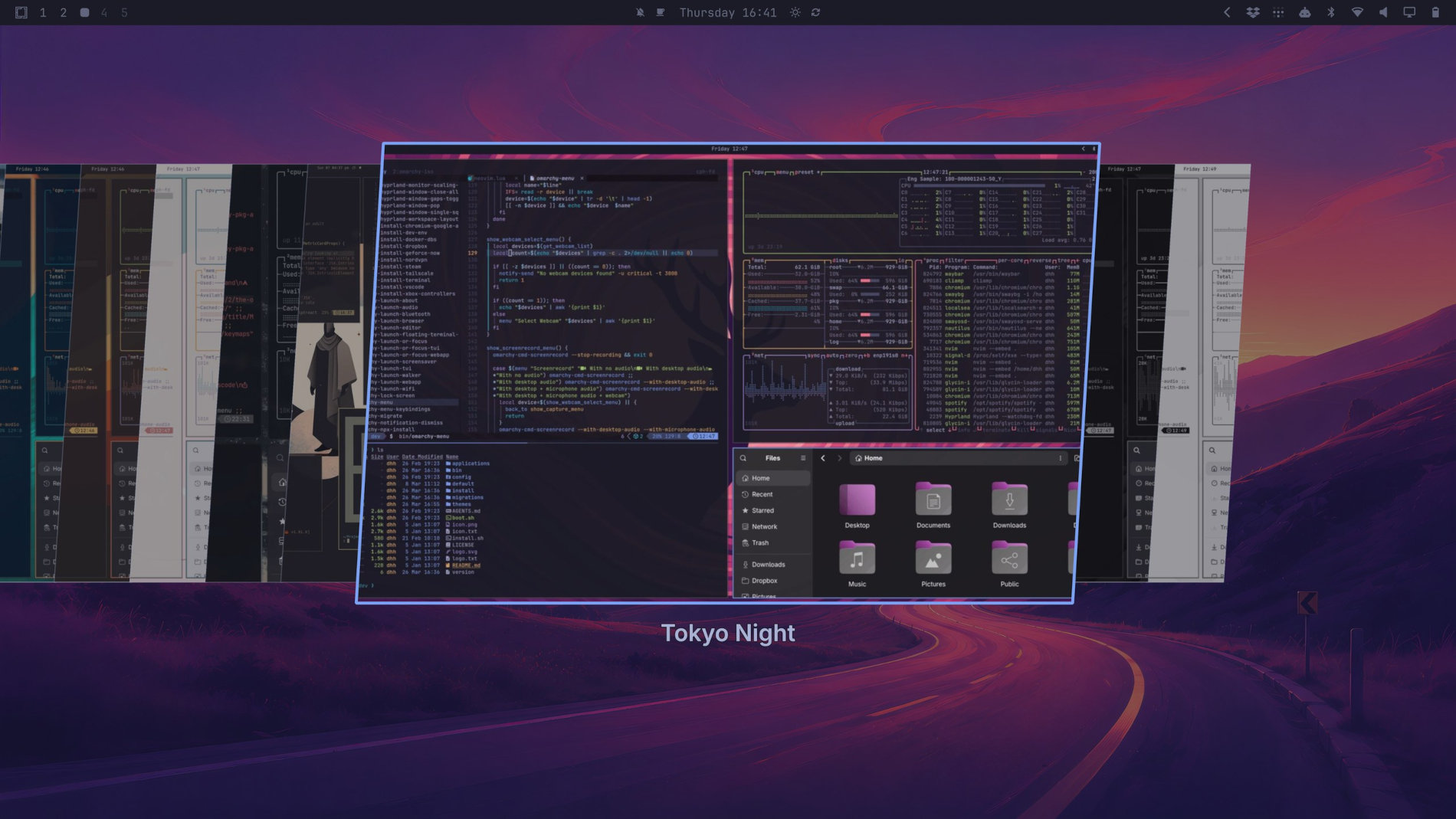
On the customization front, Omarchy 4.0 adds theme and wallpaper switchers, and the color palette now has 24 colors instead of eight. Additionally, three new themes—Solitude, Last Horizon, and Lupine—are now available. You can also set up machine-specific visual overrides in ~/.config/omarchy/shell.toml, and changes take effect immediately without restarting the shell.
Beyond the desktop itself, Omarchy now includes an ALPM guard that sends regular system upgrades through its own update tool. If needed, you can bypass this by setting an environment variable.
Hyprland configuration has changed as well. Bindings, monitor definitions, and related settings are now written in Lua to ensure full compatibility with Hyprland 0.56.
Networking has also been overhauled. NetworkManager now manages Wi-Fi connections, replacing the old setup with iwd and other tools. The new network panel supports enterprise 802.1X Wi-Fi, Wi-Fi QR-code sharing, band selection, ping tests, live upload and download stats, speed tests, and custom DNS providers.
Bluetooth management is now built into the shell, letting you pair devices, check connection status, disconnect, or forget devices. Audio switching is also better, so you can change output devices or input sources without stopping playback.
For applications, Foot is now the default terminal, chosen for its lower resource use. Three new lightweight apps have been added too: Omawrite, a Markdown editor that replaces Typora; Omacut, a simple video trimming tool based on FFmpeg; and Omacalc, which replaces GNOME Calculator.
Omarchy 4.0 also adds more AI features. You can pick a default coding agent, choosing between Claude Code, Codex, OpenCode, Pi, Oh My Pi, Gemini, Grok, Copilot, or Crush. The agent launches instantly with a keyboard shortcut or terminal alias and installs itself automatically if needed.
On top of that, ChatGPT is now available as a desktop app through the Install > AI menu, replacing the old web-app entry.
Installation receives several notable improvements. Omarchy 4.0 can now offer dual-boot installation when free disk space is available, and the installer can prepare a computer for another owner without creating the final user’s account.
Fresh Quattro installations also support a factory-reset feature through Setup > Reset Computer. The mechanism restores the system from a factory snapshot created during installation, removes accounts and machine identity information, and returns the computer to the first-boot setup state.
Other system improvements include better handling of laptop clamshell mode, brightness control for external monitors using DDC/CI, persistent power profiles for AC and battery, improved zram behavior, better SSH reconnection, Docker multi-architecture builds by default, and special PipeWire speaker tuning for 2026 Dell XPS 14 and XPS 16 laptops.
For additional details, see the changelog.
If you already use Omarchy, you can upgrade by running Update > Omarchy, then Update > Omarchy to Quattro. The developers recommend backing up your important data before upgrading.
For a clean installation, you can download the Omarchy 4.0 ISO from the project’s official website. The installation image is now over 1 GB smaller and is under 6 GB. The developers say installation is also over 30% faster and, in some cases, can finish in under a minute.