
Over the years, I’ve often thought that, despite how fast-moving the desktop Linux ecosystem is, there’s not much left that could truly surprise me. Yet I keep being proven wrong, and that’s a good thing. Winux, one of the newest additions to the scene, is a clear example.
Whether I like it or not, this distribution brings back memories of about 20 years ago, when Lindows, later renamed Linspire under legal (and fully justified) pressure from Microsoft, first tried to take the path of a Linux distribution built entirely to be as close as possible to the Windows experience.
Today, several Linux distributions aim to position themselves as an easy starting point, and even a replacement for Windows users looking to switch without friction. Zorin OS is a well-known example. Even so, these projects keep their own Linux identity, with similarities to Windows being more indirect than literal.
Winux takes a very different approach. Its goal is not subtlety but direct imitation. If there is any doubt about that, the default desktop shown immediately after installation makes the point far more clearly than words ever could.
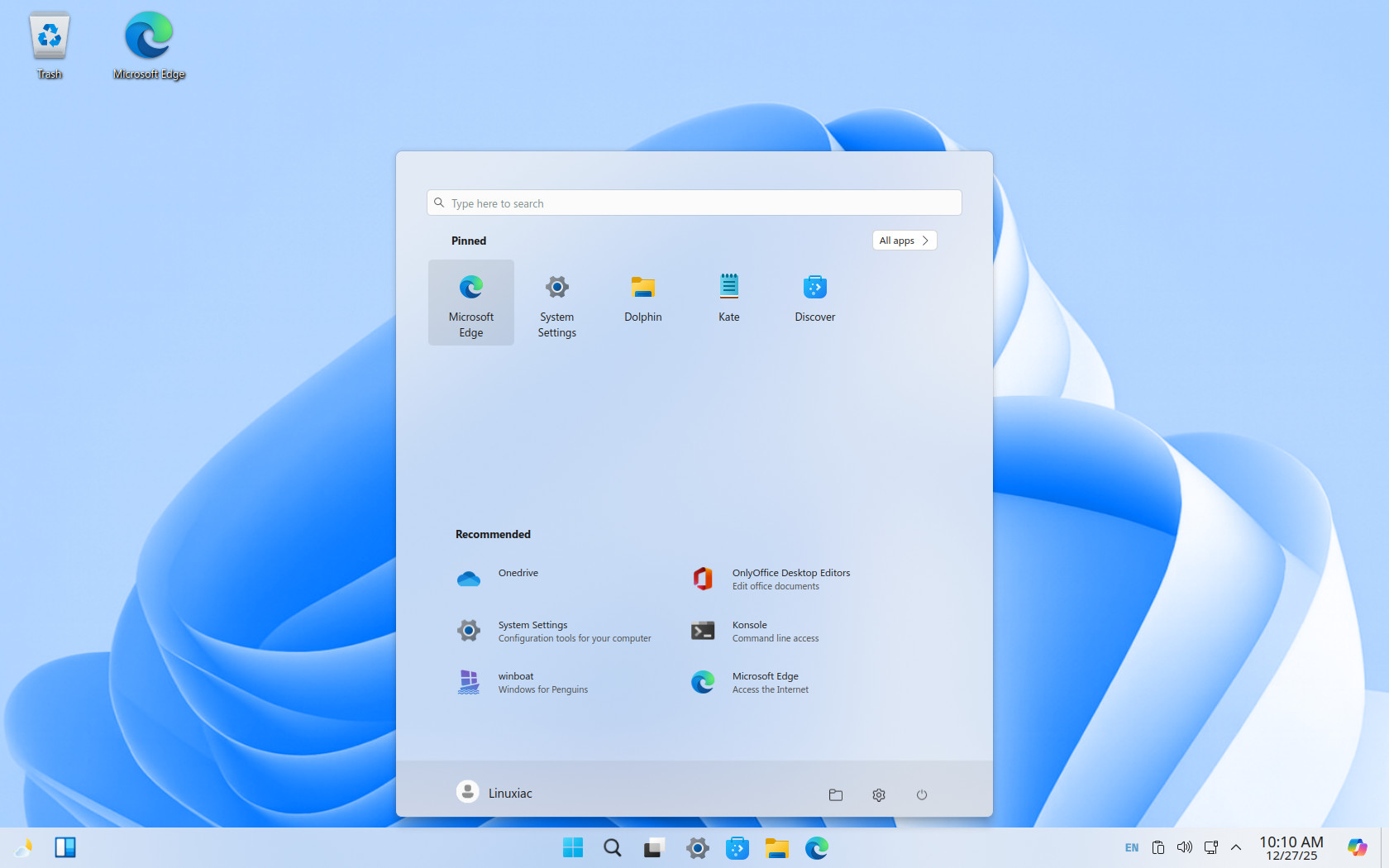
No, I didn’t mix up the screenshots when publishing the article, nor was I trying to joke with you by showing a Windows 11 desktop. What you’re looking at is Winux Linux. More specifically, it’s the KDE Plasma 5 desktop environment (version 5.27), heavily customized with themes, extensions, styles, and icons to mimic Windows 11.
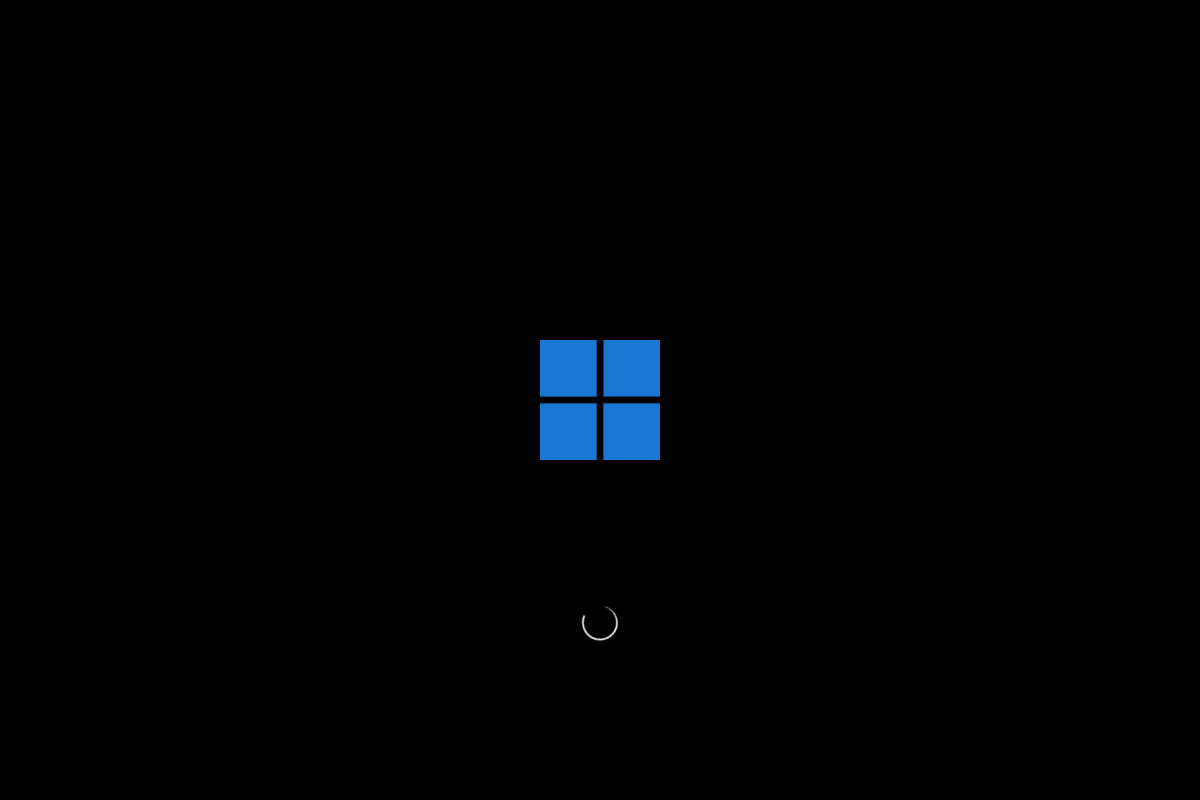
However, some things are a bit excessive, for example, the loading screen shown before logging into the system, which uses the Windows logo. Not to mention how acceptable this might be from a legal standpoint.
But before going any further, it’s worth saying a bit more about the distribution itself. As I already said, Winux is a Linux distro that aims to replicate the Microsoft Windows user experience as closely as possible. Its primary goal is to make Linux feel familiar to Windows users by closely matching Windows’ visual design, layout, and everyday workflows, while still running on a Linux system underneath.
However, rather than introducing new concepts, Winux focuses on imitation, trying to position itself as a transition-friendly environment for users accustomed to Windows who want minimal change when moving to Linux. The current stable version, Winux 11.25.12, is based on Ubuntu 24.04.3 LTS “Noble Numbat” and runs the Linux kernel 6.14.
Under the hood, Winux relies on WinBoat to install and launch Windows applications. If you haven’t heard of it before, it’s a relatively new Linux tool that runs a full Windows environment inside a container (using Docker and KVM) and displays Windows applications as native on your Linux desktop via RDP.
However, one of its requirements is at least 32 GB of disk space. Keep this in mind if you plan to try Winux in a virtual machine, and make sure you allocate enough storage. In addition, as I said, WinBoat depends on Docker, so installing Winux also installs Docker by default. Snap and Flatpak support are also provided out of the box. Application management is performed via KDE’s Discover Software Center.
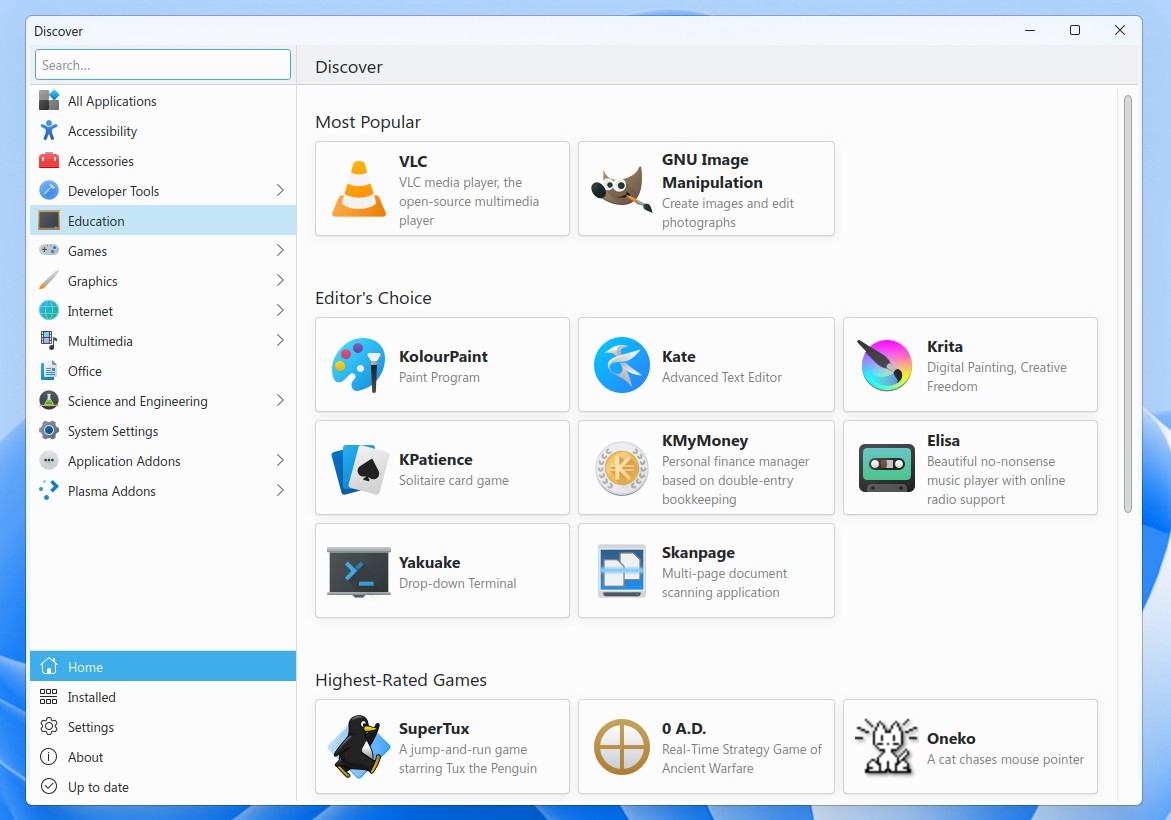
And since I’ve started talking about the software side of things, I’ll continue there. The default software that comes with Winux reflects a different philosophy from that of most Linux distributions. The default web browser, for example, (presumably chosen to match Windows users’ expectations) is Microsoft Edge.
Google Chrome is also included, while the widely used Firefox is not installed by default, though it can of course be added separately. For office work, you get ONLYOFFICE 9.2, while VLC 3.0.20 media player handles your multimedia needs. As for desktop email, there are no surprises—you get Thunderbird 140.6.0esr.
The system is managed through System Settings, which (unsurprisingly) closely resemble those found in Microsoft Windows. And now something important. Winux follows a monetization model similar to Zorin OS: the basic version is free, but unlocking the full set of features requires a product key for the in-house PowerTools application, priced at $19.99.
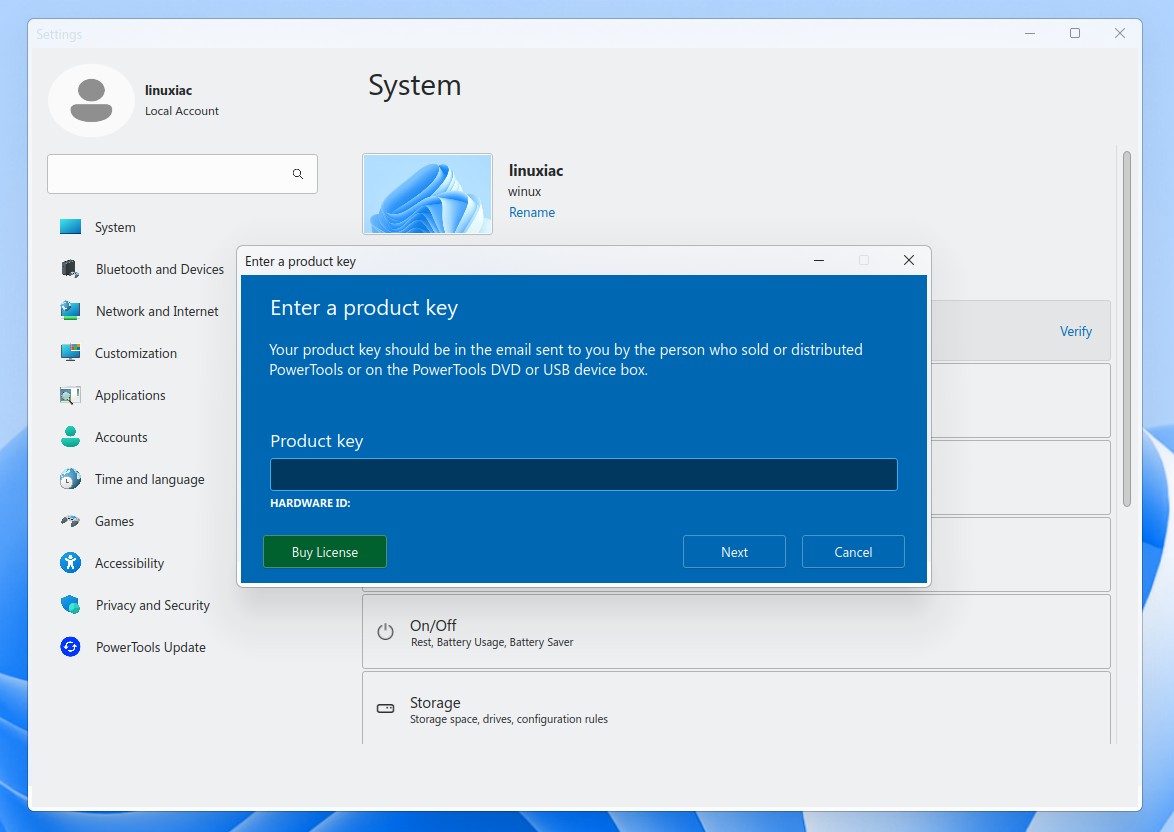
Purchasing the license unlocks features such as an even more Windows-inspired desktop and control panel, an integrated Android subsystem with graphics acceleration, a graphical OneDrive client inside the file manager, Copilot and ChatGPT integration, advanced system configuration tools, improved security for web browsing, and exclusive desktop enhancements that are not available in the free base Winux install.
For the installation process, Winux uses the well-known Calamares installer. However, the default installation occupies a substantial 18 GB of disk space, which is unusually large by Linux standards. By comparison, a Debian 13 system with the KDE desktop installed takes up less than 7 GB.
To learn more about Winux, visit the distribution’s official website. Full details about what’s new in the latest 11.25.12 release are available here. Installation ISO images can be downloaded from SourceForge.
Bottom Line
Winux left me with mixed feelings. I certainly had a lot of fun testing its capabilities while preparing this review. At the same time, one question kept coming back to me: if someone wants a smooth Windows 11 experience, well… why not just use Windows 11?
For the record, everything ran smoothly overall, thanks in large part to Ubuntu 24.04 LTS serving as a solid underlying foundation. However, my personal tastes have never leaned toward things that try too hard to imitate others, so Winux is definitely not my cup of tea.
But in any case, if you’re a distro hopper or you really miss the familiar Windows feel when using Linux desktop environments, Winux is worth a try. Whether the distribution will gain broader popularity over time, as Zorin OS has, remains to be seen.


If you are going to go Linux go full Linux. All these look alike Linux OS’s do is confuse the user.
Use this distribution at your own risk. The people behind it doesn’t seem to care much about security:
https://www.reddit.com/r/linux/comments/15acjd6/psa_wubuntulinuxfxwindowsfx/
https://www.reddit.com/r/linux/comments/ux2tof/dumping_linuxfx_customers_a_windowslike_distro/
https://kernal.eu/posts/linuxfx/
https://kernal.eu/posts/linuxfx-part-2/
https://gist.github.com/gustavo-iniguez-goya/f621068b858fa06a477dbf84d21535e4
https://wink.messengergeek.com/t/a-warning-against-the-wubuntu-operating-system/24181
Cool for trying to mimic Windows and for using KDE Plasma, but…
I want that the distro is based on Debian 13 or 14, which comes with the best hardware and software compatibility and has the largest repository of packages, including the OpenSnitch application firewall, which is the best one for Linux.
And most of the packages in its repository are built in a reproducible way, that gives the users the best privacy and security possible.
As for the design they chose to mimic, that’s the worst one ever!
They should’ve tried to mimic the one of Windows 7, which was the best one I have ever seen, in any computer OS!
And they should also use a very up to date Plasma version, like 6.5 or later.
We want also to play games with the best visual quality, with the help of WINE-Wayland and HDR!
Until then, Debian 14 (Forky) with Plasma 6.5.4 (on Wayland) and OpenSnitch application firewall wipes the floor with it!
Since I cannot edit my comment and I forgot to mention one thing, I’l leave it here…
Besides Debian 14 + Plasma 6.5.4 and OpenSnitch, I recommend using also the Klassy window decorations from here:
https://github.com/paulmcauley/klassy
Another iteration maybe this one will stick. But I smell legal action as they are charging and ship with logos and artwork. I can’t understand why you want it to look like w11 but I guess somebody will want it. There are some decent cinnamon themes out there that replicate different windows versions. I prefer to use faren os for this.
I can see this being helpful for people like my mom who uses a browser and plays an occasional game of solitaire. If I could get her on this, I’d have fewer security concerns, and it would resemble what she’s used to using.
As for the bit about a “smooth” Windows 11 experience, I got a good laugh out that.
” if someone wants a smooth Windows 11 experience, well… why not just use Windows 11?” >>> First, because my laptop won’t run on Windows 11 and I can’t afford to buy a new one. Second, I’ve been trying various Linux distributions and I still can’t seem to adjust well to it that’s why this Winux is especially welcome for me to try. And I hope it will be Linux distro for me. Thanks.
Beside the legal standpoint, the theme is a million times more refined than adwaita will ever be.
So, they did a great job on the polish there.
I can see the appeal for Windows switchers as well.
But of course, using a mimicked Windows would only be for a transitioning period, while learning the ropes of Linux, after which this doesn’t make much more sense. Still, I like how they paid attention to details, and made a better job at theming than the multi-billion dollar 19k staff joke of a company.
Yes, let’s clone the Windows 11 experience that nobody likes. I’m sorry, what? 😄
But why? 🤔
I don’t get these people… i mean if you want to use linux, just use it … why these picky behavior (owwww no i don’t want this linux because i am a Windows User i don’t feel at home with this distribution)… wtf…??? Use it or leave it. Third option is “Or be scammed by these untrustworthy wincopy distros.”
I love linux for its core not its look. I mean i use gnome and I’m grateful for its beauty but i actually USE THIS MF LINUX, i don’t care how it looks until it doesn’t get in my way of working…
And i really appreciate whoever made Gnome. Finnaly we have a Linux Original Environment that is actually nice to use.
Lindows — now Linspire — tried this 24 years ago, but Microsoft brought them to court to force them to change their name, even with all the apps out there at the time with Windows in their names.
everything I’ve read about Linuxfx/Wubuntu/winux on reddit is not great and people say it is untrustworth and is shady/scummy..
If you want an actual Linux product made (by a Microsoft developer), consider AnduinOS.
Also, apparently, winux it is just:
https://github.com/yeyushengfan258/Win11-icon-theme
For Icons
and
https://github.com/yeyushengfan258/Win11OS-kde
For the theme
Debian with KDE Plasma is already close enough to Windows. You can add the MS Edge repo and run the best browser (for Windows and Android) on it too. I load XRDP too since I need to remotely access my computers.
I think the developers of Winux might be a bit confused.
If someone likes the Windows 11 UI, Then Win 11 is already a great choice for them.
People are missing the UIs for Windows 7, 10, and perhaps even XP.
Windows 11 UI is readily available.
Windows 11 is a horrible choice for anyone – not necessarily because of the UI, but because of the spyware, requirement to have a Microsoft account, loss of local admin, using their cloud services, ads, ad nauseam. I don’t particularly care for the UI in Windows 11, but I agree with you that the UIs from earlier versions of Windows are my preference. That’s the great advantage that Linux has over other operating systems – its customizability and its security. And, it’s great to have choices about that stuff. The Linux zealots who denigrate users wanting a different desktop experience, miss the whole point of Linux’s freedom of choice for users. This one aspect of the OS is what I believe will bring Linux into the mainstream and challenge the bigger players. And, for those Linux zealots who love the niche aspects of this “rogue” OS and it’s various flavors, command line prowess, well Linux has you covered as well and always has!
You’re missing the point, windows is full of bloatware and mandatory programs. Winux doesn’t have Gemini built in
You just lost all credibility when you said Edge is ‘the best browser!’
It is the best browser honestly and this is coming as a Microsoft hater. It improves on Chrome in basically every way. Sure Firefox may be better from a privacy perspective but for everyday and performance Edge is one of two browsers I prefer to use.
Linux newbe here: Tried it and some other common distros. It harder to get windows app running in WINE / WINE bottles for some reason and it starts advertising at you to pay for the upgraded version.
If someone really wants Windows user on an OS that can run the occasional Windows app, develop a better front end for WINE prefixes. Winboat is just winbloatVM.
Windows users can understand a GUI, it’s when you tell them they need to open a terminal and type commands to do things, buy dont worry once you spend the time to learn all the linux commands you’ll prefer to use the terminal.
It’s McDowell ‘s not McDonald’s 🤑🤣🤣🤣
“They got the Big Mac, We got the Big Mic,… They got two all beef patties, special sauce, lettuce, cheese, pickles, on a sesame seed bun,.. Our buns don’t have sesame seeds…”
This is just the people behind windowsfx, linuxfx and wubuntu rebranding yet again to try and distance themselves from the shady controversial stuff they do. Please don’t promote this.
They really missed an opportunity. Should have made it look like Win 10, not 11.
It is just the new name of Wubuntu. They are just using open source softwares allready existing and not developed by them and making money with that(for example their paid option “Android Support” is based on Waydroid). They do not respect the GPL license of some components of their system as they add some closed source changes on top of them to block usage of some fuctionalies if you don’t pay. Their customer database have been hacked when it was called Wubuntu and it was easily possible to download private informations about all their customers. I don’t know if that’s still the case, but when it was called Wubuntu, users didn’t have root or sudo access on their own PCs. (sorry for my bad english, I am french)
Just use Windows 11. That’s funny!
By requiring TPM Microsoft crippled perfectly good computers, leaving users with an outdated brick. In addition, Widows 11 is spying by taking screenshots of users desktops. And Microsoft is forcing ads and copilot on users. Windows 11 is broken and needs a service pack 2 moment.
Hardware specs would’ve been helpful, really.
If it’ll run on something really light I might throw it on a couple of ancient aio PCs that are lying around here doing nothing that could possibly be used as occasional browser terminals in spare rooms if it can come up fast enough to make the screen size an asset versus pulling my phone out
What’s important for most computer users isn’t the OS shell, but the application software, especially the Office suite. Regardless of OS shell, anyone with a basic Internet connection can easily run Office 365 without having to learn anything except how to start the app. Further, exceptional stable Linux Mint avoids the stability problems of Zorin and many other attempts to make Linux “user friendly.”
I’m sure Microsoft’s lawyers are constantly working on ways to deal with this breach of copyright and theft of intellectual property meaning that sooner or later the distribution will fail to be kept up-to-date resulting in a Windows 10 outcome leaving users high and dry.
I think this distro was Wubuntu and now changed the names ti Winux ? Am i telking right Bobby ?
I don’t know why some peoples wants to turn linux into a windows ! Linux philsophy are difference.
About of games, ask an AI about of linux gaming, for example windows 11 against Nobara or Steam OS, you will be seen the answers !, nobara with maximum frame rates play new games, top of windows 11.
Yes, they are the same. If you check the source forge repo, you can see it is just Linuxfx, and no one should be using their stuff.
No, please do not rely on an AI for this information. They are actively lowering the collective IQ of all those who rely on them for this type of information. They are not a glorified search engine, as their outputs are typically incorrect. Do the work yourself when it comes to this, and examine benchmarks performed by actual humans.
As an AI engineer and proficient AI user, this answer is no longer true and AI has sufficiently advanced. Feel free to use Perplexity to get your answers, it will be accurate.
AI chats are still encouraging people to end their lives and you’re pretending everything is fine. You’re an agent of chaos and you’ll say anything that you have to say to keep the grift going. AI bros are psychopaths.
AI tells people to end their lives, hence all use of AI is bad. Internet has tutorials to end yourself, so any use of internet is bad.
Grifts die out. Not balloon to 800M users like ChatGPT and become the fastest growing software user base in history. People don’t use things and come back to use it more unless it’s useful. Not just use it, but pay pricey subscriptions for it. Keep telling yourself AI is some fad.
The one thing I would like to know is not addressed in the article: can I run this Windows 11 lookalike on an old machine which cannot run the real thing?
I can’t believe the developers went as far as pirating the Windows logo. That seems to be really asking for repercussions!
Echoes of Linspire (lindows). Does Win11 actually look like the images displayed here? ick. At least, I don’t expect WinUX to replicate the ads, the surveillance and the privacy abuses Microsoft engages in. That’s gotta’ be a plus.
I mean, they are wanting to charge you $20 to bloat up your install with chatbots and OneDrive. This is stuff you can do for free, and I’m not even sure if they can technically do this since they definitely didn’t write the utilities that enable these. At least when you pay for Zorin, you’re getting original, in-house configurations (that can also be manually set up for free).
“This distribution brings back memories of about 20 years ago, when Lindows, later renamed Linspire under legal (and fully justified) pressure from Microsoft, first tried to take the path of a Linux distribution built entirely to be as close as possible to the Windows experience.”
There’s a whole lot of stuff wrong with this paragraph. First of all, Microsoft had a massive monopoly at the time of December 2001, when the lawsuit started. And actually, it almost ended with Microsoft (at least in the US), losing the trademark to “Windows”, such that Microsoft actually paid Lindows $20,000,000 to buy the name, settling thd lawsuit. That was why Lindows changed their name to Linspire; the ball was actually in Lindows’s court this time. (Even in the one or two European countries where Microsoft WAS able to get a preliminary injunction against Lindows, which was actually denied in the US, they just used the name “L—–s” until the settlement, likely as a middle finger to Microsoft, so they knew that they had something.)
This whole lawsuit came after Microsoft had gotten almost every competitor, including BeOS and Linux, out of the market, via a unethical (and almost illegal) monopoly, and only Apple was left. And while both Microsoft and Apple have become terrible platforms, in this case at that time, Microsoft absolutely did this to themselves and deserved the humiliation, if not more so. Especially given what they funded with the Halloween Documents and later funding other FUD like the SCO Group vs Linux lawsuits that resulted in essentially nothing.
That being said, Winux should be avoided for other reasons. Lindows/Linspire at least was not a complete trademark and copyright violation unlike Winux, and it did have some nice ideas. One of these was of course bundling Wine for running Windows applications by default, even if it was disabled in Lindows 3.0 because of how spotty it was, especially back then. And of course, Winux had a bunch of other scams too, via this and other “projects”.
I would use Zorin OS, Bazzite, Tuxedo OS, heck, even Linux Mint, over Winux any day of the week. Those at least don’t try to scam users and don’t just put a big “kick me” sign by blatantly using trademarks and copyright to things that they do not own or are licensed to use.
I have seen apple and microsoft sue each other for way less then this.