If you’re looking for an easy way to share files, synchronize clipboards, or control your Linux computer from another device, there’s a project worth checking out. It’s called Linksy, a free and open-source application that makes communication between devices easier without requiring accounts or cloud storage.
Inspired by tools like KDE Connect and GSConnect, Linksy goes further by combining everyday device synchronization with features typically found in separate apps, including remote desktop access, webcam sharing, and virtual displays.
Importantly, Linksy isn’t limited to connecting a Linux computer with an Android phone. It supports communication between two Linux machines and multiple paired computers, phones, and tablets. Devices discover each other on the local network and communicate directly, even without an internet connection.
One core feature is file sharing. Users can transfer individual files or entire folders between devices, with support for resuming interrupted transfers and verifying file integrity.
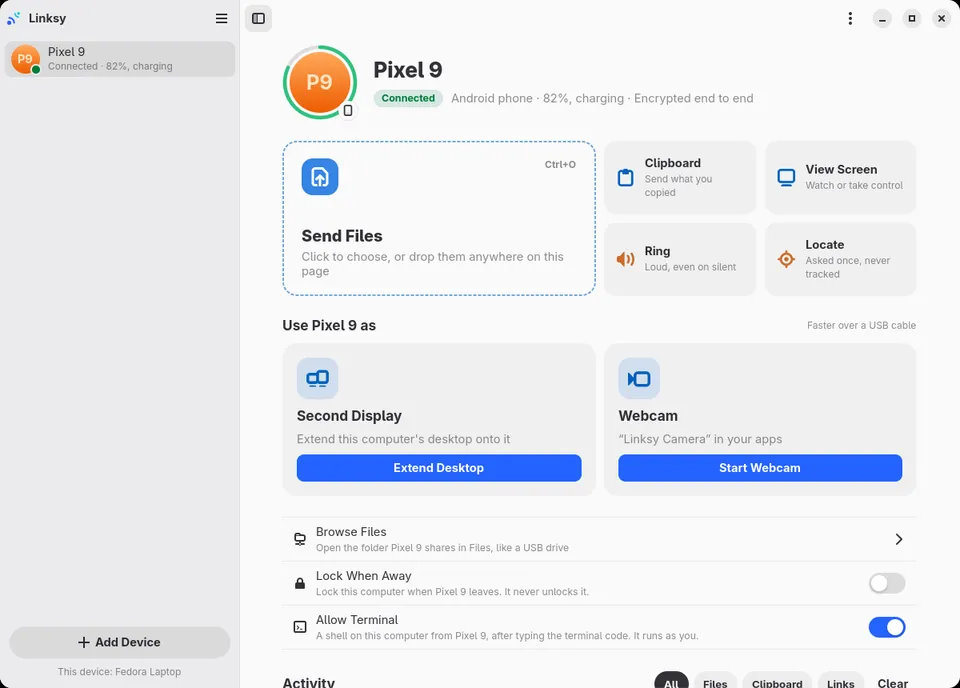
Clipboard synchronization is also available, although automatic monitoring depends on the desktop environment. For example, KDE Plasma and wlroots-based environments are supported; GNOME currently has limitations in this area.
However, Linksy’s capabilities extend past file transfers. The developer says it can turn an Android phone into a webcam for Linux applications, supporting resolutions up to 1080p at 60 FPS. The phone’s microphone can also serve as an audio input device.
Another interesting feature is screen sharing and remote control. Users can view and control a Linux desktop from another device or turn a phone or tablet into a secondary display. There’s also remote terminal access, allowing users to execute commands on their Linux computer directly from an Android device.
For everyday convenience, Linksy offers media playback controls, battery monitoring, phone ringing, link sharing, and automatic desktop locking when a paired phone moves away. It also makes selected Android folders accessible from the Linux file manager.
For privacy, Linksy uses QUIC with TLS 1.3 encryption and mutual authentication, and pairs devices using a QR code or six-digit verification code. Screen viewing, remote control, and access to sensitive hardware require user approval.
Although designed primarily for local networks, Linksy supports communication over the internet. Previously paired devices can reconnect remotely for up to a week after sharing the same network, using direct encrypted connections when possible or a relay when necessary. According to the project, the relay only forwards encrypted data and doesn’t store transferred content.
Under the hood, Linksy is primarily written in Rust, with a background service responsible for device discovery and communication. Its Linux graphical interface uses GTK 4 and libadwaita, while a separate Qt 6/Kirigami frontend is also being developed for KDE Plasma.
At the time of writing, the project’s official website lists version 0.8.7. Linux packages are available for Debian, Ubuntu, Fedora, and openSUSE, with a Flatpak installation option also provided. Flathub and AUR availability are planned.
Of course, Linksy is still a relatively young project, so users should expect occasional rough edges, particularly with more advanced functionality and desktop-specific integrations.
For more information, installation instructions, and source code, visit the Linksy website or its GitHub repository.
Image credits: Linksy