
Aura Glass is a new community initiative that gives the GNOME Desktop a complete redesign in the style of glassmorphism, incorporating dynamic blur, transparency, custom interface elements, accent colors, icons, extensions, and a set of CSS adjustments into one unified setup.
Instead of simply being yet another GNOME Shell theme, Aura Glass should be seen as a full customization package. The installer combines a number of existing open-source projects and then adds its own configuration, patches, and styling to achieve a unified look for the desktop.
The project currently supports GNOME Shell 48, 49, and 50, and the developer explicitly mentions that GNOME 50.3 has been tested. Wayland is preferred, although X11 is also supported with a fallback blur feature. Currently, compatibility is provided for Arch Linux, CachyOS, Fedora, Ubuntu, and Debian.
Installation is done with an interactive shell script; after cloning the repository and running ./install.sh, users go through a terminal-based setup wizard that lets them choose how the desktop should look and which components to install.
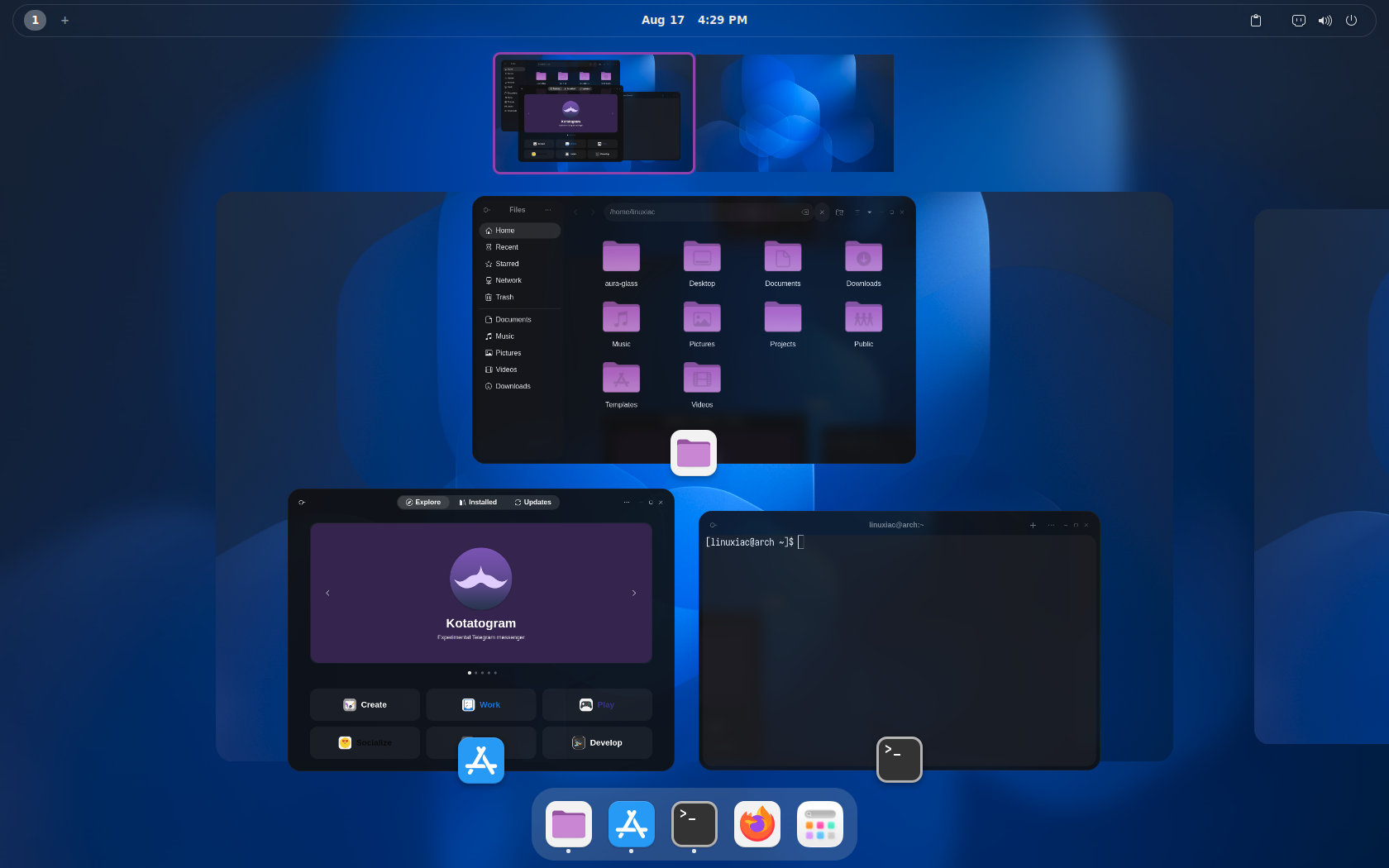
Another useful point is that purple is by no means the only option. When installing the program, users can choose from nine accent colors: Purple, Blue, Teal, Green, Yellow, Orange, Red, Pink, and Slate. The installer also lets users choose between the full frosted-glass look and a lighter solid mode, set optional application transparency, select extension packages, and decide whether to match the GDM login screen styling.
The main feature is dynamic background blur. Aura Glass applies this effect to the GNOME top bar, Quick Settings, the application switcher, dialogs, notifications, menus, and all other Shell elements. The project makes use of gnome-rounded-blur in conjunction with Blur My Shell in order to achieve dynamic blur with correctly clipped rounded corners. If that component is not available, then Aura Glass will use a statically blurred wallpaper instead.
The styling extends beyond GNOME Shell; you can also apply optional translucent window effects to GTK4 applications and software based on Electron or Chromium, such as VS Code and terminals. There are three predefined transparency levels: 90% for the recommended balanced appearance, 82% for a more transparent effect, and 94% for a more subtle look.
Aura Glass also works with GNOME’s built-in accent color system. Instead of leaving different sections of the desktop with inconsistent colors, the toggles, sliders, focus indicators, and icon variations all match the selected accent. This feature makes the project feel more like a unified desktop upgrade than a loose assortment of unrelated extensions.
Moreover, the theme includes visual changes, such as a more compact, pill-shaped volume and brightness OSD, optional matching GDM theming, alternative icon sets and cursor shapes, redesigned Quick Settings sliders, modified buttons and dropdowns, calendar corrections, and additional GTK3 and GTK4 styling.
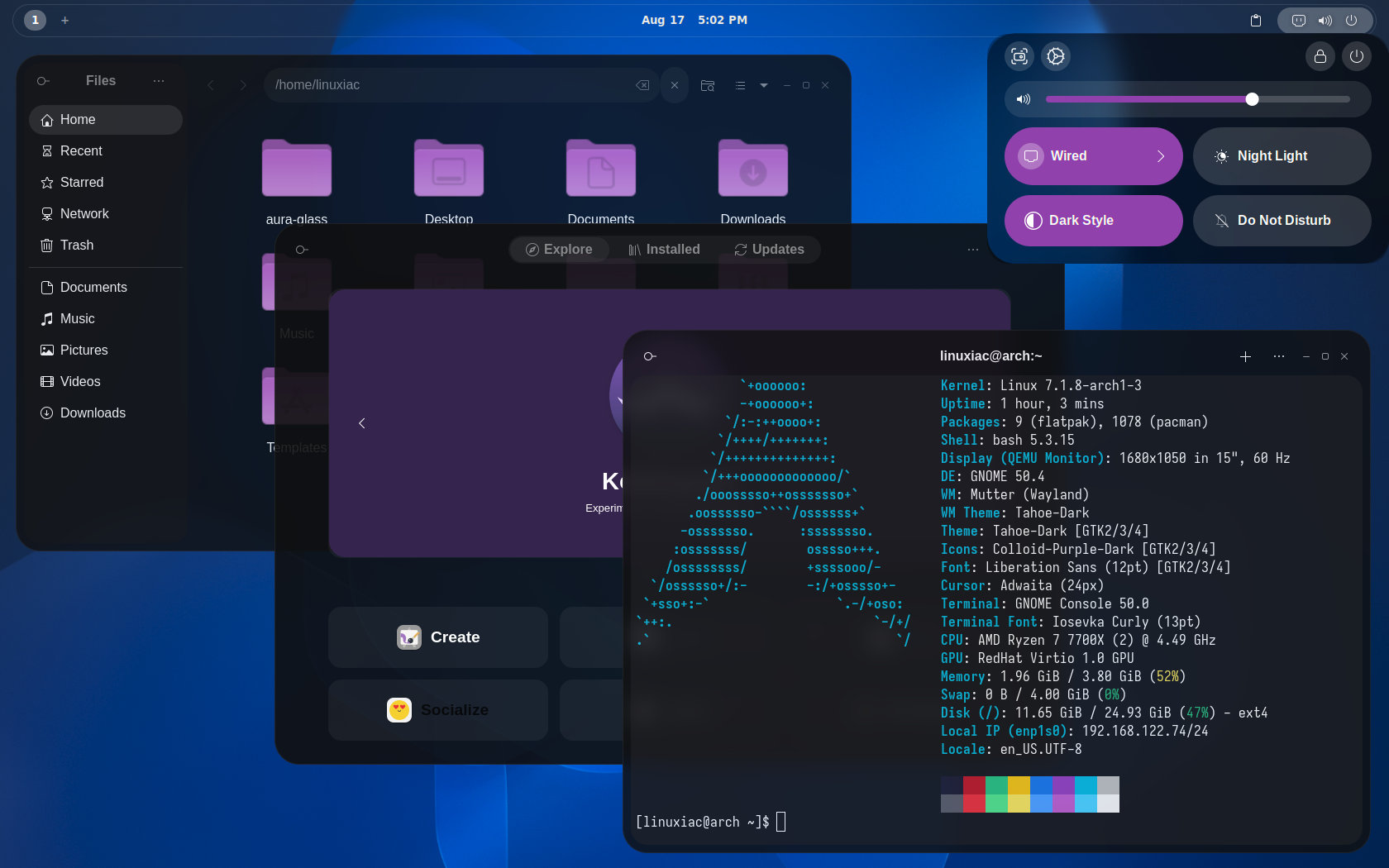
Advanced users are given a good deal of control as well. Aura Glass can be set up non-interactively using command-line arguments, which enables users to choose an accent color, the transparency level, the extension bundle, the icon set, the GDM theme, or a minimal installation. There is also a --dry-run option available so that users can preview the changes before actually modifying the desktop.
Under the hood, Aura Glass uses GNOME-macOS-Tahoe as the basis for its theme, Blur My Shell for blur effects, Open Bar to customize the top bar, Custom OSD, gnome-rounded-blur, Colloid, and MacTahoe for icon themes, and GNOME’s User Themes extension, among others.
In other words, it mainly brings these elements together, adds its own CSS work, compatibility patches, design tokens, installer logic, and configuration, and packages them into a single, unified experience.
For additional details and installation instructions, visit the project’s GitHub repository.

Tried this but there is nothing frosty or glassy looking about this package. There is some transparency. And what’s with that default mouse cursor? Ugh.
Thankfully it’s uninstall script works perfectly and my Ubuntu 25.10 system is back to normal.
IMHO the Windows 7 Aero look -and-feel set the bar high. IMHO you really do want the edges of windows to be clearly visible so it’s easy to grab them.
System76 COSMIC DE comes a very close second.
On one hand it’s ugly and distracting, but on the other it’s vibecoded garbage!
Even this won’t tempt me to switch to slopland.
Well, many users left Apple because of the glass design… me too. Unnecessary shadows, unnecessary and unrealistic glass effects, huge round corners that no one needs. The interface of macOS became increasingly unsightly. Now the whole thing has been thrown together for Linux… I don’t think it’s worth the effort. And probably very error prone. A solid Gnome desktop is always better than any experimental desktop.
Gnome dudes are doing (Solid) Gnome.
some dudes are doing glass design and unnecessary shadows & stuff because they have fun doing it. the OSS World is full of “unworthy fun projects”. nothing to worry about.
You seem a bit late to this. Linux has been doing eye candy like this for over 20 years. These things have been around for it waaay before Apple ever made it part of their design standard.
Yeh, I was just going to say that. Linux has had this stuff for years, way before Apple.
A bit late, all the ricers use KDE and Hyprland now. Gnome devs stubbornness has pushed so many users away.
Hard to disagree with Anonymous comments above. Kudos to the developers for their work on this, and I hope it’s fantastic. After many years of using Gnome, my move to Cosmic gets better all the time. No longer need extensions, and their recent glass introduction was extremely well done. I certainly enjoyed Gnome and it’s minimalism, but it does seem they go out of their way to ignore users desires. No looking back for me, but thanks Gnome for some good years.
It’s funny you say you switched to Cosmic. I went from cosmic on a few machines KDE on my others. Everything now has gnome. 7 or 8 extentions later it’s perfect. Now let preface that by saying I hated gnome. Tried it once. And it was all gestures and keyboard navigation and minimalist in its offerings. it wasn’t very easy to figure out. Put ZorinOS on an old laptop with a dual core processor my MacBook Air 2013. Forgetting gnome is it’s default DE. The computer ran the best that’s ever ran so I decided to look into gnome. Found out about extensions. I set it up with the default gnome. ZorinOS has presets one looks like Windows one looks like Windows XP. Went with the default gnome look. found other extensions besides just dash to dock. like alphabetizing the app grid some tiling features like Windows 11 and Windows 10. And it’s perfect. Everything that had KDE now has gnome. All my desktops look the same even on Fedora workstation and ZorinOS. Bing daily wallpapers look awesome. It is a nice change of pace from Windows I’m really digging the minimalist look. Cosmic, if System76 plays their cards right…has a long way to go before it’s serviceable for a daily driver but it could be the spiritual successor to gnome. I’ll look back into it when they figure some things out with their Cosmic apps like Cosmic files is absolutely atrocious. Failed file transfers. Lack of proper notifications of file transfer status. I will check back in and see what Cosmic is all about when Cosmic reaches 2.0
Zorin is great, was my very first jump into Linux OS years back, even got the pro version I was so excited to leave the MS world! But you nailed it (for me) with Gnome in general — need so many extensions to get to where I want it to be. But much as Cosmic, I liked it for its clean, minimalist look. Used Silverblue for years, is very solid.
Been using Fedora Atomic Cosmic as daily for quite some time now, working great, bummer you having issues, I may be a different use case. Give it a whirl on 2.0 I would agree woth a shot should only get better, they are moving at good pace on fixes and features. Good to have choices, best of luck!
Speaking as someone who’s been using it since alpha 2 on an RTX machine, it’s more than ready to be a daily driver. If the file manager is your only complaint, I’d say COSMIC is in a pretty good position. Also, you aren’t locked into using cosmic-files. You can use any file manager you want, even GNOME’s. The modularity of COSMIC allows for this.
True. I am using cosmic on all machines that need a DE. And yes Cosmic is nice. What I didnt like about gnome is the inability to hide the top bar. Cosmic has done that without me needing to rely on some extensions that constantly falls behind gnome or archs updates. File manager is understandabley not as mature as others. So I simply use nautilus. Cosmic is going there. But it doesnt complain if you rely on other apps too. And thankfully, some dialog issues on Intellije IDEs have been fixed as well. Going steadily good for me. Gnome is simple I know, but too rigid. I needed something between plasma and gnome. Found Cosmic.
Community-Initiative.
In other words, 3rd parties doing the work Gnome devs can’t (for the life of me) ever do.
It’s still adwaita behind, so it’s like decorating a cheap-looking theme, it’s still going to be cheap-looking.
Then it will be breaking regularly since Gnome devs don’t like initiatives being taken that are not theirs.
It’s already funny.
If you want a polished frosted glass effect with a theme that doesn’t look like it was made 10 years ago, just switch to better and more polished desktops.