

Firefox 149 was released a month ago, but Mozilla failed to mention a very important feature of it – the initial development of a content-blocking engine based on Brave’s adblock-rust project. However, it is not yet available as a built-in ad blocker for users.
This update was implemented through Mozilla Bug 2013888, titled “Add a prototype rich content blocking engine.” The bug has been resolved and fixed in Firefox 149. According to Mozilla developer Benjamin VanderSloot, Brave’s crate has been integrated into Firefox’s network code alongside the existing URL classifier. The feature is managed by preferences and remains disabled by default.
The code is now located in Firefox’s source tree under third_party/rust/adblock. Regarding functionality, the project supports network filtering, cosmetic filtering, scriptlet injection, resource replacement, hosts syntax, and uBlock Origin syntax extensions.
It is important to note that Firefox does not introduce a complete ad-blocking feature in the browser interface. There is no standard settings switch, and Firefox does not provide ready-to-use filter lists. This functionality remains experimental and is accessible only through internal preferences.
Shivan Kaul, VP of Privacy and Security at Brave, who commented on the change, describes this as Firefox beginning to include Brave’s adblock-rust engine. This development is significant for one simple reason: it introduces a native ad-blocking filtering engine into Firefox’s codebase for the first time. Something I am convinced will be welcomed by the browser’s users.
So, the big question is: how do you test it? It’s easy. Users who wish to try the new engine can enable it manually in Firefox 149 or later via about:config. The primary preference is:
privacy.trackingprotection.content.protection.enabledCode language: CSS (css)which must be set to true.
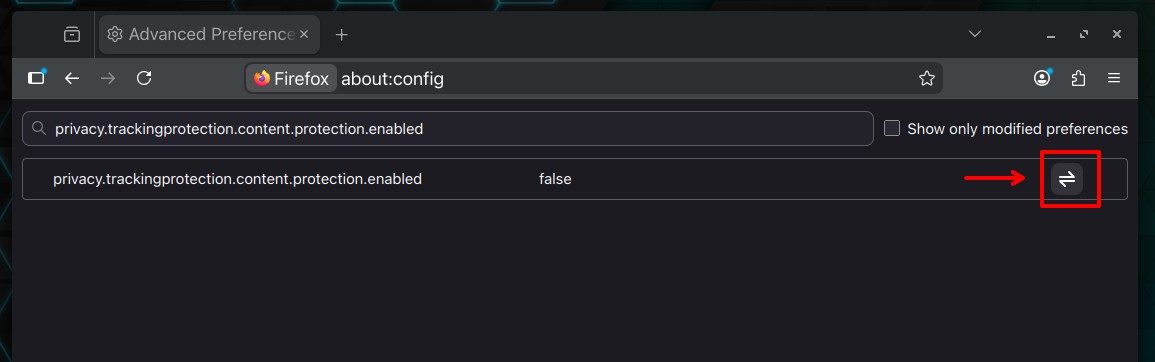
Next, since Firefox does not provide filter lists for this prototype, users must add their own list URLs using:
privacy.trackingprotection.content.protection.test_list_urlsCode language: CSS (css)For example, users can add EasyList and EasyPrivacy by setting:
https://easylist.to/easylist/easylist.txt|https://easylist.to/easylist/easyprivacy.txtCode language: JavaScript (javascript)The two URLs should be separated by a pipe character, as the preference accepts multiple lists in this format. Modifying this preference will also reload the lists.
Finally, once again, this should be considered foundational work rather than a finished feature. Although Firefox includes the engine, Mozilla has not released it as a consumer-ready ad blocker, so users should not expect any visible changes after an update.





Mozilla VPN is just a way to gather telemetry, especially from savvy users who have disabled it.
Prove me wrong.
Brave has such a sketchy past & ownership. Always feel like they are the trojan horse and will at some point do another nasty
Using awesome Librewolf so will see what they do with that. Of course it open source so will be verified, but as the very wise saying goes…. When people show you who they are, believe them
And so I do
Why don’t you sketch out a table for us showing the sketchy past and actions of the Firefox and Brave organizations? You may be surprised as to which organization is sketchier.
I think I’ve seen your comments before, and you have a significant distaste for brave. Your purity is acknowledged.
As for myself, I use all three.
it is much easier to just use brave.