
Switching to Linux is exciting for many computer users. Most people rely on Windows out of habit, but sooner or later, some become dissatisfied and start looking for an alternative.
In this article, I won’t argue for or against any operating system. Each has its strengths and weaknesses. Instead, I’ll share my top recommendations, the most sensible choices if you’ve decided to try Linux for the first time.
Before taking this serious step, however, I strongly recommend reading the following two articles, where I share my thoughts as openly and honestly as possible:
- The Only Thing Stopping You from Switching to Linux Is Your Mindset
- Linux for Windows Users? There’s No Such Thing!
I decided to split my suggestions into two pairs. The first one includes two Linux distributions with user interfaces that feel familiar to Windows users, making it easier for them to feel at home right away.
The second pair features two other well-established options, but with a different desktop experience. As you’ll quickly discover in Linux, the desktop can take many forms, and in fact, that flexibility is one of Linux’s most appealing qualities. So, here they are.
Linux Distros That Feel Familiar to Windows Users
My first two suggestions are well-known options that often rank among the top choices for people switching from Windows to Linux. They offer a familiar working environment and interaction style, making the transition easier for Windows users.
Linux Mint
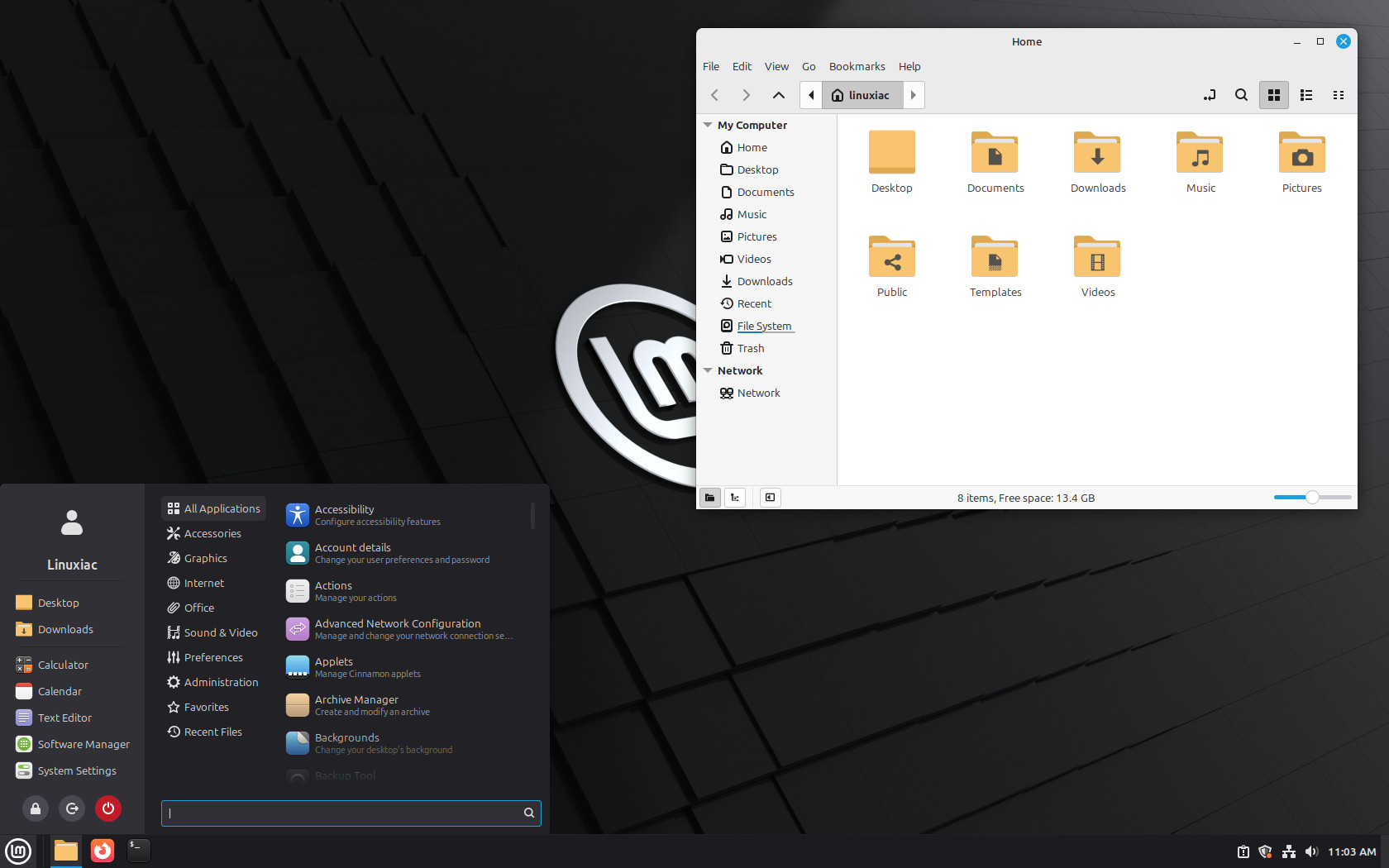
Linux Mint has earned a strong reputation in recent years as a perfect landing spot for people coming from Windows. Simply put, it’s a safe and comfortable choice that’s hard to go wrong with. Here’s why.
First, the desktop experience feels immediately familiar. Mint’s default Cinnamon desktop follows a traditional layout with a bottom panel, system tray, and a menu in the lower-left corner. In other words, it does not force users to relearn computing.
Second, Mint prioritizes usability over experimentation. While many Linux distributions showcase cutting-edge technologies, Linux Mint takes a more conservative approach, focusing on stability and predictability. There are no surprises here, and things just work.
Hardware compatibility is another strong point. Linux Mint is based on Ubuntu LTS releases and benefits from broad driver support out of the box. Wi-Fi, Bluetooth, printers, and GPUs typically work immediately after installation, which aligns well with Windows users’ expectations of “it just works.”
So, if you’re the kind of person who prefers to play it safe, you can stop reading here, go with Mint, and I can confidently say you’ve made the right choice.
Zorin OS
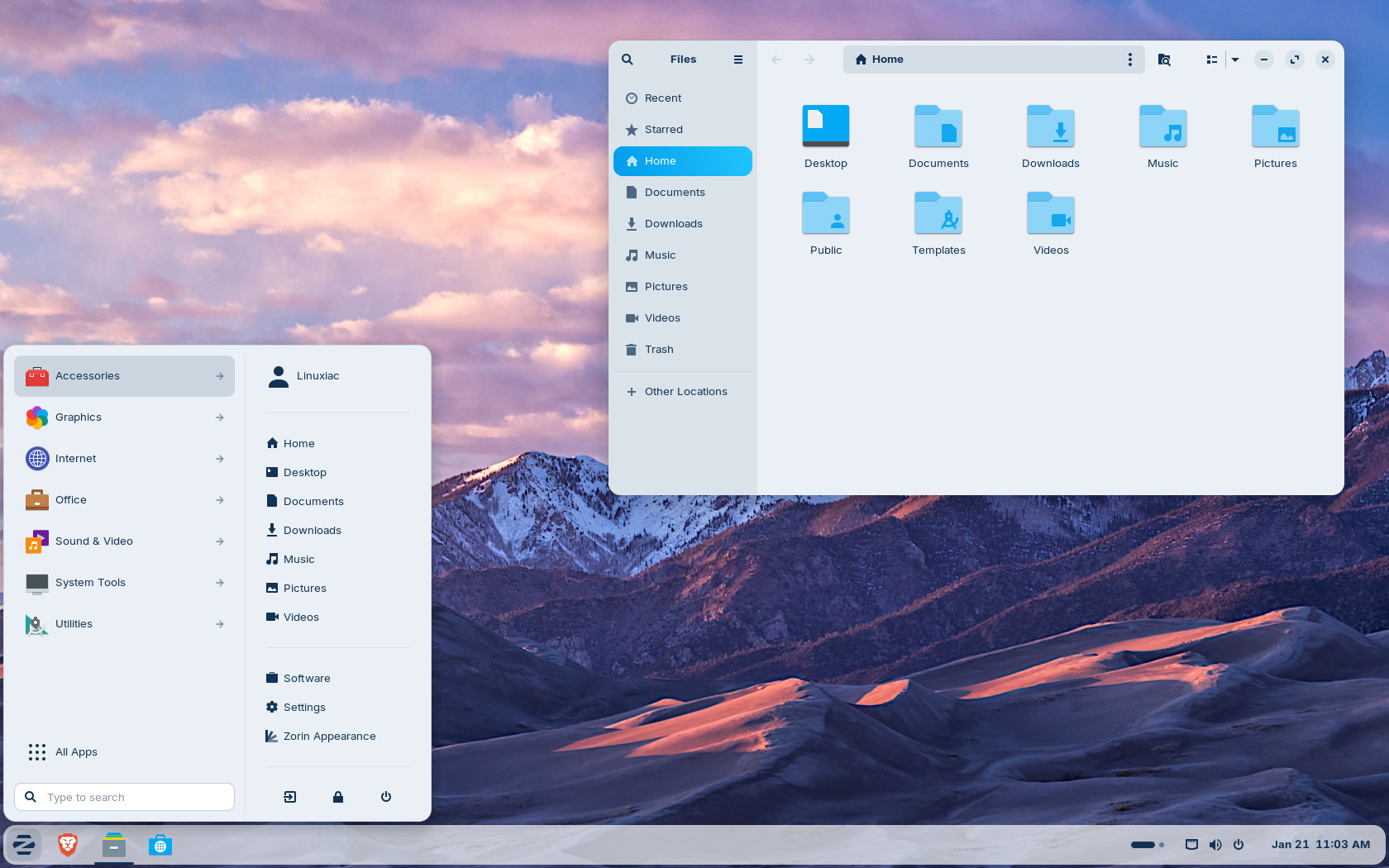
Zorin has been courting Windows users for years, and its popularity has been growing rapidly. And with good reason. Its design explicitly targets familiarity and ease of transition.
A key selling point of Zorin OS is its deliberate visual and interaction parity with Windows. Through its layout system, users can select desktop arrangements that closely mirror Windows 10 or Windows 11, including panel placement, menu structure, and window behavior.
On top of that, the distro emphasizes polish and cohesion. The desktop environment is carefully themed to appear consistent and professional across system components and applications. For users accustomed to Windows’ visual uniformity, this often proves decisive.
As with Mint, Zorin is built on Ubuntu LTS foundations, ensuring broad hardware support and access to a large software repository. In addition, the distro promotes built-in support for running Windows applications via compatibility tools, which can ease the transition for users who still depend on specific Windows-only software.
Established Linux Distros with Modern Desktop Ideas
This brings us to the other pair of my top recommendations for people moving to Linux. Unlike the first two, however, these options still offer proven stability and reliability while introducing a desktop experience different from what most Windows users are used to. For many, this is the first real “breaking point” (in a good way) where it becomes clear that Linux is simply different.
Pop!_OS
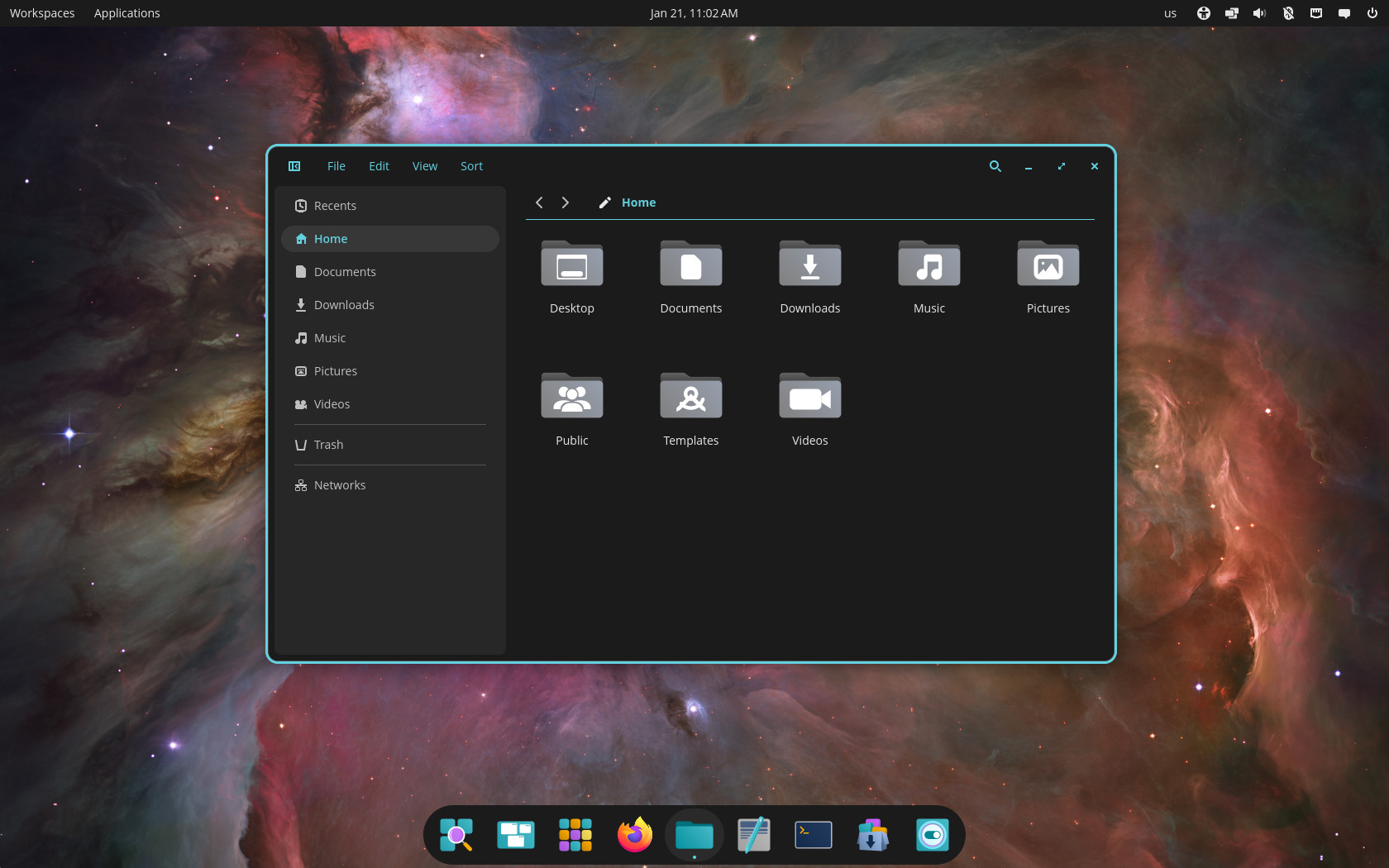
Pop!_OS (I agree, a strange choice of name) is a Linux distribution developed by System76, and, guess what? It’s also based on Ubuntu. But what sets it apart is its in-house developed COSMIC desktop environment.
While its approach differs from distributions explicitly modeled after Windows, Pop!_OS combines usability, performance, reliability, and thoughtful design in ways that can appeal to Windows users, especially those interested in productivity and efficiency.
COSMIC emphasizes a clean, organized workflow, with features such as a dedicated application launcher, intuitive workspaces, tiling capabilities, and optional keyboard-driven navigation. For users willing to adopt a slightly different paradigm, this can result in a smoother and more efficient experience than they had on Windows.
Performance and hardware support are top-notch, as expected given that it inherits these characteristics from Ubuntu.
Ubuntu
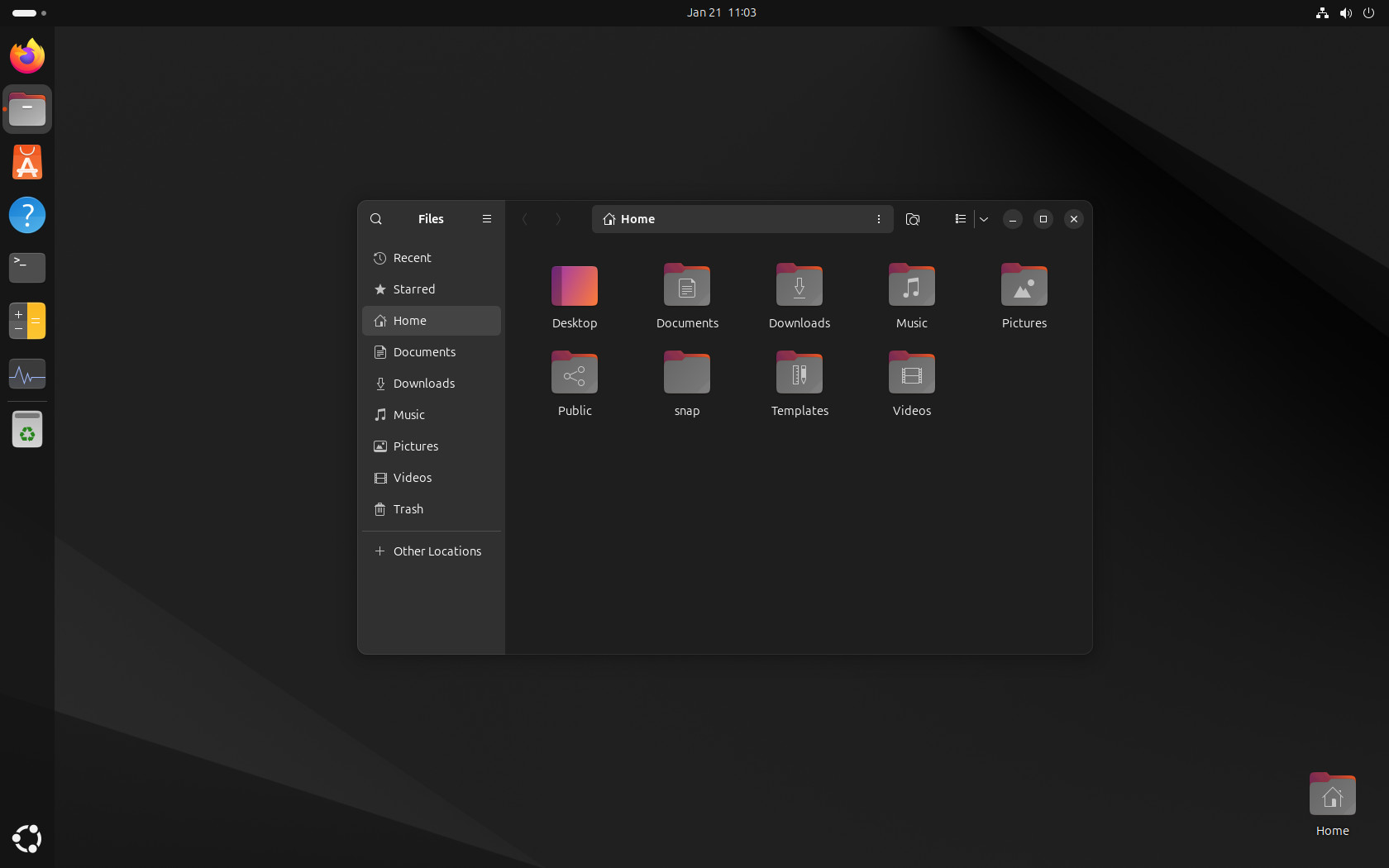
Finally, since all three distributions mentioned above are based on Ubuntu, it makes sense to look at Ubuntu itself. It remains one of the Linux distributions with the largest user base. While it is no longer the default choice for many home users (for reasons beyond the scope of this guide), it is still one of the most popular and reliable options for people switching from Windows to Linux.
The LTS (Long-term support) releases play a key role here, providing users with stability and predictability amid rapid change. On top of that, if you opt into Ubuntu Pro, you’ll receive reliable, proven support for up to 15 years, helping ensure long-term security and peace of mind.
Hardware support in Ubuntu is another major advantage. OEMs, cloud providers, and hardware vendors frequently certify or target Ubuntu specifically, which reduces friction for new users installing Linux on consumer hardware. This means that whatever hardware you have will likely work seamlessly with the distribution.
And finally, regarding the desktop, you’ll get a modified GNOME-based one, which does not attempt to replicate Windows’ layout. For some Windows users, this may feel unfamiliar at first. However, the design is internally consistent and easy to grasp once the basic concepts are learned.
Bottom Line
I’m sure you’ve seen very different recommendations elsewhere. For this article, though, I chose to play it safe and avoid experimenting with niche distributions just to sound more interesting. The choices may be a bit boring, but they’re proven. Whichever of the four names above you go with, you really can’t go wrong.
However, there’s one major missing from the list above, and it’s not a Linux distro, but a desktop environment: KDE Plasma. Polished down to the smallest details, it offers an interface that feels immediately familiar to Windows users. And I’m sure you’ll discover it soon and quickly find yourself impressed by just how much it has to offer.
The other thing to keep in mind is that this is just your entry point into Linux. Once you start feeling confident and realize that Linux offers countless possibilities and styles to suit every taste, you’ll almost certainly begin experimenting with different names (often called “distro hopping”) as you search for the best one.
But the truth is, there’s no such thing as “the best Linux distribution.” If someone claims there is, it’s worth taking that with a grain of salt. What does exist is the best distribution for you, shaped by two simple factors: your current needs and your level of technical experience. Well, that’s all from me. I hope I’ve been helpful.



I migrated to Debian from Windows 7 month ago and have had no problem.
It was hard the first month but became easier and easier. Everything works…
If you wanna learn something try something harder than the normal. After you will win.. now i look at the ones you recommend for new users and i 🙂
Kumander Linux (based on Debian Stable). It adopts the XFCE desktop, modified to resemble Windows 7.
The above distro are not only for new users, but are more user-friendly than others. As a 30+ year Linux Professional I tend to use Linux Mint or Ubuntu at most. Mostly because, since I shifted from RedHat (not RHEL) to Debian and then on to Ubuntu in the early days, I have stuck with it. If you are comfortable with a specific distro, then use that distro. It really doesn’t make much difference.
I am now on Kubuntu 26.04, first time I tried and installed it when it was in Beta state and it worked just fine at least on my hardware. My first distro was Ubuntu 8.04 I tried it 17 years ago and I was surprised about driver support out of the box, but I am still dual boot user.
I suggest Debian KDE: with only ‘main’ and ‘non-free-firmware’ repositories (enabled by default), it will work fine for all kinds of user.
I think that Debian withe the testing repository being enabled by default, like in the weekly builds of the next Debian release next year (version 14, codename Forky) with Plasma desktop environment (graphical interface + core programs) made by KDE is the best for a Linux beginner.
Debian gives the best privacy + security + freedom + compatibility + stability and Plasma gives the most intuitive, simple by default, yet power graphical interface which comes by default with a traditional Windows-like layout.
So you are recommending Debian testing for people switching from Windows? That would be cruel. Or are you just changing the subject to list your favorite beef?
Of course I’m recommending Debian to new people as I wasn to put them on the right path from the beginning, with the least problems possible and Debian has:
The best stability.
Very good hardware support and compatibility.
Very good software support and compatibility, including with documentations and tutorials intended for Ubuntu or Linux Mint.
The ability to switch and use the ‘testing’ or the ‘unstable’ repository to trade a bit of that stability for newer kernel, graphics drivers, desktop environment and programs.
Very good support for Qt and KDE software, which is the best there is for Linux.
Why do you think Debian has so many derivative distros based on it, including the TuxedoOS?
BTW, Debian is also working on Raspberry Pi, for people that cannot afford yet a full desktop or laptop computer.
If you take everything into consideration, you will see that Debian has really many advantages and it’s the best choice to recommend to a new user, if you want to put them on the right path and minimize the chances for them to running back to Windows.
I would never recommend Debian to a new user and I love Debian. Why? New users need help and they won’t find it at the Debian forum. RTFM is not helpful. There are many good Debian downstream OS’s to recommend that have great forums, patience with new users, and experts very willing to help. Recommend those over actual Debian.
1. Linuxmint
2. Kubuntu LTS (with kubuntu-restricted-extras)
3. Debian KDE Plasma
ubuntu or a distro that uses ubuntu to make there distro. anything based on redhat os avoid since ibm hates everyone who is not paying them.
It’s unanimous. The best Distro for new users switching from Windows is the one I use! LOL
I’m soooo glad you didn;t say Arch!
I wouldn’t use Zorin even if you paid me to promote it, the entire OS as the Pro version is, is soooo Bloated after I gave it a test thanks to a friend shelling out for Zorin 18 Pro, reminded me of why I got away from Windows 17 years ago.
I run Ubuntu and have since I came over to Linux, and now I have a family and my kids use Ubuntu on their PC’s and my 10 year old son uses the Terminal after I showed him how to update and upgrade via it, he prefers it as he put it “I can see how it works this way!”
I run a Plex Media Server on a homebrew machine, and for my daily use a HP ZBook 14 G2 with 16Gb RAM and Ubuntu 24.04LTS, but soon to upgrade it to 26.04LTS.
I always recommend Linux Mint or Ubuntu Cinnamon to newbies, but if they want to go outside the look of Windows, it’s Ubuntu with the GNOME desktop that can be tweaked with the Extension Manager to look however you want it… Mine is a MacOS/GNOME mashup, and I’ve already won a few Windows 10 users over with the look!!!
If you ask 10 Linux users an opinion you will probably get 12-15 opinions all based on what the person like rather than pertaining to the question.
Personally I use Ubuntu Mate. I agree with you on Zorin, actually all Windows clones. Clones only confuse people in my opinion. If you switch to Linux, go full Linux. I think Mint meets that requirement. Ubuntu Mate would too, and had a much better forum, but is kind of stuck in limbo right now with the main developer leaving and the site archived. Another good OS under that would be Sparky and Windows users might like the semi-rolling release upgrades which is more like the Windows upgrades.
Probably Zorin OS, Linux Mint (Cinnamon DE), and maybe Elementary OS.
Zorin might be at the top of the list, I guess.
That’s the three I recommend to Windows refugees who ask about a good Windows-replacement OS to use. And the advice normally includes a chat about WINE and Bottles….in case they have Windows software that doesn’t have a good alternative in the world of Linux
Zorin was my first step into Linux years ago, even paid for the pro version I was so impressed. Honestly, it was a great experience overall and a good first for anyone I would agree.
All Ubuntu based, which I won’t touch. Debian is surely the safe ‘uncontroversial’ choice for newcomers.
Debian for newcomers? You think they know how to install codes?
For new users the forum is as important as the OS and desktop. Bobby maybe you could rate some OS forums as user friendly for those looking to switch to Linux? RTFM is not helpful to anyone.
My recommendation would be Mint Cinnamon (MInt Xfce is ugly as hell), MX Xfce, MX KDE.
I generally beiieve that KDE Plasma offers a more complete out of the box experience and it is much more conflgurable than gnome. Xfce is another option, very easy for newcomers to understand and use. But vanilla XFce is very raw. I do not know about Pop OS, i hesitate to recommend Ubuntu due to snaps, i do not find the gnome intutive and i do not like to depend on 3d party extensions for basic functionality. And i ll never suggest to a newbie a rolling distro. Last, i won’t tell him that Linux is like windowz so i ll do not recommend him any distro that implies something different (so, no Zorin either).
PS: amongsth the distros i have installed on friends boxes are Debian and Slackware. The key point here is that i know speciffically their need and i have setup everythinh for them.
As someone who last used Winders at W95, I find XFCE (on Mint) is not ugly, but just the ticket for what I need. I’d recommend it for anyone changing.
CachyOS baby 🚀
Porteus linux is the best from all linux distros tried..running also winapps and appimages..fast..stable..secure with 2 firewals..works also on intelmacs..
I just switched my main PC to Linux in December. I work in k-12 IT support so I’m not a average windows user. I’m a bit more advanced. I looked at several different distros, like Linux mint in the regular and Ciniminon flavors, Ubuntu 24.04.3 LTS, Fedora 43, Kubuntu and Zorin. I used all of them as live demos. I installed Ubuntu on an old laptop here at work mostly for a way to prove all my tasks and things I did with my personal computer I could do on Linux. I found new programs and that some of the programs have a Linux version. Then back to picking a distribution. I seemed to not like the ones that attempted to look like windows and not a fan of KDE Plasma though it looks nice. For me the Gnome desktops though different than windows and slightly more like mac felt more intuitive once you got used to them. I ended up settling on Ubuntu just because of the LTS support and being the widest used version with probably Fedora almost being chosen. Now that im using it for about a month i dont miss windows.
I’ve just installed Mint on my K2 Ryzen Mini PC. Installation was flawless, mike’s away from how I recall installation of Linux being. I love the layout, the app availability and the overall speed the OS offers me and, it’s not windows – something I’ve been using for well over 30 odd years.
So far it’s great for gaming using Steam, which I primarily use my PC for – games from the 2000s, multiplayer, online.
I’m absolutely blown away by the ease of installation, ease of use and polished feel the OS has. If you’re on the fence, it’s absolutely worth a try.
I started linux before it had a desktop. Had a hard time adapting. Then tried beOS, bear-ops and MANY others. Finally settled on linux mint cinnamon a few years ago and haven’t looked back. Zorin failed to install properly multiple times, so that didn’t trip my trigger. In linux mint, my entire steam library of nearly 400 games run flawlessly, with better framerates than I ever got in windows with the exception of 2 indie titles that I never played anyway. Besides zorin, I agree with your list of 1st step linux distros, and I wish people would stop recommending distros like arch to people taking their 1st try at linux. Have them try the user friendly ones first, and as they get comfortable, then they can look around and try others that require a bit of technical savvy to even install. Overall, good job.
Started with openSUSE. Dustro-hopped for a bit. Keep coming back. I think some other distros are overrated, one of your picks caused me 3 reformats in a week, just to get games going.
For beginners, I suggest educating them first on what the BIOS is and how it automatically updates a Windows machine but does not a Linux machine. A windows user might be using a E.O.S. end of support/ old machine when this does not matter but on newer machines when the BIOS will receive updates this matters a great deal. If a BIOS is not updated it can break a machine in different ways and a novice windows user, mom, pop, G-ma, G-pa, wife and so forth has no idea how to create a BIOS recovery usb, much less get into the BIOS of a Linux machine and find their latest version, then go to the manufacturers website to get the most up to date BIOS…. imo it’s easier to just stick with Windows and Mac when the user doesn’t have to do any of this…
35 years of Windows, and I’ve never heard of the BIOS updating Windows, or Windows updating the BIOS. (you seem to be confused which you’re talking about?)
Some motherboards have software you can install that can update the BIOS from Windows, maybe that’s what you meant?
In general, I recommend not to update your BIOS unless you already have a problem – some BIOS manufacturers even explicitly make the same recommendation. It tends to not matter, unless you’re upgrading hardware components (RAM, CPU) that weren’t supported when your motherboard was built.
But mom and pop aren’t typically upgrading their PCs, they’re usually just buying a new one. 😉
BIOS updates are called firmware not software.
Firmware is a type of software that provides low-level control for a device’s specific hardware. It is embedded directly into the device’s read-only memory (ROM) and acts as the intermediary between the hardware and higher-level software. Firmware is critical for the functionality of devices such as computers, routers, cameras, and embedded systems.
ubuntu comes with a firmware updater tool and windows can update firmware also. Usually you need a major brand to receive firmware updates since more generic brands never get updates sometimes but continue to work anyways.
In my windows work laptop bios updates have to be done manually too. They are in fact simpler as you don’t need to boot with a USB drive, but without knowing you would be stuck with an ancient uefi version as well.
And it’s a HP laptop, I regard that as a well known brand.
I think you’re referring to the Kernel, which is completely separate from the BIOS.
For beginners I suggest Ubuntu LTS. It supports Secure Boot and It is simple to set up.
Reading comments like didn’t mentioned, Arch, Fedora, etc… Guys, do you not know, that an average Windows users are clueless about this! All they know is to install certain app and click on the icon and thats it!! And you want to give that user to run Arch Linux possibly with KDE as the king of the customization? Seriously??
That’s why Mint, Zorin, Ubuntu (Gnome) are first choices.. Out of the box experience is much better.
Let them first try Linux and then after they get use to it, let them explore..like majority of us did when we switched to Linux! I bet 1 out of 50 Windows users does actually understand Linux!
I’d say more like 1 out of 10 Windows users would understand Linux today.
My re-dive back into Linux (for the 1,000th time over my techno years…) I tried Arch versions first. The fast moving pace of Arch is exciting, but not quite up to the smoothness of the debian builds. I waffle between Mint and Zorin. Both so similar, but to me the Zorin interface is a bit more refined.
I’m not sure where Arch will end up, it’s got a lot of momentum right now with Steam (pun sorta intended) If Arch can clean itself up and get an interface top end that makes it shine like Mint or Zorin, it may end up being a solid choice for anyone. Most people like solidity in their computing platforms of choice. We are getting tired of the “Moore’s Law” like cycle forcing, yes FORCING, change every 2 years. It get’s old, and tiresome to be forced into something new without wanting or needing it.
You didn’t even mention Fedora, Debian or OpenSUSE……
You didn’t even mention baby can drive either…
and Arch, btw
I guess reading comprehension is not your forte. What does the title of this article say? “Linux Distros I Recommend for Those Switching from Windows.” What does the image right below the title say? “Your First Step Into Linux”
You banned my ip…
Not a single suggestion of something which uses KDE by default, despite that being the most feature-complete Windows-like DE.
Agree, personally i use fedora Kde
KDE on any non LTS (long time support) distro that moves quickly will support Steam gaming and most Office Suite, Browser users. Nobara, Fedora both come to mind.