
A year after the previous 6.4 release, the Linux Mint development team has rolled out Cinnamon 6.6, with the desktop environment set to debut in the upcoming Linux Mint 22.3 “Zena” expected around Christmas.
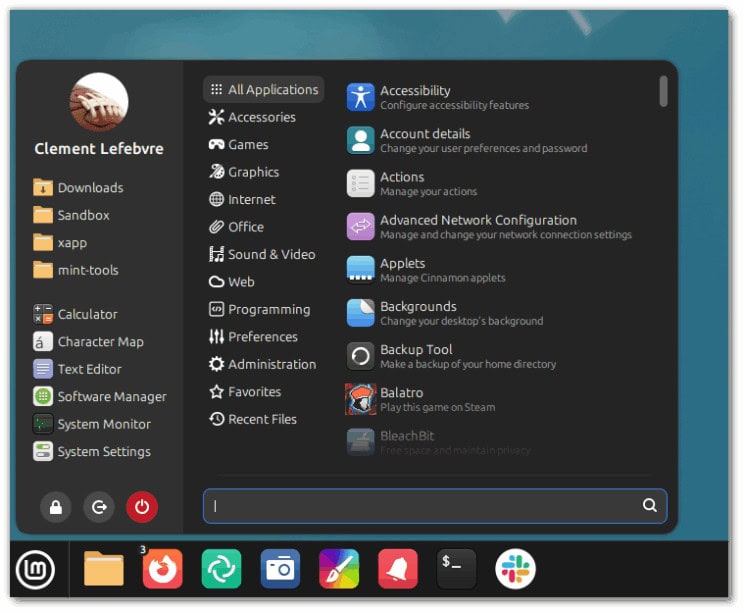
The main menu receives the most visible set of changes. Its layout has been modernized with simplified navigation, cleaner category handling, optional avatars, and configurable places and bookmarks.
Moreover, system buttons now sit at the top, category icons use the new XApp symbolic style, and several performance issues around startup warnings and icon handling have been addressed. Improvements to hover effects and sidebar behavior further streamline navigation.
At the same time, Night Light gains an “always” schedule mode and a new dedicated applet, while display settings now expose options for fractional scaling direction.
Applets such as the window list, workspace switcher, corner bar, and sound indicator benefit from fixes that range from hover behavior to notification badges and album art handling. Multi-instance applets now reload more reliably, and keyboard layout switching gains new shortcuts.
Under the hood, numerous components transition from older Tweener animation code to easing-based effects, reducing visual inconsistencies. The virtual keyboard receives theme improvements, layout switching, and fixes for extended keys.
NetworkManager dependencies can now be disabled at build time, and the session startup process improves polkit, SSH, and network agent handling. Several Python and JavaScript modules are refactored for cleaner code and more predictable behavior.
Cinnamon 6.6 also includes fixes for calendar refresh logic, workspace rendering, menu misclick detection, tooltip updates, and issues affecting applet configuration windows.
Lastly, the update modernizes keyboard handling, adds a reset-zoom shortcut, improves keybinding validation, and resolves multiple regressions in themes, backgrounds, and icon cache management.
Image credits: Linux Mint





Really not a fan of the additional, uncustomizable clutter in the Cinnamon menu (e.g. Favorites are displayed with an icon alongside the name of the favorite, can’t hide the search bar, can’t resize the lock, logoff, restart buttons, etc.)
How to disable the new menue design?
Linuxmint is getting insanely popular, I love how it spreads through my IT infrastructure. 🔥
Gosh I wish they would support ARM processors. I miss running Linux Mint since buying an Apple silicon MacBook.