
When it comes to taking screenshots on Linux, KDE’s Spectacle and Flameshot are two of the most familiar options. Both offer plenty of features, but a new alternative is worth checking out, especially if you’re running a Wayland desktop and want something noticeably faster.
It’s called LumineCapture, a free and open-source screenshot utility written in Rust, designed for speed and low resource use. The project is still young but already offers a full feature set, including image annotations, text recognition, and several capture modes.
What makes LumineCapture interesting is its approach to performance. According to the developer, on a KDE Plasma system with a single monitor, the app can display a frozen screenshot with its editing interface ready in about 40 milliseconds. On a dual-monitor setup, that rises to around 60–80 milliseconds, with COSMIC reportedly performing slightly faster.
Those are impressive figures, though based on the developer’s measurements. I’ve also tried LumineCapture ourselves, and the difference is noticeable. Compared to KDE Spectacle, it feels lighter and responds faster, especially when launching the screenshot interface.
The developer also published benchmark results comparing LumineCapture with Spectacle and Flameshot. In a test of 30 full-workspace captures saved directly to a file without opening the editor, LumineCapture averaged 150.5 milliseconds. Spectacle took 576.1 milliseconds, while Flameshot, with its daemon running, averaged 737.9 milliseconds.
In other words, LumineCapture was about 3.8 times faster than Spectacle and 4.9 times faster than Flameshot in that test. Of course, these results shouldn’t be taken as universal benchmarks since performance varies by hardware, desktop environment, and configuration. Still, they explain why the app feels so responsive in everyday use.
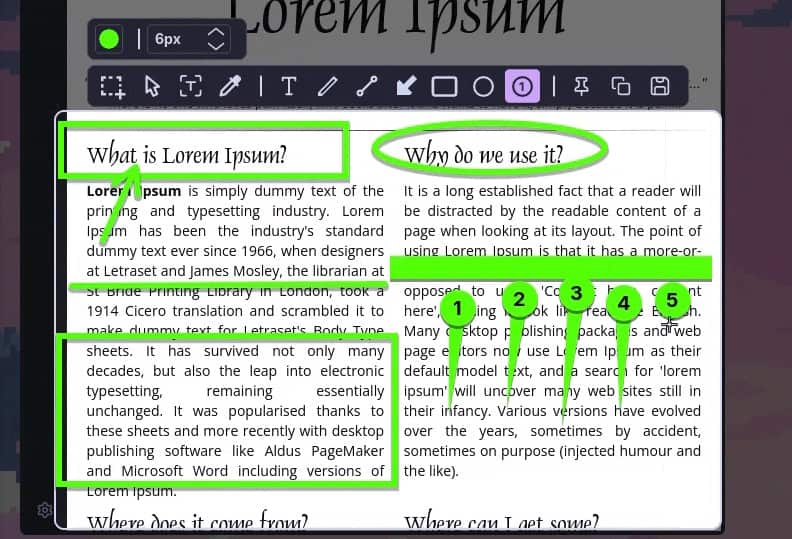
Speed aside, LumineCapture offers plenty of functionality. Its built-in editor lets users add arrows, lines, rectangles, circles, text, freehand drawings, and numbered arrows directly to screenshots. It also includes a magnifier for precise selections and an eyedropper tool for picking colors.
Another useful feature is OCR. Instead of opening a separate window with recognized text, LumineCapture lets users select and copy text directly from the screenshot, like on modern smartphones. The OCR uses PaddleOCR models, with options for additional languages.
The application also supports pinning screenshots to the desktop, which can come in handy when you need to keep a reference image visible while working in another application.
For capturing images, LumineCapture offers several options. Users can grab the entire workspace, capture the monitor under the mouse pointer, or select a specific region. There’s also an active-window capture mode, although that functionality is currently limited to KDE Plasma.
Those who prefer keyboard-driven workflows will appreciate the shortcuts and command-line options. For example, running lumine-capture opens the screenshot editor, while lumine-capture -r lets you select a region and capture it immediately without opening the editor. Screenshots can be saved to a file, copied to the clipboard, or pinned to the desktop.
Another advantage is that LumineCapture doesn’t require a continuously running background daemon for its regular operations. The only exception is the optional GPU-accelerated OCR functionality, which can use a dedicated background process.
Regarding desktop compatibility, the developer has tested the application on KDE Plasma, COSMIC, and Niri. Other Wayland compositors might work, but haven’t been officially tested. GNOME, meanwhile, isn’t supported at this point.
LumineCapture is currently available in version 0.2, with prebuilt packages for Fedora 43 and newer, Ubuntu 24.04 LTS and newer, Debian 13 and newer, and Arch Linux. Installation instructions and downloads are available on the project’s GitHub releases page.


fresh alternative for spectacle
This looks very nice, will be trying on Fedora Cosmic
I use it on niri and it is working well. It faster than Gradia and instantly replaced it. Thanks for the article. Looking for this package to be officially released on the aur.
Thank you, Bobby, for trying out my program and for the kind words, I really appreciate it!
New versions are in the works. The next couple of releases will focus mostly on polishing, bug fixes and small features some people have asked for. After that, I’ll move on to bigger features. I also plan to add screen recording at some point, and themes for those who don’t like the default look (all colors can already be changed in the settings).
And yes, it’s Wayland-only for now. It’s a native Wayland project first and foremost, but I’m open to adding X11 support in the future
Wayland Only
The Stupidity
Why folks become so emotionally attached to projects that are withering for good reason?
Time to move on, put resources where they will be best useful.
Installed in a debian container on solus kde. Yes it’s fast alright. But there’s no tooltips when u hover over the icons or a formal settings button.
I’m really sorry for missing such an obvious quality of life thing, It will definitely be added in the near future
What’s the ‘Stupidity’, Wayland is the future of Linux, X11 is old stuff that everyone is abandoning. It happened gradually, and now faster and faster, lets took the same kde, only roughly 5% of its users remains on x11; and I’m not very sure, but I think they are going to completely drop the support of x11 in the next updates, tho xwayland will still work of course
And also the most important thing, it’s a one man project, he can’t support everything all at once, X11 is probably far from a priority with today’s trends