
Most of us are proud to run only free software on our Linux systems. In reality, though, this is not entirely true (a topic for another article). To a large extent, a modern Linux workstation can rarely meet today’s user expectations (GPU drivers, firmware, some multimedia codecs, etc.) without relying on at least some non-free software.
In fact, many of us are probably using more of it than we realize. But have you ever stopped to ask yourself whether you’re running non-free software, and if so, which ones? That’s where an interesting little tool comes in, one I’d like to introduce here: vmrs, short for virtual Richard M. Stallman.
Originally developed in the Debian ecosystem, vrms is a utility that checks installed packages and reports those that do not comply with the Debian Free Software Guidelines. Instead of removing software or enforcing policy, vrms focuses on transparency, giving users visibility into which parts of their system fall outside Debian’s definition of free software.
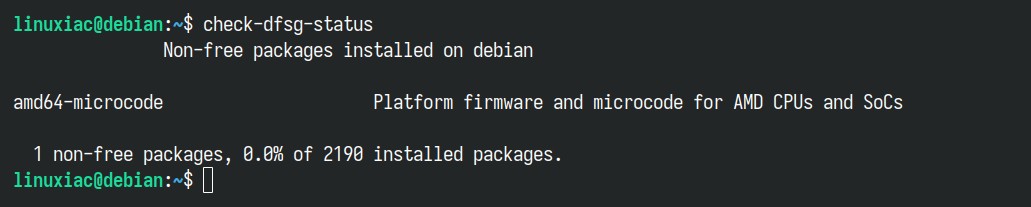
In Debian (and its derivatives), this concept is reflected in the official check-dfsg-status (vrms transitional package name) tool. It evaluates installed packages using Debian’s own metadata, distinguishing between software that belongs in the main archive and packages classified as non-free or contrib. Just install it, launch it, and you’ll see output similar to what’s shown below.
A similar idea has been adapted for RPM-based distributions through vrms-rpm, a community-maintained project that brings the virtual Richard M. Stallman concept to Fedora, RHEL, openSUSE, and related systems.
Instead of relying on Debian’s DFSG categories, vrms-rpm analyzes RPM license tags and compares them against configurable license allowlists, such as Fedora’s approved licenses or SPDX-based definitions.
Despite differences in implementation, both tools serve the same purpose: identifying installed software that does not meet the distribution’s chosen criteria for free or open-source licensing. Keep in mind that they depend entirely on the accuracy of package metadata and make no attempt to modify the system, acting solely as reporting and auditing utilities.
But what about Arch and its derivatives? Well, it’s a whole different story. Unlike Debian and Fedora, Arch does not provide an official equivalent to vrms or DFSG-style compliance checks. And let me tell you – this is not an oversight; it reflects a fundamentally different distribution philosophy.
Arch does not classify packages as free or non-free at the policy level and intentionally avoids making value judgments about software freedom. And as you can see, this doesn’t stop it from being one of the most beloved, widely adopted, and respected distributions in the Linux ecosystem. So let’s not be such purists.
For more information, see Debian’s vrms or check vrms-rpm’s GitHub page.

I use the best software for my needs and I couldn’t care less if it is non-free.
Not everyone in the Linux world has communist leanings.
Well, yes…..I sometimes use Non-Free software in Linux.
It rarely happens, but sometimes you need to…to get full Linux functionality for some things you need or want.
Hardware drivers, multimedia codecs….once in a while you need to go the Non-Free route.
You don’t have to always go the biblical radical RMS way all the time.
It’s up to the user to decide what to do (or what to use) to achieve his/her ultimate objective.
Like religion, I dislike Zealots who try to ram their ideology down your throat. I don’t need anybody force feeding me anything.
Which is why, I guess, I’m more inclined to the “Open Source” side of the equation….as opposed to the “Free Software” camp.
Just a personal opinion, that’s all
At the moment, i am used to use some non-free software; but for a while now, have been aspiring to slowly become more independent from those packages and reducing the amount of packages. I did not know about this package mentioned here until now. Thank you for this, and also thank you for doing what you are doing via Linuxiac – I have come to rely on it for my daily dose of Linux news. Linux seems to be an open invitation for each to start a journey towards the free ideals, and realizing just how much dependence we have on what restricts us.
I use Manjaro, but I am careful to use NO non-free software. I contribute to the FSF on an irregular basis and believe in the value of the philosophy and practical application.
I use DaVinci Resolve, NVIDIA drivers, Steam, and Signal. I think that’s all the non-free software I use. DaVinci Resolve is an ABSOLUTE must for me.
I use Nvidia drivers, Signal app, and Steam games.
For everything else, I only use free software.
Do You Use Non-Free Software? Yes I do (rpmfusion). Multimedia support is important for me.
I’ve used a lot of operating systems in my life: some exotic, some common, including macOS, Windows, BSD, Linux, and even some archaic ones. Open source has come a long way, but there are still gaps. Ironically, sometimes those gaps are right at the core.
Take email clients, for example. I love Thunderbird, but clients like eM Client or even Outlook offer some handy features and, for many business users, a more logical approach to email. Things like tabs: Thunderbird’s implementation isn’t everyone’s cup of tea. Handling attachments can feel clunky. And what about Evolution? After decades, why is it still so static? Why aren’t there more plugins and configuration options? There are countless use cases where people want things to work differently.
Then there are commercial apps that simply work: no issues, no drama. DaVinci Resolve is a great example. I pay for it and I’m happy using it. Or FreeFileSync, which works across Windows, macOS, and Linux. There are many more examples in the commercial space.
Here’s my point: the “Free Software First” approach is fine, up to a point. If people want to ditch Windows and macOS for Linux (as I did) but don’t mind paying for quality software, what’s the problem?
The biggest issue is the mindset that says, “No need, we already have that,” referring to a well-intentioned open source alternative that is still far from a polished, finished product.
We need to move past the old-school, gatekeeping mentality that says, “If you can’t handle the terminal, you’re not good enough for Linux.” GUI-focused approaches matter. ZorinOS, for example, does a great job making Linux accessible for modern users.
LibreOffice has come a long way, and OnlyOffice is a strong replacement too (despite some people avoiding it for political reasons). And the list goes on.
We’re even seeing progress in audio software. Bitwig is a great alternative to Ableton. But we need more of these commercial-grade apps. Not to undermine Linux or FOSS, but to complement it: providing a sustainable ecosystem for users who want to support developers for their hard work.
Ultimately, the problem is twofold:
1. A group of Linux die-hards clinging to their “terminal-only” status quo.
2. Commercial companies that, with some exceptions, lack incentive to invest in or upgrade their products for a broader consumer base.
Linux needs a stronger commercial ecosystem, not less; because the future of desktop Linux depends on it. And given the power of Linux, according to me, it deserves to be the late bloomer in (consumer and end-user) IT systems.
RVNC
Seven years ago, I permanently moved away from macOS and Windows to Linux. I’m not a developer, just a guy who needs to get work done. I appreciate all the effort that goes into FOSS and I support with money, bug reports, etc. when I can, but if I were forced to use only FOSS, I couldn’t have switched.
In addition to Nvidia drivers, there are several pieces of software I need for my career (audio engineer) that I have purchased, plus I use Moneydance as a Quicken substitute. One thing I will never do again is support any software that is subscription based.
Does this make me a ‘bad’ Linux user? I don’ t think so!
I purchased a license to Master PDF Editor 5 because it pretty much does everything that you’d want do with PDF-type files and doesn’t put you through any unnecessary pain. Putting users through unnecessary pain is what the majority of software does all too well.
yes, nvidia.
I don’t game, & I don’t need nVIDIA. I always had nVIDIA cards until the driver became rubbish!
Down to CEX, trade in 4 screens-worth for 9 screens-worth of slim, silent AMD Radeon cards.
(& I use ’em all using Nouveau.)