Beyond technical improvements, Linux Kernel 6.19 will also deliver something that, oddly enough, can be seen from a more aesthetic point of view. And more specifically, it is set to introduce a new Terminus 10×18 console bitmap font, offering a clearer, more balanced option for users who rely on text-mode consoles.
The addition arrives through a recent PR as part of a broader set of fbdev updates targeting the 6.19-rc1 cycle. Expectations are that the new font will improve readability in environments where console clarity still matters, especially on modern laptops and framebuffer-based systems.
The Terminus 10×18 font is designed specifically for mid-density 13–16-inch laptop displays with resolutions such as 1280×800 and 1440×900. Existing built-in fonts, most notably the long-standing 8×16 fallback used by the kernel for decades, tend to appear cramped or thin on these panels.
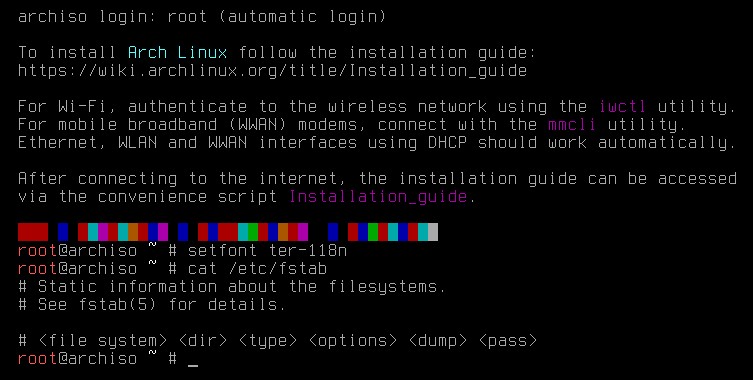
A 10-pixel width and 18-pixel height give the new font more vertical structure while maintaining a moderate column width, producing a cleaner console image without significantly reducing the number of visible lines. Here’s what it actually looks like.
Here’s how things actually happen under the hood. The kernel ships with a small collection of legacy bitmap fonts embedded directly in the source tree, including 8×8, 8×16, 6×11, SUN12, SUN15, VGA fonts, and the newer Terminus set introduced gradually over recent releases.
When no userspace configuration overrides the default, the kernel invariably falls back to the 8×16 bitmap font. This fallback has been the de facto standard since the early days of the VGA console.
Most distributions, however, do not leave the fallback in place. On systems using the modern DRM/KMS console, userland tools such as setfont load fonts during early boot. As a result, many Linux installations use packaged Terminus PSF fonts, such as ter-116n or ter-132n, or larger Latin/Unicode fonts for broader character coverage.
Still, the kernel’s own internal inventory determines what is available before userspace starts or when running in minimal, recovery, or embedded environments. Adding a new built-in option like Terminus 10×18 directly benefits all of these cases.
For more information, see this.