
FFmpeg is a tool almost every Linux user has benefited from, even if they have never typed its name in a terminal. It powers countless media workflows, handling video, audio, image, subtitle, and metadata processing with great flexibility.
The problem is that using it directly usually means dealing with long commands, codec names, bitrate settings, filters, containers, and much trial and error. Frame tries to make that part less painful.
It is an open-source desktop application providing a graphical interface for FFmpeg. Instead of replacing FFmpeg, it wraps it in a native app and offers users a cleaner way to configure common media conversion tasks. The project describes itself as a native media conversion utility built in Rust, using FFmpeg and FFprobe underneath for media handling.
In other words, FFmpeg remains the engine doing the heavy lifting. Frame is the interface and workflow layer on top, handling source probing, FFmpeg argument generation, compatibility checks, task control, and progress parsing.
This includes converting video files, extracting or converting audio, changing image formats, working with subtitles, editing metadata, resizing or cropping media, using presets, and processing multiple files in a queue.
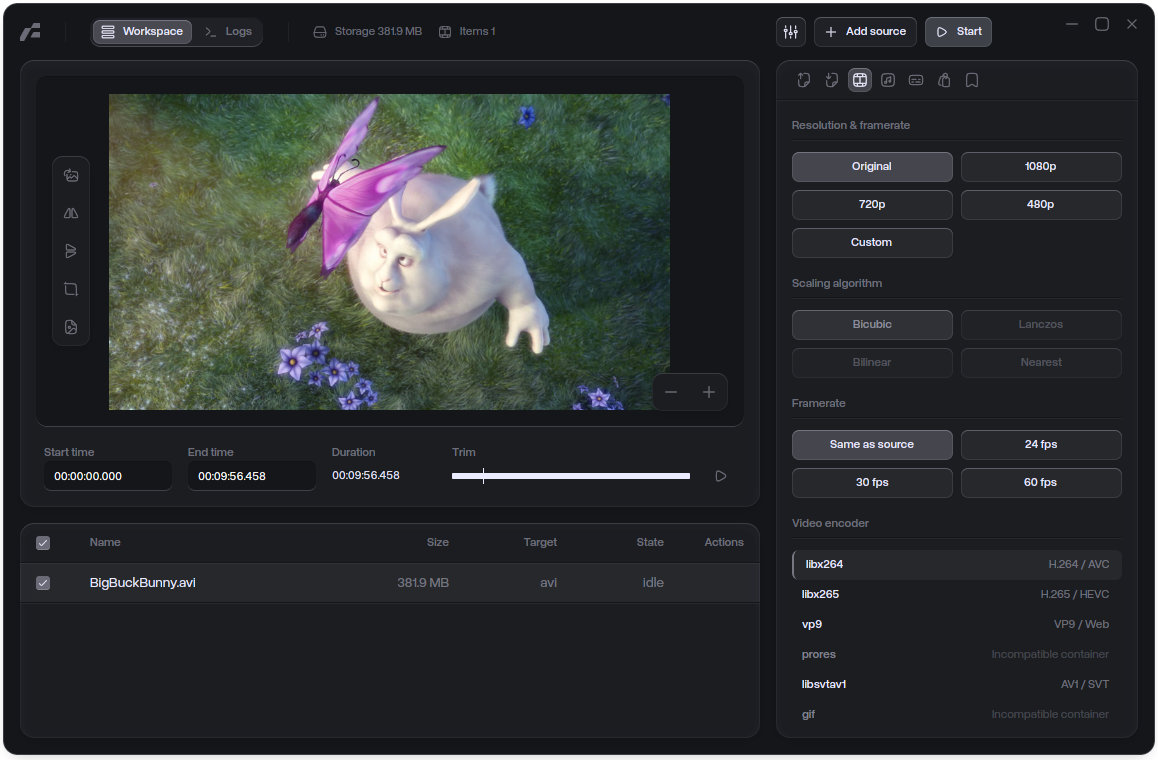
According to the project, Frame supports common video formats such as MP4, MOV, MKV, AVI, WebM, and GIF, along with audio formats including MP3, M4A, WAV, and FLAC. On the image side, it supports PNG, JPEG, WebP, BMP, TIFF, AVIF, HEIC, and HEIF. Output options include video, audio, and image formats, including MP4, MKV, WebM, MOV, GIF, MP3, M4A, WAV, FLAC, PNG, JPG, WebP, BMP, and TIFF.
The app also exposes a fairly broad set of conversion controls. Users can work with video encoders such as H.264, H.265/HEVC, VP9, ProRes, SVT-AV1, and GIF palette output. Hardware encoders are also supported when available in the configured FFmpeg build, including NVIDIA NVENC and Apple VideoToolbox options.
Beyond basic format conversion, Frame includes controls for CRF and bitrate settings, encoding presets, scaling, cropping, rotation, flipping, overlays, subtitle burn-in, metadata cleanup or replacement, and real-time logs. It is not just a “pick input, pick output, click convert” utility. It exposes useful parts of FFmpeg’s flexibility without forcing users to write full commands.
The project provides Linux builds, including tarball, AppImage, and Flatpak-style release artifacts, alongside macOS and Windows builds. However, users should keep expectations realistic: this is a young open-source project, and the developer notes the app is currently unsigned, so operating systems may warn on first launch.
More details about the project are available on its official website and GitHub page.

Nice 🙂
Meh. “Modern interface” seems to mean dark theme with inadequate contrast, rounded corners on everything, cryptic icons, and pared down features and limited flexibility. Handbrake remains the Gold Standard; familiar, functional and very full featured.
Your negativity is only surpassed by your poor judgment.