
System76 has released COSMIC Desktop 1.3, the latest update to its Rust-based desktop environment. Although it improves nearly every major aspect of the desktop, its main attraction is the long-awaited frosted-glass appearance.
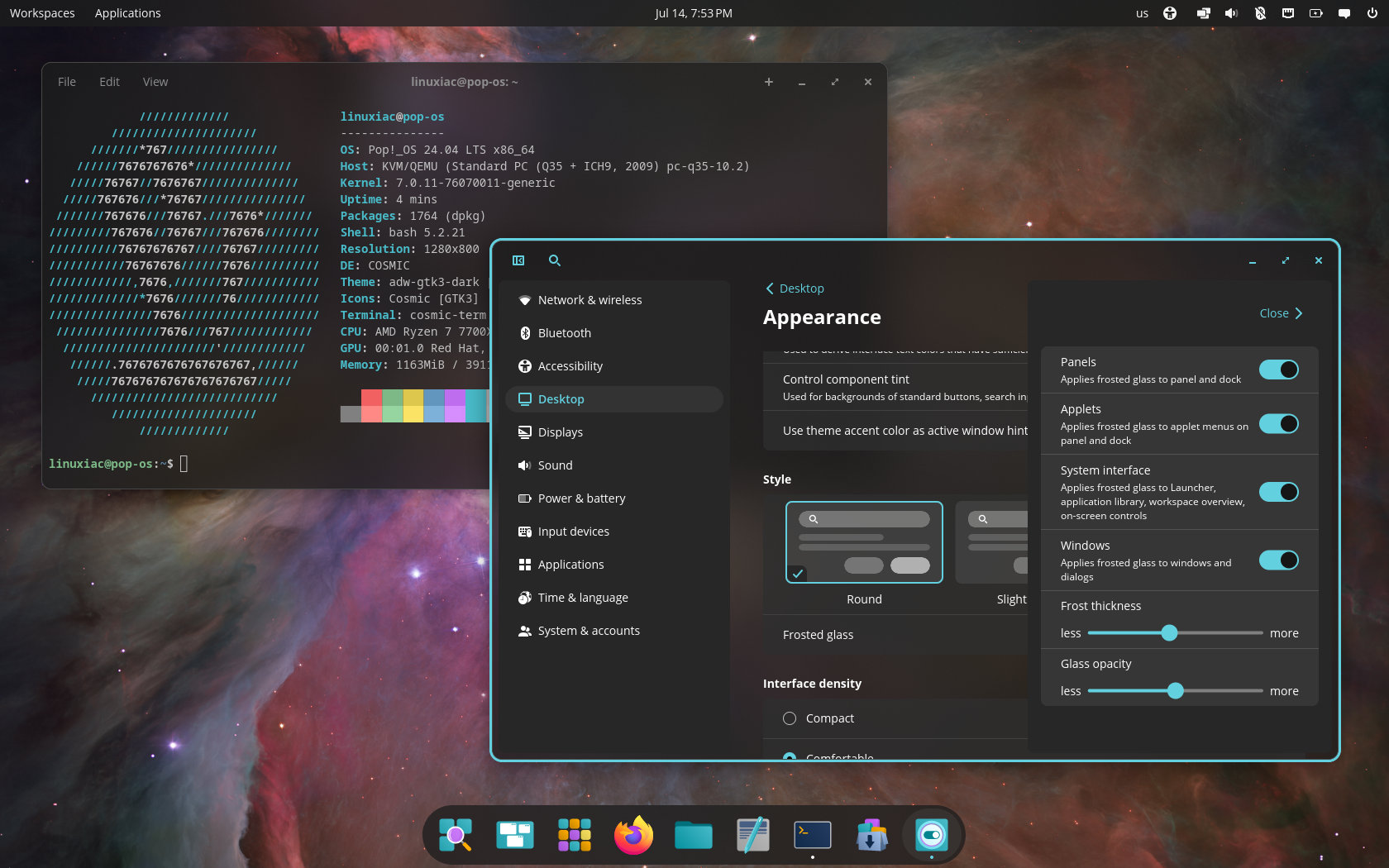
The new visual style results from several months of work across the COSMIC Desktop stack. Instead of simply making panels transparent, the effect gives surfaces a softly blurred look that lets the wallpaper and windows behind remain visible without sacrificing readability.
Users can enable and customize it by opening COSMIC Settings and navigating to Desktop > Appearance, where Frosted glass is available in the Style section.
The effect can be adjusted to personal preference, allowing anything from a subtle translucent look to a more prominent glass-like desktop. It applies across supported COSMIC components, including panels, applets, menus, and application surfaces.
However, third-party COSMIC applications and applets will not automatically get the new appearance. Developers must update the libcosmic version used by their projects before the applications can support frosted glass.
Beyond the visual upgrade, the COSMIC System Monitor can now calculate power consumption for AMD and Intel GPUs and display GPU power usage and total VRAM directly on its dashboard.
Additionally, memory usage monitoring has been added for Intel GPUs. NVIDIA hardware receives improvements allowing supported GPUs to suspend correctly, along with other GPU-related refinements.
The COSMIC Panel has also received several welcome options. Users can now configure a panel to remain permanently hidden, extending the existing visibility choices for those who prefer a completely unobstructed desktop.
Another new setting lets the panel or dock keep its visual style when a window is maximized. Previously, maximizing an application could change the panel’s appearance. With this option enabled, users retain a consistent desktop design regardless of window state.
Frame pacing for embedded applet popups has also improved, resulting in smoother animations and interactions when opening menus from the panel.
Wallpaper support has been expanded to include AVIF images. Both the COSMIC background component and COSMIC Settings now use libdav1d to decode AVIF files, allowing them to be selected directly as desktop backgrounds.
Several compositor fixes address problems with multi-GPU systems, external displays, fullscreen windows, magnification, and touchpad gestures. These include a fix for texture corruption on multi-GPU computers and one for laptops whose internal displays could get stuck on the manufacturer’s logo when an external monitor was connected.
The desktop magnifier gets corrections for rounding errors and focal-point calculations. Fullscreen surfaces now return to the correct position in the window stack. COSMIC also forwards relative axis direction information from libinput to Wayland clients, fixing certain touchpad gesture problems.
Pointer theme compatibility has been improved through a fallback to legacy X11 cursor names when necessary. Another correction addresses windows returning from a minimized state at the wrong size after their animation finishes.
COSMIC Files fixes a crash that could happen when right-clicking a mounted location in the navigation bar. The file manager also adds support for MIME subclasses when scanning files in dialogs, improving detection of compatible file types.
COSMIC Terminal fixes fractional mouse-wheel scrolling and an issue causing the terminal to lose keyboard focus after clicking its header bar.
Bluetooth users now see previously known devices in the applet. Scroll events from the status area can be forwarded to applications using StatusNotifierItem functionality.
On the networking side, COSMIC’s applets and settings have moved from their custom NetworkManager integration to nmrs, a NetworkManager client written in Rust. According to devs, this internal architectural change matches networking components more closely with the rest of COSMIC’s Rust-based desktop stack.
The application launcher now shows the discrete GPU as the default option in COSMIC’s context menu on systems where launching with dedicated graphics is available. Plus, display orientation changes revert correctly when not confirmed, and volume slider updates are throttled to avoid sending too many changes while moving the slider.
Rounding out the release are translation updates, dependency updates across numerous COSMIC projects, keyboard-layout protocol work, Flatpak environment corrections, and improved panic handling in the COSMIC desktop portal.
For additional details, refer to the changelog.
COSMIC Desktop 1.3 packages are expected to arrive in the repositories of rolling-release distros such as Arch, openSUSE Tumbleweed, CachyOS, and others shortly. Pop!_OS 24.04 LTS users already have it available as an update.



testing this 1.3 release on Cachy Os.
No crash, yet.
Even the asusrog program is working well.
The ‘Frost’ feature is nice , as the weather is too hot 😉