Collabora Productivity has released Collabora Online 26.04, the latest production-ready version of its open-source, browser-based office suite for editing and collaborating on documents, spreadsheets, and presentations. This release follows CODE 26.04, which is the freely available Collabora Online Development Edition for testing, home use, and smaller deployments.
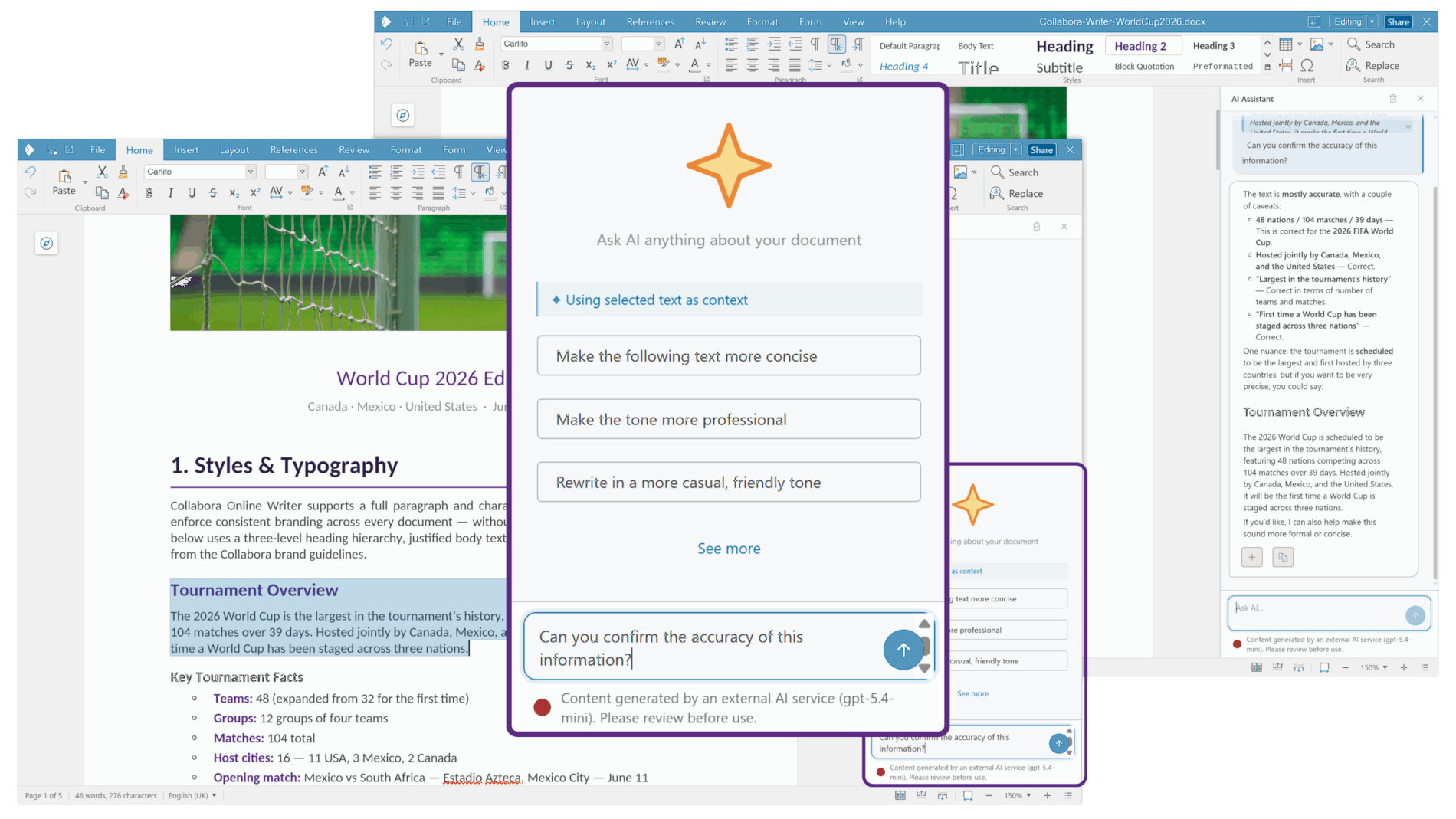
A key addition is an optional AI assistant integrated directly into Writer, Calc, and Impress. In Writer, the assistant can draft, summarize, rewrite, and refine text. In Calc, it helps create or troubleshoot formulas and analyze data. In Impress, it assists in turning source material into structured presentations and generating slide content.
Importantly, the assistant is not enabled by default. Administrators determine its availability, select the AI provider, and choose whether the provider is hosted externally or on the organization’s infrastructure. Moreover, the assistant cannot access or modify document content without explicit user permission.
Beyond AI, Writer now offers an enhanced document comparison workflow. Users can compare the current document with an earlier version stored locally or on a server. Inserted, deleted, and moved content, including text, images, and tables, is shown with color-coded changes, author, and date information. Differences can be reviewed using the tracked-changes interface or in a side-by-side comparison view.
In addition, Writer now includes a multi-page view for navigating long documents, redesigned comment cards, improved change tracking, enhanced search in the Navigator, and style previews in the sidebar. Comments can also be included in the margins when exporting to PDF.
Another notable new feature is support for importing and exporting Markdown files. Formatting such as headings can be converted into proper Writer document styles, while existing documents (including DOCX, ODT, RTF, and older DOC files) can be exported to Markdown for use in documentation systems and other plain-text workflows.
Calc introduces personal sheet views and adds new functions, table styles, calculated fields for pivot tables, and improved pivot-table filtering and dropdown behavior.
For presentations, Impress expands the collaborative presenting experience with Follow-Me functionality, allowing viewers to follow the slide currently being shown by the presenter. The release also improves multi-monitor support, introduces slide sections for organizing larger presentations, and provides better handling of embedded fonts to preserve a presentation’s appearance across different systems.
On the accessibility side, updates include more flexible dark-mode controls, sharper PDF rendering, refined application settings, and improved document opening behavior. Collabora has also enhanced interoperability with Microsoft Office file formats to reduce formatting differences between office suites.
For additional details, see the announcement.
Collabora Online 26.04 is available from Collabora Productivity and its integration partners. Organizations with supported deployments will receive the new release according to their provider’s or integration platform’s update policies.
Image credits: Collabora