
For sure, Linux has no shortage of video players, but Cine enters with a clear goal: to provide a clean, modern desktop interface using MPV as its playback engine, plus a GTK4/libadwaita interface that fits naturally on modern GNOME desktops.
It targets users who want MPV-backed playback without using MPV directly from the command line or a traditional media player interface. It sits in the same category as other MPV frontends but focuses strongly on a modern GNOME-style experience.
The app is built for Linux and presents itself as a simple video player focused on a distraction-free viewing experience. Rather than replacing advanced media tools with many niche options, Cine focuses on the common controls users expect from a desktop player and leaves playback to MPV.
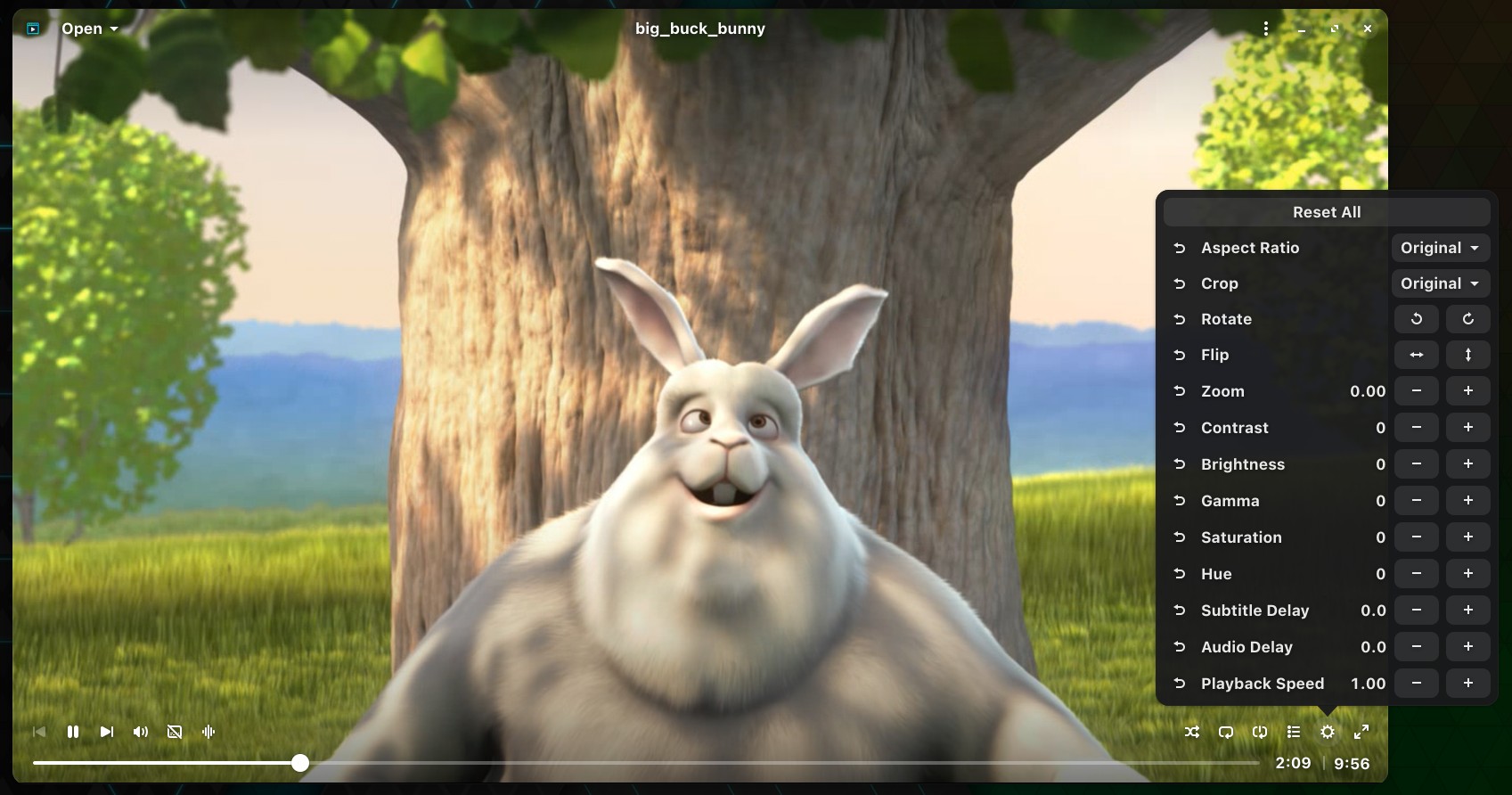
Cine’s features cover the essentials. Users can select audio and subtitle tracks, adjust synchronization, and control video options like brightness, contrast, zoom, and aspect ratio. These controls make Cine more than a bare MPV launcher while keeping the interface clean and focused on playback.
For additional details, visit the app on GitHub. The player is available for installation from Flathub. Some distros already include it in their repositories.
While the project is still relatively small, it is already worth watching. For now, Cine should not be viewed as a major new rival to established players such as VLC. But for users who prefer modern GNOME-style apps and want a straightforward way to play local video files, Cine is a project worth knowing about.


I prefer Haruna, it looks normal and works as it should. This player looks like it was made for Gnome and looks a bit ugly due to that – looking at anything Gnome-based these days makes me feel like I’m using a budget version of Mac OS and Mac OS is pretty bad and limited as it is.
Just tried it, it works great.
I try to stick to the Adwaita look and feel which is uncluttered and to the point visually, but of course, there is KDE if you like to have lot of tweaks. I personally prefer to tweaks my desktop using .conf files of gsettings, so a simple bash script can restore my desktop to a new PC. On a daily basis, I want to focus.
I think that this will be my new daily driver!
Downloaded, installed… the videos look great, the controls are convenient and easy to get to. Great design in that everything you really need is a click away. Great find!
The only issue I’ve found so far is that it’s a flatpak install. As a result, it doesn’t save preferred settings, load video where you left off, etc…
There are some instructs that did not work for me. I’ll have to dig further to figure this out. Am I beginning to prefer this to smplayer?
libadwaita? Hard pass.
Not sure why people keep making use of this, while most desktop environments are dropping or bypassing it, and while the non-Gtk ecosystem is eating up Gtk.
This is bad for fragmentation to use niche libraries that lock the users out of making a consistent experience on any desktop.
You seem to be misinformed. COSMIC handles libadwaita very well, and easily adopts windows to the libcosmic look for uniformity. COSMIC being a direct response to the follies of GNOME has this in mind, and it handles Adwaita windows considerably better than Qt. cutecosmic is available for Qt uniformity, as well, and kvantum also exists, but neither are officially part of COSMIC. So, no, it’s not creating an inconsistent experience across all desktops.