
Canonical has published additional details about DirtyClone, the recently disclosed Linux kernel vulnerability that can allow a local user to gain root privileges on affected systems.
DirtyClone, tracked as CVE-2026-43503, was publicly disclosed by JFrog on June 25, 2026, and has a CVSS 3.1 score of 8.8 (high severity). Canonical notes the issue was responsibly disclosed to Linux kernel maintainers earlier, with the CVE record published on May 23. The first Ubuntu security updates addressing this vulnerability were released on June 2.
Just a reminder that DirtyClone is a local privilege escalation flaw, allowing a local user to gain root access. For container deployments running third-party workloads, Canonical notes the vulnerability could enable container escapes, although no proof-of-concept exploit for this scenario has been published.
DirtyClone affects the same components as the previously disclosed Dirty Frag and Fragnesia vulnerabilities. Systems where administrators have already blocked the affected kernel modules as mitigation for those issues are also protected against DirtyClone.
For Ubuntu users, the fix is provided through Linux kernel image packages. The following kernel versions include the fix:
- Ubuntu 26.04 LTS: 7.0.0-22.22
- Ubuntu 20.04 LTS with 5.15 kernel: 5.15.0-181.191~20.04.1
- Ubuntu 22.04 LTS: 5.15.0-181.191
- Ubuntu 24.04 LTS: 6.8.0-124.124
- Ubuntu 25.10: 6.17.0-35.35
Importantly, Ubuntu 20.04 LTS systems still using the 5.4 kernel remain affected. Older releases, including 14.04 LTS, 16.04 LTS, and 18.04 LTS, are also listed as affected in Canonical’s table.
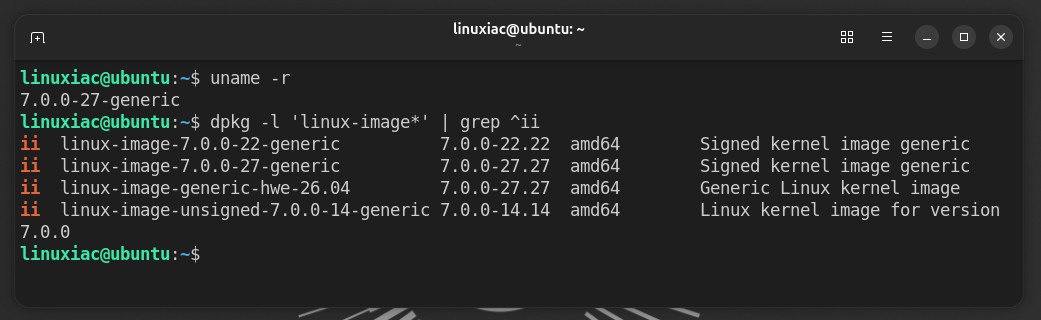
Users can check their currently running kernel version with uname -r. Canonical also suggests checking installed kernel image packages with dpkg -l 'linux-image*' | grep ^ii.
To install the available security updates, Ubuntu users should run the usual package upgrade command:
sudo apt update && sudo apt upgradeCode language: Bash (bash)If you prefer to update only the kernel meta package, Canonical provides a targeted command sequence. However, for most users, a full system upgrade is simpler and safer.
As with all kernel updates, installing the package is only part of the process. A reboot is required for the system to run the fixed kernel. Canonical also notes that unattended-upgrades is enabled by default on Ubuntu 16.04 LTS and newer, so security updates may install automatically within 24 hours. However, a reboot is still necessary.
More details are available in Canonical’s announcement.