OpenShot 4.0 is now available as a major update to the open-source video editor, introducing built-in screen and webcam recording, a new color-grading workspace, 10 new effects, local AI-powered object masking, a fully native Qt timeline, and many performance and usability improvements.
One of the biggest additions is the new Recording View, which lets users capture their screen, webcam, microphone, and system audio directly inside OpenShot. Each source is saved separately so screen footage, voice, webcam video, and system sound can be edited independently afterward.
On Linux, recording supports both X11 and Wayland, with PipeWire handling capture on modern Wayland desktops. OpenShot also added better desktop portal integration to improve screen capture and file access on newer Linux distributions.
The second major addition is the new Color View, which brings more advanced color correction and grading tools into OpenShot. Users now have access to color wheels, editable curves, LUT support, exposure and contrast controls, temperature and tint adjustments, and controls for highlights, shadows, saturation, and vibrance.
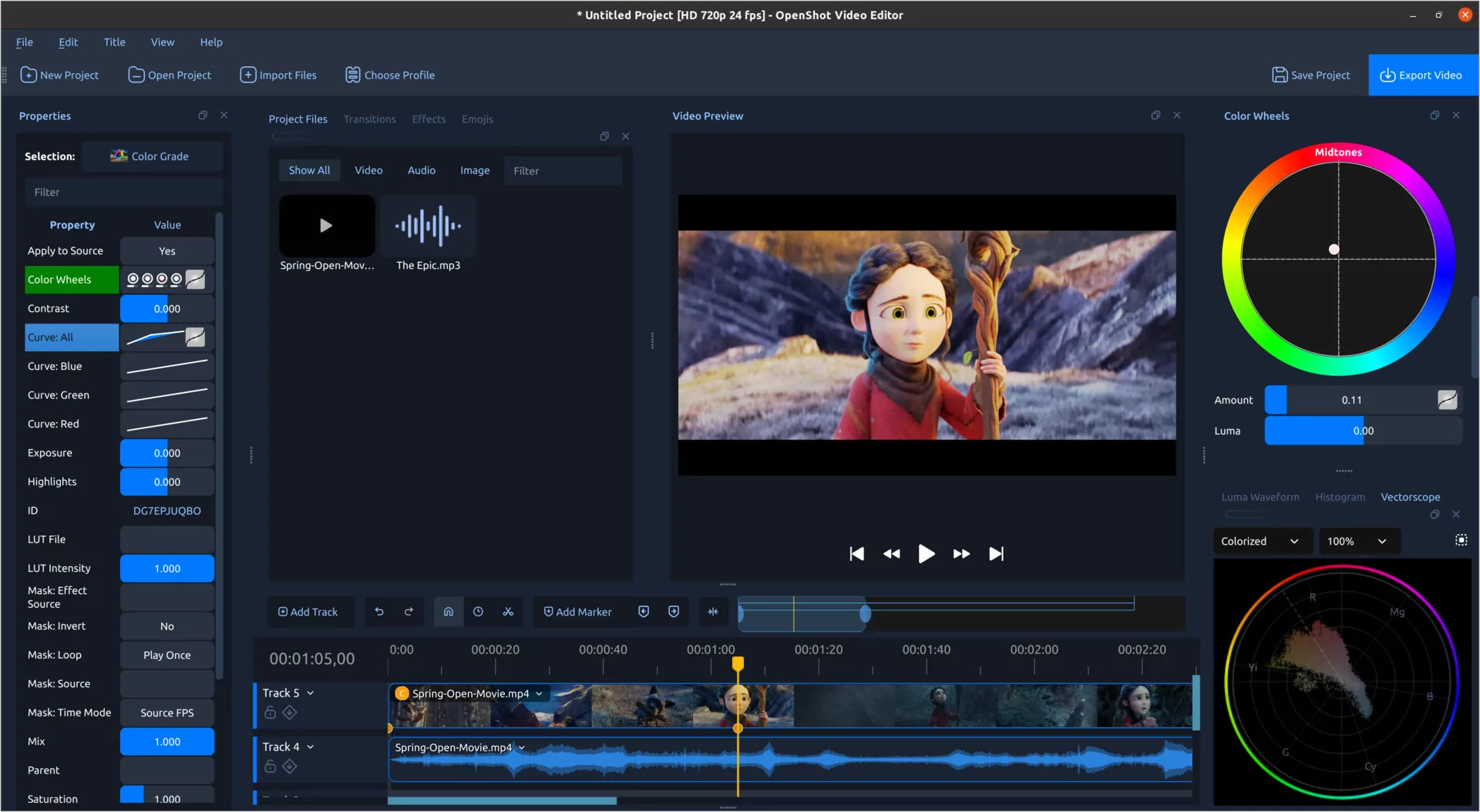
OpenShot 4.0 also introduces professional video scopes, including Luma Waveform, Histogram, RGB Parade, and Vectorscope.
For users who prefer something simpler, OpenShot includes quick presets like Auto Contrast, Lift Shadows, Warm Up, and Boost Color. These presets use the same editable Color Grade effect, so adjustments can be fine-tuned afterward rather than being permanently baked in.
Another notable addition is Object Mask, a new effect designed to automatically isolate and follow subjects through a video clip. Users can mark the desired subject and surrounding areas, after which OpenShot generates and tracks the mask across the footage. Importantly, this processing runs locally.
Object Detection has also been improved with downloadable YOLOv5 models, segmentation masks, model validation, and additional controls over tracked objects.
Moreover, OpenShot 4.0 adds 10 new effects. Along with Color Grade and Object Mask, the release introduces Audio Visualization, Beat Sync, Film Grain, Denoise Image, Shadow, Glow, Displacement Map, and Timer.
The OpenShot 4.0 timeline completes the transition away from the old web-based timeline components, with clips, transitions, keyframes, tracks, rulers, and menus now handled through a native Qt timeline.
According to the developers, this results in smoother zooming, clearer clips and keyframes, more consistent interaction, improved thumbnail spacing, and better behavior when navigating larger projects.
The clip context menus have also been reorganized around categories such as Transform, Look, Audio, Speed, and Motion. New motion presets cover camera movements, entrances, exits, emphasis effects, and credits, while new Look presets make it easier to apply film grain, glow, shadows, sharpening, blur, and analog-style effects.
Finally, for Linux users specifically, the release expands Qt 6 and PySide6 compatibility, improves High-DPI scaling, window behavior, themes, desktop portal support, and compatibility with current Linux desktop environments.
For more details, see the changelog or refer to the announcement. OpenShot 4.0 is available now for Linux, Windows, and macOS from the project’s website, with source code and release details also available on GitHub.
Image credits: OpenShot