ONLYOFFICE Docs, an open-source, self-hosted office suite for documents, spreadsheets, presentations, fillable forms, PDFs, and diagrams, has just released version 9.4.
Right from the bat, starting with version 9.4, the open-source Community Edition no longer has a 20-simultaneous-connection limit. This release also removes code minification, consolidates the architecture into a single process, and eliminates RabbitMQ and database dependencies in order to simplify self-hosted deployments.
The ONLYOFFICE suite’s licensing terms have also been updated. The software remains under the GNU Affero General Public License v3.0, with added requirements for attribution, copyright notices, and labeling of modified versions. Rights to use ONLYOFFICE trademarks are not included and remain governed by a separate trademark policy.
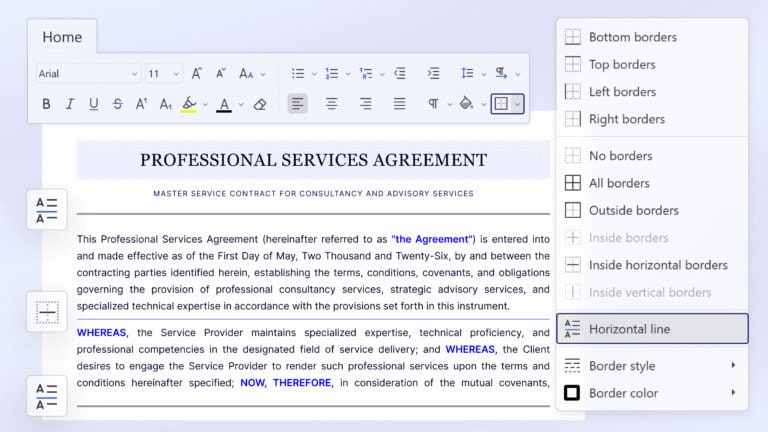
ONLYOFFICE Docs 9.4 adds support for inserting horizontal lines in the Document Editor, an option available from the Home tab via the Borders button.
Forms receive several updates as well, including built-in recipient assignment and filling status tracking within the editors. The release also introduces smart signature storage, with signature fields defaulting to the last selected image.
The Spreadsheet Editor now includes a Dark Document mode. When the general Dark theme is enabled, users can switch the spreadsheet canvas to a dark background from the View tab.
The Presentation Editor now offers 25 new themes and 20 new slide transitions. Themes are available from the Design tab, and transition effects can be found under the Transitions tab. Plus, ONLYOFFICE Docs 9.4 introduces a dedicated Chart Design tab in the web editors.
On mobile, ONLYOFFICE adds a manual Save button to its iOS and Android apps and the mobile web version. Users can now disable Autosave and save changes manually. Updates for the mobile and desktop apps will follow.
For enterprise deployments, ONLYOFFICE Docs Enterprise adds new WOPI settings for SharePoint in the Admin Panel, including synchronization with the required WOPI Zone and optional Authorization header inclusion. Developers receive API and Doc Builder updates, with new methods for forms, custom plugins, paragraph settings, and formatted tables.
For additional details, refer to the announcement or see all changes on the project’s GitHub changelog.
ONLYOFFICE Desktop suite is available for download in multiple installation formats for Windows, macOS, and Linux (DEB, RPM, Flatpak, Snap, AppImage), as well as for Android and iOS via the Google Play Store and the Apple App Store.