
System76 has begun rolling out the official in-place upgrade from Pop!_OS 22.04 LTS to Pop!_OS 24.04 LTS, letting users move to the latest long-term release from their current installations.
Starting now, systems running Pop!_OS 22.04 LTS will receive an upgrade notification. After installing updates, users can start the process in Settings > OS Upgrade & Recovery, as the upgrade preserves user files and most settings during the transition.
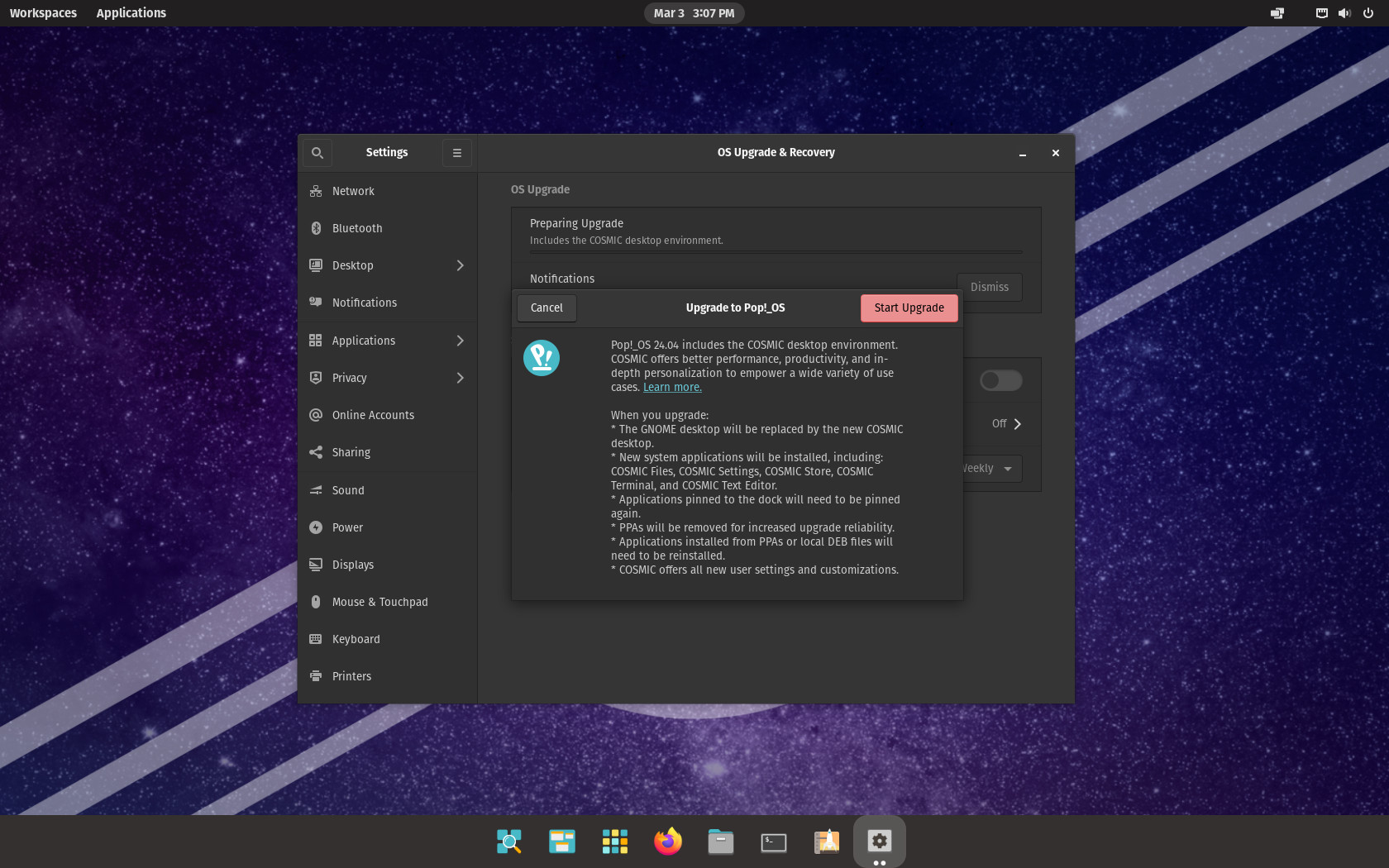
Of course, the main change for 22.04 users is that the upgrade replaces the old GNOME-based desktop used in earlier versions with COSMIC, System76’s new desktop environment written in Rust. After upgrading, you receive its latest 1.0.8 version.
It introduces a completely redesigned workflow centered on window tiling, flexible workspaces, and layout customization. Tiling can be enabled or disabled from the panel and supports keyboard and mouse interaction. Windows can be rearranged with visual placement hints, stacked into tabbed groups, or snapped to predefined positions on screen.
Moreover, users can arrange workspaces horizontally or vertically, pin them to prevent removal, or span them across multiple displays. Importantly, workspace layouts and settings persist across reboots, allowing tiled and pinned configurations to remain unchanged after restarting.
In 24.04 LTS, multi-display support has also been improved. Displays are automatically scaled based on pixel density, and configurations are restored when reconnecting previously used monitors. If a display is unplugged, windows from that display are moved to a new workspace on the remaining screens.
Regarding customization, users can configure panel and dock layouts, place them on any screen edge, and add applets to expand functionality. Theme colors can be adjusted directly from the settings interface using built-in color pickers.
The upgrade also introduces a whole new set of core applications designed for COSMIC. These include COSMIC Files, COSMIC Settings, COSMIC Store, COSMIC Terminal, COSMIC Text Editor, COSMIC Media Player, and COSMIC Screenshot.
During the upgrade process, the previous GNOME desktop is replaced entirely by COSMIC. System76 notes that pinned applications on the dock will need to be re-pinned after the upgrade. Additionally, third-party PPAs are removed during the transition to improve upgrade reliability, and software installed through PPAs or local DEB packages may need to be reinstalled afterward.
Finally, I’d like to mention that in my testing, the upgrade from 22.04 LTS to 24.04 LTS went absolutely smoothly as the entire process took less than 30 minutes.
For more information, see System76’s official announcement.

Time to drop outdated Gnome and jump 10 years in the future with Cosmic.
The cosmic update is the one that made me give up on Pop_OS! and go with CachyOS instead.
Just to keep an outdated desktop?
You know you can have more modern DEs on Cachy than Gnome, right?
Upgrading as we speak. I decided to wait until System76 offered the upgrade through the GUI, assuming that means it’s polished and they’re proud of it, rather than CLI upgrading in December.