Pangolin, an open-source, self-hosted platform that combines the features of a reverse proxy and a zero-trust, WireGuard-based VPN, released v1.13, marking the project’s most significant architectural change to date and positioning it as an alternative to commercial private access platforms such as Twingate.
The release introduces a redesigned networking model built around WireGuard, enabling secure, VPN-like access to internal resources without traditional tunnel management or per-site connections.
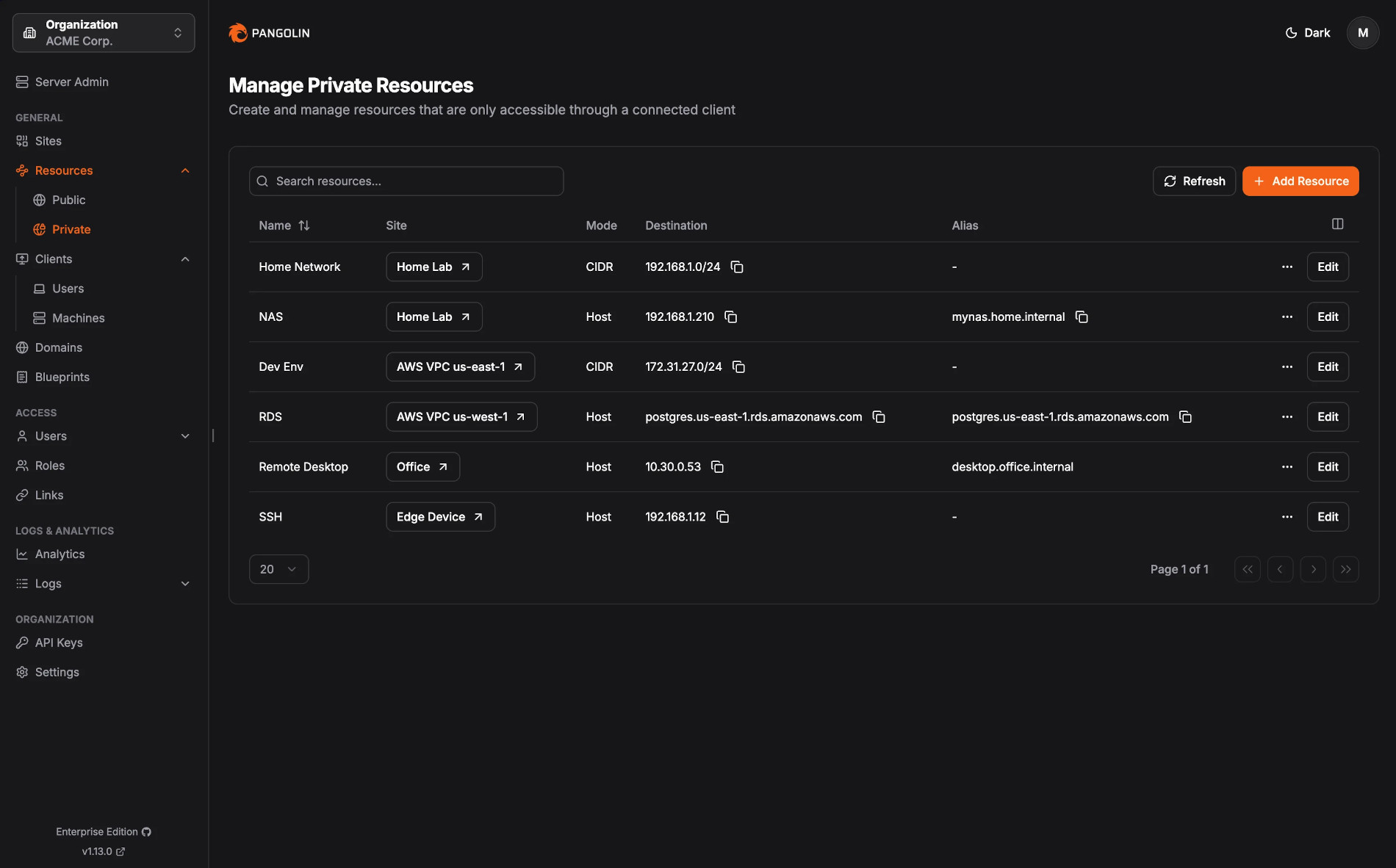
The main change is the new Private Resources feature. It replaces the old Client Resources, Proxy Resources, and site-based subnet setup. Private Resources determine what can be reached in the network, from a single host to an entire subnet, using CIDR.
After connecting, users and services can reach these resources using regular LAN addresses. There’s no need for port forwarding, custom routing, DNS setup, or proxy redirection.
Clients have been updated, too. Existing clients are now called Machine Clients and are meant for servers, automation, CI/CD runners, monitoring, and other non-interactive tasks.
Moreover, Pangolin 1.13 adds User Devices, allowing human users to connect directly to private resources using native clients. GUI clients are available for Windows and macOS, while CLI clients support Linux and macOS, with Windows CLI support planned. All clients use WireGuard for encryption, support NAT traversal, Magic DNS aliases, and peer-to-peer connections when possible.
This update adds Magic DNS aliases to Private Resources, so users get easy-to-remember internal hostnames that work automatically when connected. Admins can now assign access to users, roles, or machine clients, and future updates will add more detailed controls for ports and protocols.
In addition to networking changes, Pangolin 1.13 adds a Request Analytics page with stats, maps, and graphs. Request logging is now faster, and the UI has been improved. New admin features include credential rotation, adjustable audit log retention, and optional sidebar notifications for updates and new features.
For more information, see the changelog.
The developers warn that this release is a breaking change and needs coordinated updates across the whole Pangolin stack. The minimum supported versions are Pangolin 1.13, Gerbil 1.3.0, Newt 1.7.0, and Olm 1.2.0.
Some old options and flags have been removed, like site-based remote subnets, client-to-site associations, and several branding configuration keys. Existing clients and resources are automatically moved to the new model, but the developers strongly suggest checking your configurations after upgrading.
Finally, remember that Private Resources, User Devices, and Machine Clients are still in beta. The team plans to leave beta in early 2026. As with any major upgrade, users should back up their data before updating, since downgrades are difficult after switching to the new model.