Microsoft is expanding the Windows Subsystem for Linux with built-in support for running and managing Linux containers, with WSL Containers now generally available.
Simply put, WSL can now run Linux containers more directly on Windows, without developers having to rely on a separate container platform, such as Docker for example, for every task. That means a simpler setup for running, testing, and managing Linux-based development environments while staying inside Windows.
The new wslc.exe command-line tool lets developers build, run, and deploy Linux containers directly on Windows. In addition, Microsoft also provides container.exe as an alias. A new API allows native Windows applications to launch and control Linux containers programmatically.
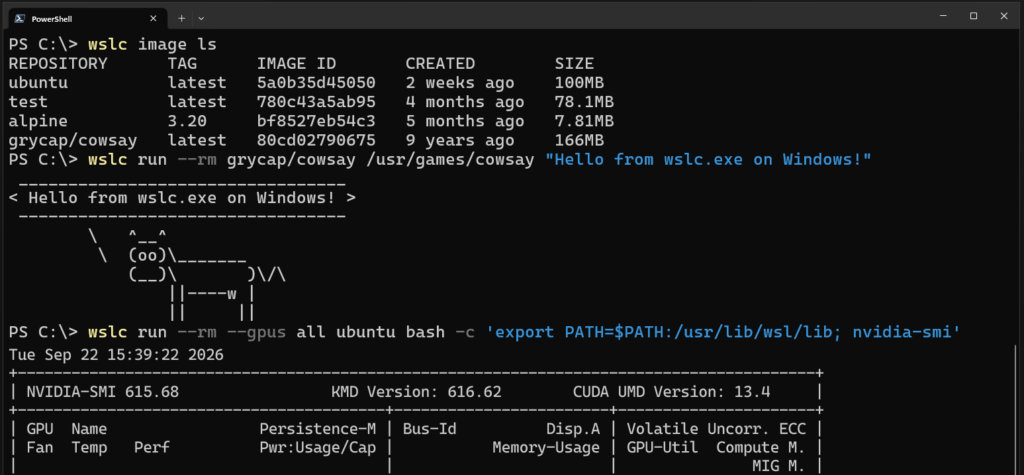
The GA release adds a broader set of daily container management capabilities. These include container restarts, file copying, health checks, mounts, real-time event monitoring, configurable storage locations, and commands to connect or disconnect containers from networks. Custom network driver options are also supported.
Microsoft is also positioning WSL Containers for enterprise use. Integration with Microsoft Defender for Endpoint can expose process, file, and network activity from containers to security teams, while Microsoft Intune can now control access to WSL Containers and restrict image pulls to approved registries.
Developer tooling is already starting to adopt the new runtime. VS Code Dev Containers can use wslc as a driver, while Aspire supports WSL Containers as a container runtime. Other integrations include the VS Code Container extension, Lazywslc, and WSL Container Desktop.
Performance and networking are also part of the work. According to Microsoft, WSL Containers can deliver up to twice the performance when accessing Windows files from Linux environments. A new consomme networking mode aims to improve compatibility across development and enterprise environments.
However, one notable feature is still missing: Compose support. Microsoft says this is currently its top requested addition and plans to make existing compose.yaml files usable without modification through a future wsl compose up workflow. But for now, Docker remains the more mature option, especially for users who rely on Compose and its broader ecosystem.
Users can get the new container functionality by updating WSL with wsl --update or installing the latest WSL release from GitHub.
For more details, see Microsoft’s official announcement.
Image credits: Microsoft