
A promising new open-source Nextcloud client has quietly appeared, and unlike many early-stage projects, it already looks remarkably polished. Called Nextcloud Native, the application brings Files, Photos, Talk, Calendar, Mail, Notes, Deck, and other services from a Nextcloud server together in one coherent native interface.
Importantly, the project is developed independently and is not affiliated with, sponsored by, or endorsed by Nextcloud GmbH. It is still young and officially considered alpha software, but runnable builds are available for Linux, Android, and Windows, with Linux being the project’s primary interactive desktop development target.
Under the hood, instead of embedding remote web pages, Nextcloud Native communicates with the server through verified Nextcloud APIs and contracts, then represents the returned data using native interface components. According to the developers, unsupported applications have no automatic WebView fallback, so if the client cannot safely determine how something should work, it stops rather than guesses.
That approach allows different Nextcloud applications to retain interfaces appropriate to what they actually do. Mail behaves like a mailbox, Deck like a board, Tables like a table, Calendar like a calendar, and Memories like a photo library, while still sharing common navigation and design language across the client.
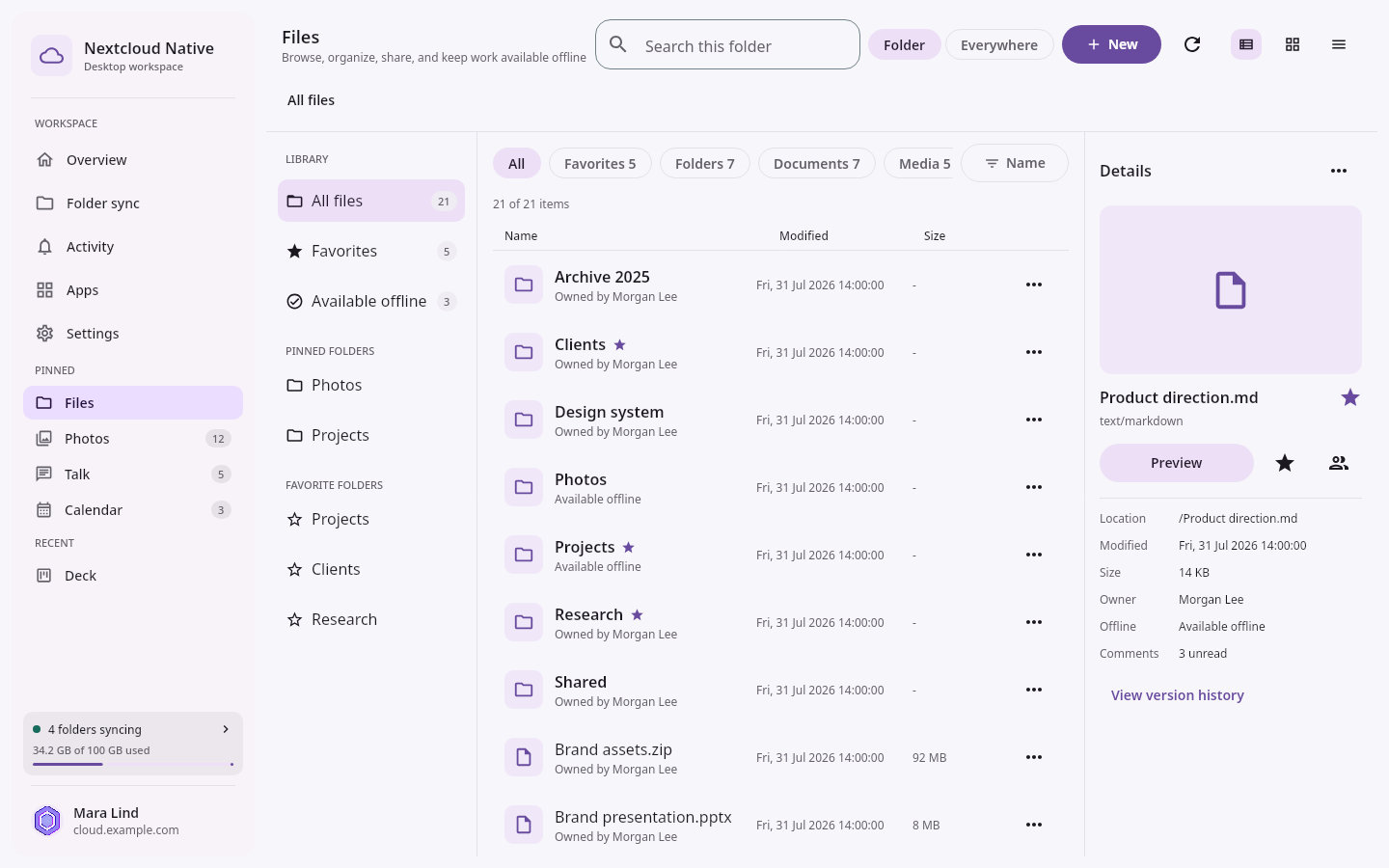
Visually, Nextcloud Native is already one of the more attractive attempts at building an alternative Nextcloud client. The desktop interface uses a clean modern layout with dedicated spaces for files, photos, conversations, events, and other services. The Android version adapts the same concepts to a touch-oriented interface rather than simply shrinking the desktop UI.
Despite its early stage, the current alpha contains a broad set of functionality. Users can browse Nextcloud Files using list and grid layouts, view previews and media, edit text files, and access early sharing features. Photos and Memories support collections, albums, tags, people, favorites, RAW/JPEG grouping, and progressive loading of originals.
There is also native Talk history with message cards for text, files, recordings, calls, and other shared objects, along with Notes featuring folders, Markdown editing and previews, Activity, global search, Dashboard integration, user status, and app navigation.
Additionally, native semantic interfaces for Mail, Music, Cookbook, Calendar, Contacts, Tasks, Tables, Deck, Cospend, Budget, and several other services are also available, although their completeness varies considerably.
Linux users can install the application through DEB packages for Debian and Ubuntu or RPM packages for Fedora and RHEL-based distributions. Windows users get an unsigned x86-64 MSI installer. Android requires version 8.0 or newer. A macOS build exists, although supported sign-in is not yet available. iPhone and iPad versions remain planned rather than released.
There are interesting platform-specific integrations. On Linux, Nextcloud Native can map a local directory to a remote Nextcloud folder and perform synchronization, including two-way operation and explicit conflict handling. The Linux guides also describe background checks and recovery procedures for conflicting changes.
Android receives its own integrations, including folder pairing through the system picker, offline file availability, background synchronization, system Files integration, and automatic photo and video uploads to Nextcloud.
Still, anyone tempted to immediately replace an existing Nextcloud setup should keep expectations in check. The developers explicitly describe the current versions as testing releases and warn users not to make the application the only place that stores important data.
It is far too early to know whether the project will eventually deliver on its very broad ambitions. Still, for something that only recently emerged and remains firmly in alpha territory, Nextcloud Native already combines an unusually polished interface with an interesting technical approach and a surprisingly functional foundation.
For additional details, visit projectr’s GitHub page.
Image credits: Nextcloud Native




Follow-up after looking deeper into the Nextcloud Native source.
The more interesting problem is not whether AI was used.
It is what the resulting codebase actually looks like.
I ran a conservative duplicate-code scan over the snapshot I reviewed. Comments and whitespace were ignored, but identifiers, strings and numbers were left intact.
The result is hard to explain away as “just similar platform code”.
Between “AndroidNextcloudServices.kt” and “DesktopNextcloudServices.kt” alone I found roughly 1,000 lines of token-identical implementation, spread across dozens of clone regions.
That includes duplicated code for things like:
– login
– DAV operations
– Files
– Notes
– previews
– activity handling
– dynamic APIs
– groupware operations
This is a Kotlin Multiplatform project.
Sharing exactly this kind of protocol and business logic is supposed to be one of the main reasons to use KMP in the first place.
And it gets better.
There are helper functions copied verbatim into multiple files.
“publishAtomically(…)”, including the same atomic-move fallback logic, exists multiple times.
Inside the roughly 11,700-line “GenericNativeRenderer.kt”, I even found the same local “moveDraggedRecord(…)” helper defined twice.
Several Android/Desktop source files are literally identical while the project already has shared JVM source infrastructure.
This is not a theoretical architecture complaint.
It creates a very practical maintenance problem:
Which copy is the canonical implementation?
When a DAV edge case gets fixed on Desktop, who guarantees Android gets the same fix?
When authentication behavior changes, are two implementations updated?
Five?
When a bug is discovered six months from now, does the maintainer remember which cloned version has diverged?
And duplication is only part of it.
The error-handling style is surprisingly inconsistent too.
The project clearly knows about Kotlin coroutine cancellation.
Some code explicitly does the correct thing:
“if (error is CancellationException) throw error”
There is even dedicated cancellation-rethrow logic in parts of the codebase.
But elsewhere, suspend calls are wrapped in plain:
“runCatching { … }”
followed by “.onFailure”, “.fold”, “getOrNull()” etc., without preserving “CancellationException”.
That matters because Kotlin’s “runCatching” catches “CancellationException” too.
So the same repository contains both:
“Cancellation must be propagated.”
and:
“Catch everything and turn it into a normal UI failure.”
Those are not merely different styles.
They are different coroutine semantics.
I also counted large numbers of broad “Throwable”/”Exception” catches, discarded exceptions and “runCatching” usage throughout the production code.
None of those patterns is automatically wrong in isolation.
The problem is the scale.
When a project consists of hundreds of thousands of lines, giant source files, duplicated platform implementations and several competing error-handling patterns, maintenance stops being about whether the code compiles today.
It becomes about whether a human can still build a reliable mental model of the system tomorrow.
And this circles back to the AI discussion.
The project’s own AI policy says contributors should understand generated code well enough to:
explain it, defend it, debug it and modify it.
Excellent standard.
So apply it.
Take one of those 15,000-line files.
Take the thousand-plus duplicated platform lines.
Take the hundreds of exception-handling paths.
Take the mixture of explicit cancellation propagation and “runCatching” around suspend operations.
Now ask:
Can one maintainer confidently explain why each of these implementations exists, which copy owns the behavior, and what happens when one of them fails under a condition that wasn’t in the prompt?
That is the question I think the “look how polished this already is” coverage completely misses.
Generating another screen is cheap.
Generating another API wrapper is cheap.
Generating another 5,000 lines is becoming extremely cheap.
Understanding, validating and maintaining those lines is not.
The risk with AI-assisted development is not necessarily that the generated code fails immediately.
The scarier outcome is that it works just well enough for the codebase to grow faster than anyone’s ability to truly understand it.
Nextcloud Native may become an excellent project.
But after reading the source, my concern is no longer that it is “too early”.
My concern is that technical debt appears to be accumulating at roughly the same astonishing speed as features are being added.
I actually tested Nextcloud Native.
It works. The UI is impressive. And that is precisely why I think the almost completely uncritical hype around this project is a problem.
“Looks surprisingly good already” is the least interesting observation you can make about software that wants to handle people’s files, synchronization, offline state, calendars, contacts, mail and potentially destructive remote operations.
I went through the source code.
The snapshot I checked contains roughly 284,000 lines of Kotlin/Kotlin build code/Rust/Java, of which about 278,000 lines are Kotlin.
And some of the production files are absurdly large:
– “NextcloudNativeApp.kt”: 15,082 lines / ~687 KB
– “GenericNativeRenderer.kt”: 11,745 lines / ~512 KB
– “DesktopNextcloudServices.kt”: 6,389 lines
– “AndroidNextcloudServices.kt”: 4,327 lines
That is not automatically “bad code”.
But it is an enormous review, comprehension and maintenance burden for a young project whose selling point is an extremely broad feature surface.
And the project’s own roadmap is much more revealing than the screenshots.
It literally says in “ROADMAP.md:97”:
«“The prototype is not yet a sync client.”»
The same paragraph says that network and protocol code is duplicated between Android and desktop, metadata is mostly held in memory, background work is not durable, Files actions are incomplete and Talk calling is not implemented.
Read that again.
The flashy native interfaces are already there while the project itself says that some of the boring infrastructure that makes a sync client trustworthy is still foundational work.
The roadmap then lists what still needs to become the shared core: transport, persistent metadata storage, blob storage, a sync journal, tombstones, pending operations, conflict tracking and durable background scheduling.
That is the product.
A beautiful Files screen is not the difficult part of a cloud sync client.
The difficult part is what happens when:
– the process dies halfway through a write,
– the server changes while you are offline,
– two devices edit the same object,
– an upload succeeds but the response gets lost,
– an ETag becomes stale,
– storage fills halfway through an operation,
– authentication expires during a transfer,
– a server implementation behaves slightly differently,
– 10,000 files become 500,000 files.
To the project’s credit, there are a lot of tests. I counted roughly 2,743 “@Test” methods in the snapshot.
So “there are no tests” would be false.
But that impressive number needs context too.
There are numerous tests explicitly labelled as live Nextcloud audits which simply return or are skipped unless environment variables such as “RUN_LIVE_NEXTCLOUD_*” are enabled.
Meanwhile the normal GitHub CI runs “desktopTest”, Android unit tests, lint and build tasks — but I could not find it running the existing Android “androidTest” instrumentation suite or provisioning a real Nextcloud server for continuous end-to-end interoperability testing.
So again: lots of test code is not the same statement as “this enormous compatibility matrix is continuously verified against real Nextcloud installations”.
Then there is the AI question.
I am not claiming that I can prove this repository was generated by AI. Anyone making that claim from vibes alone is speculating.
But pretending the question is unreasonable is equally silly.
This repository contains an explicit “AI_POLICY.md” and “AGENTS.md”. AI-assisted development is explicitly permitted, and disclosure is explicitly optional.
More interestingly, the project’s own AI policy says that a human contributor must:
«“review every changed line”»
and
«“understand the implementation well enough to explain, defend, debug, and modify it”.»
Good.
That is exactly the standard I would like to see applied here.
With hundreds of thousands of lines of code, gigantic source files, implementations spanning Android, Linux, Windows, DAV, Files, Photos, Calendar, Contacts, Mail, Talk, Music, Deck, Tables and more, the interesting journalistic question is not whether the application can produce a nice screenshot.
I tested it. It can.
The interesting question is:
How much of this code was written with AI assistance, how was that output reviewed, and can the human maintaining it actually reason about the entire system when something goes wrong three abstraction layers below the UI?
That is not an insult.
That is a completely legitimate engineering question for software people may eventually trust with their data.
In fact, the codebase makes that question more important, not less.
I found 454 broad “Exception”/”Throwable” catches in production Kotlin, 64 catches that discard the exception entirely, more than 850 uses of “runCatching”, and hundreds of “getOrNull()”-style failure collapses.
Again, not every one of those is a bug. Kotlin applications legitimately use these patterns.
But at this scale, combined with huge files and a rapidly expanding feature matrix, someone has to understand which failures are deliberately degraded, which ones are recoverable, which represent ambiguous remote state and which could affect data integrity.
That someone cannot be an LLM.
An LLM does not maintain your software after the context window is gone.
It does not take responsibility for a subtle DAV interoperability bug six months later.
It does not remember why one of 850 “runCatching” blocks exists.
The maintainer does.
And this project is creating an absolutely enormous amount of maintenance surface that somebody will have to own for years.
That’s why I find the “wow, it already looks so good!” coverage frustrating.
The UI is the strongest part because the UI is the easiest part to demonstrate.
The real test of Nextcloud Native will be whether its maintainer can turn this gigantic prototype into a coherent, reviewable, boringly reliable system — and whether other developers can realistically understand, review and maintain it too.
I genuinely hope that happens, because the product idea is excellent and after trying it I understand why people are excited.
But right now I see something very different from what the hype suggests:
an extraordinarily ambitious and visually convincing prototype whose codebase has expanded far faster than its fundamental synchronization architecture has matured.
That is fascinating.
It may even become great.
But it deserves technical scrutiny, not applause based on screenshots.
And if AI really is responsible for a significant part of this development velocity, then the next question should not be “isn’t that amazing?”
It should be:
Who is going to understand and maintain all of it when generating the next 10,000 lines is no longer the hard part?
Yes! This looks amazing!! Definitely something I’ve wanted for a long time. I hate having to keep a browser window open all the time when I just need Deck open