

ONLYOFFICE has announced Docs 10.0, a major update to its online office suite, introducing more than 50 new features, over 1,000 bug fixes, and about 35 security vulnerability fixes.
One of the most notable changes is the expanded AI functionality, now available throughout the suite. Users can access AI tools from a dedicated tab, with options tailored to the type of document they’re working on.
In the document editor, for example, AI can summarize lengthy texts, rewrite paragraphs, translate content, check grammar, suggest titles, and even apply formatting automatically. Spreadsheet users can generate formulas, analyze datasets, identify trends, build forecasts, and clean up inconsistent data.
The PDF editor also gets AI assistance, allowing users to ask questions about a document, generate summaries, draft emails based on its contents, and redact sensitive information. Meanwhile, presentation users can generate outlines, slide titles, speaker notes, and other content.
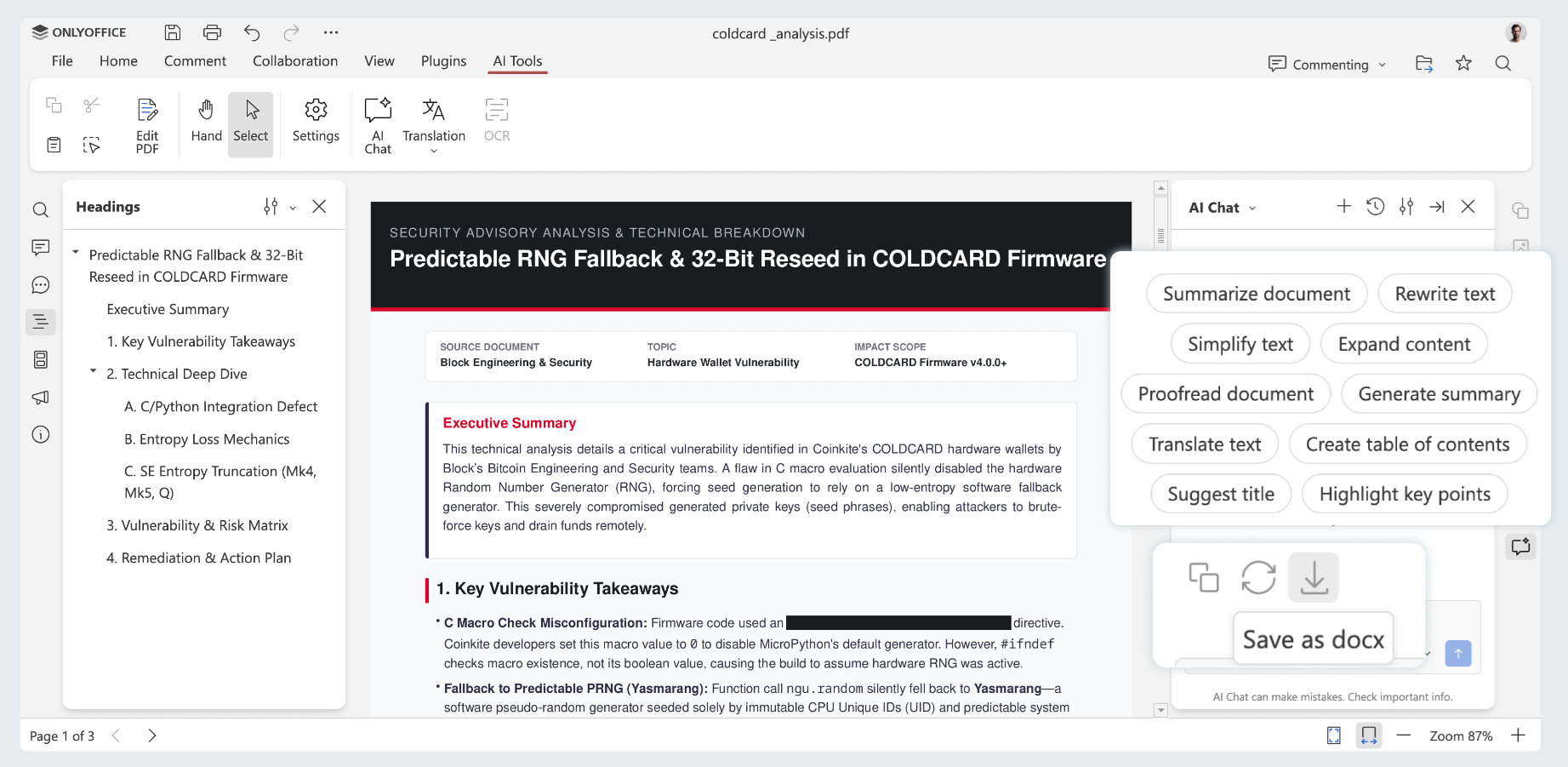
Moreover, ONLYOFFICE has also introduced customizable AI actions, assistants, and saved prompts. However, quick AI actions and assistants are currently limited to the document editor.
Importantly, the company says it removed built-in AI from the open-source versions following community feedback. Instead, AI tools are installed separately. For self-hosted installations, users can connect their preferred AI models, including locally hosted ones, without relying on external cloud services.
Another major addition is a modular application approach. ONLYOFFICE Docs 10.0 can now work alongside optional apps for AI agents, forms, rooms, and file management. This lets users enable only the components they need instead of installing everything as a single package.
Beyond AI, the update includes several improvements to everyday document editing.
The PDF editor now supports removing hidden metadata before sharing files, helping prevent sensitive information from being exposed. It also introduces automatic table recognition when editing PDFs, customizable annotation settings, and reusable signatures for forms.
In the document editor, collaborative editing has been refined with an option to follow another user’s cursor in real time. Formatting improvements include better control over horizontal lines, options to keep related paragraphs and tables together, and support for splitting long table rows across pages.
The developers also improved right-to-left language support, particularly when working with graphical formulas and other inline objects. Plus, spreadsheet performance improved for common functions, including SUMIF, SUMIFS, COUNTIFS, AVERAGEIF, AVERAGEIFS, MAXIFS, and MINIFS.
Additionally, spreadsheet users also get highlighted cell ranges when editing formulas, clearer function hints, an animated selection outline when copying or cutting cells, and the ability to resize all cells using the mouse. AutoComplete can now be disabled, and worksheet backgrounds are preserved when opening and saving files.
The presentation editor has received five additional viewing modes: Outline View, Reading View, Notes Page, Notes Master, and Handout Master.
Printing options have been expanded as well, allowing users to print notes, outlines, and handouts with more control over slide numbers, comments, backgrounds, and other elements. Presentations can now be exported as GIF animations or videos, making them easier to share outside the office suite.
Regarding file compatibility, ONLYOFFICE Docs 10.0 adds support for opening and converting OFD files, saving spreadsheets in the older XLS format, and converting SVG images into editable shapes.
The update also includes a redesigned Plugin Manager and several new community plugins, including Antidote for spelling and grammar checking, Curly for reusable templates, and a Salesforce integration for exchanging spreadsheet data.
Finally, on the security side, ONLYOFFICE says the release addresses about 35 vulnerabilities, though the company plans to share more details in a separate announcement.
Those interested in trying the release can access ONLYOFFICE Docs 10.0 through the company’s cloud service. However, the updated self-hosted version isn’t available yet, and the developers say it will arrive later.
For more information, see the official announcement or consult the full changelog.
Image credits: ONLYOFFICE

LibreOffice says having “No AI” is a software feature, and they are right on target.
Didn’t need another reason to keep OpenOffice on my Do Not Use list, but they certainly gave me one. Cheers!