

Mozilla has introduced native Containers in Firefox 153, bringing one of the browser’s most useful account-separation features straight into Firefox without requiring users to install an extension.
So, what exactly does this new feature do? In short, Containers allow users to divide their browsing into separate spaces such as Personal, Work, Banking, and Shopping. Each container keeps its own cookies and login sessions, even though all of them are open inside the same Firefox window.
In other words, this means Firefox can treat tabs as though they belong to different browsing environments. A website opened in the Work container does not share its login session with the same website opened in the Personal container.
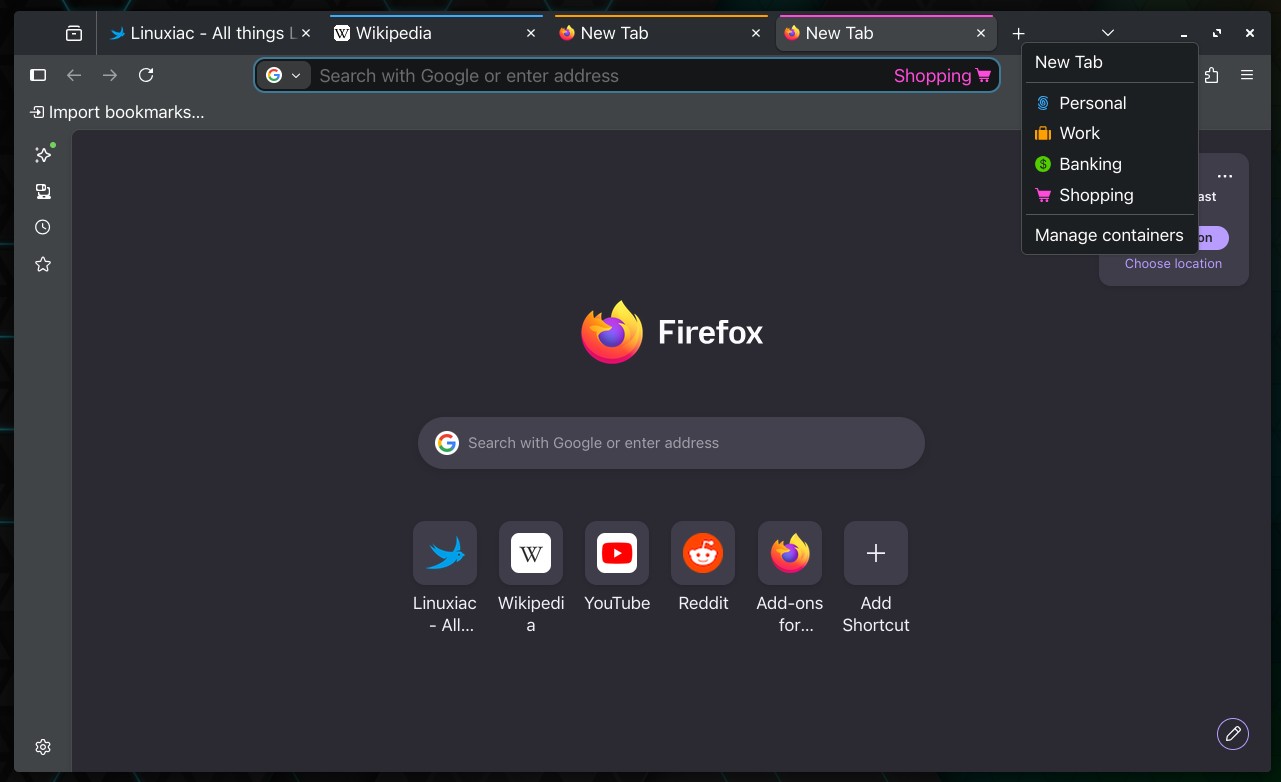
One obvious benefit is the ability to use multiple accounts on the same service at the same time. For example, users can keep a personal Gmail account open in one container and a work account in another, without constantly signing out or opening a second browser.
Containers can also help separate unrelated online activities. Users might keep online shopping inside one container, banking inside another, and social media inside a third. Because cookies and advertising data stay inside their respective containers, activity from one part of the browser is less likely to be connected with activity taking place elsewhere.
Just to be clear, this does not make users anonymous, and it does not replace a content blocker or other privacy tools. What it does provide is a practical layer of separation between different accounts and browsing contexts.
Opening a new container tab is simple. Users can right-click a tab, hold the new-tab button, or manage containers through Firefox’s settings.
The idea itself is not new. Mozilla has offered this functionality for almost a decade through the Multi-Account Containers extension. The important change is that the core experience is now becoming a native Firefox feature, making it easier for ordinary users to discover and use.
Mozilla describes the current implementation as a preview, so it does not yet include every feature available in the existing extension. Users who already rely on Multi-Account Containers can continue using the add-on alongside the built-in version and do not need to uninstall it.
For additional details, see Mozilla’s announcement.





Librewolf has had this for ages Bobby and works very well straight out of the box so as too speak. Firefox is becoming to heavy with to many options. Have and still use Firefox on dual boot systems and still prefer Firefox to many others, but Librewolf and even Waterfox are far less bloated.
I just use different instances & profiles for this purpose (start with –profilemanager), in additional it allows to have different settings, extensions, themes, adblocker rules,.. for trusted, generic and temp instances
Same here,
Single click gives me four differing profiles that don’t know anything about each other.
Heavy plugins for the general browsing profile and none for banking, or maybe just adblock…
Not sure whether containers are any more secure, guess we will find out…