
Shotcut, a popular open-source video editor, has released version 26.1, introducing hardware video decoding. The feature arrives after years of development work aimed at making it reliable across operating systems and GPU vendor APIs, and it is now available on Linux, Windows, and macOS.
Hardware video decoding is enabled through Settings > Preview Scaling > Use Hardware Decoder and is turned on by default, except on Linux systems using NVIDIA GPUs.
On Linux, the implementation relies on VA-API, while Windows uses Media Foundation and macOS uses Video Toolbox. Keep in mind that the decoder only works with codecs supported by the underlying hardware and automatically falls back to software decoding when necessary.
The new decoder is designed primarily to reduce CPU usage rather than dramatically increase playback speed. Users working in Linear 10-bit CPU processing mode or on lower-powered systems are expected to see the most benefit.
The feature also helps reduce battery drain and system heat, though it has a limited impact on seeking and scrubbing. Proxy files remain the recommended approach for smooth editing in those cases. Due to data transfer overhead between CPU and GPU memory, hardware decoding is currently limited to preview scaling or to sources up to 1080p at 60 fps.
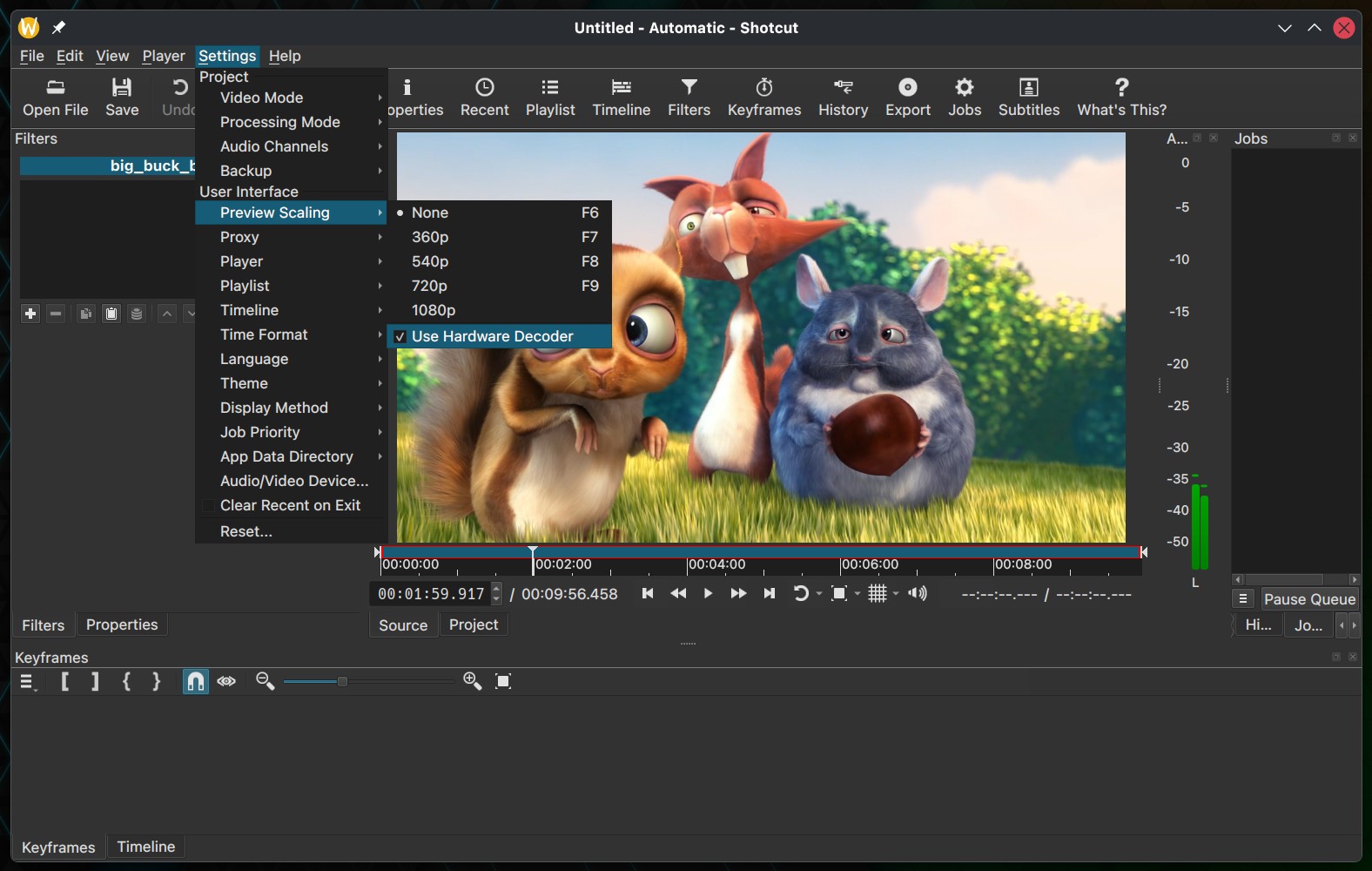
Shotcut 26.1 also adds an optional hardware decoder setting for exports, available under Export > Codec > Use hardware decoder. This option is disabled by default because it can sometimes increase export times, depending on the workflow. The setting persists and is remembered across sessions and projects.
Alongside decoding, this release introduces the ability to convert projects between GPU and CPU processing modes, improving flexibility for editors who switch workflows mid-project.
A new Blend Mode filter and track option has been added for the Linear 10-bit GPU and CPU processing modes, and the maximum supported resolution in Video Mode and Export has been increased to 8640 pixels to better support 8K VR180 content. The interface also gains Simplified Chinese as a selectable language.
Additionally, text filters, including Simple, Typewriter, GPS Text, Subtitle Burn In, and Timer, now render outlines more consistently. Proxy handling has been streamlined so that enabling proxy mode immediately updates clips without requiring a project reload. Plus, timeline actions for adding generators no longer move the playhead, and default keyframe behavior in certain mask filters has been refined for multi-track transitions.
Finally, on the bug fixes side, the release delivers a long list of fixes. These address issues ranging from brightness filters interacting incorrectly with transparent clips, to audio recording resetting the selected device, to incomplete 10-bit mask processing.
Several Linux-specific issues have been resolved, including reliability problems with opening URLs and file locations in AppImage, portable, and Snap builds. Stability improvements include support for crashes in long playlists, proxy job handling, subtitle navigation visibility, alpha channel handling in high-bit-depth formats, and export progress reporting.
For more information, see the changelog. The release announcement is here.