
KDE developers continue preparing Plasma 6.6, and although there are over a month to go before the final stable release (scheduled for February 17, 2026), the team posts weekly updates on the KDE Blogs about what changes to expect from this version. After I covered some of them recently, now we have a new batch to look at.
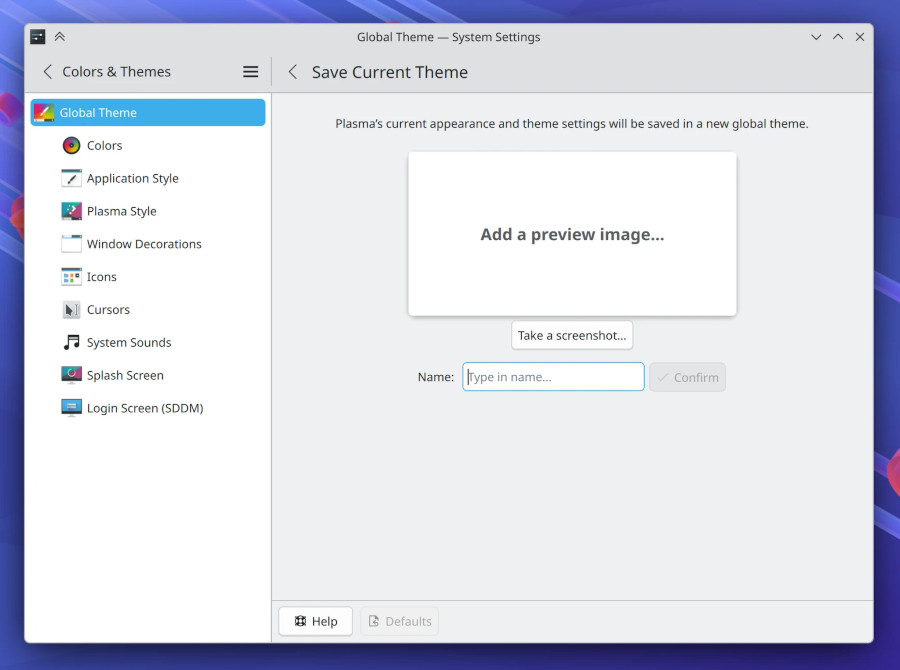
One of the most notable recent additions is the ability to save the current visual configuration as a new global theme. Users can now capture their active color, window decoration, icon, and other appearance settings directly from System Settings, simplifying theme creation and reuse without manual component selection.
Bluetooth management also becomes more convenient. A new “Forget device” action in the Bluetooth system tray widget lets you remove paired devices instantly, eliminating the need to open System Settings for a task often performed on the fly.
System Monitor sees several functional and visual improvements. Processes can now be searched by their full command-line invocation when the Command column is enabled, making it easier to identify services and scripts. The “Configure Columns” dialog has been refined for clarity, while lingering issues with blurry application tables at certain scale factors have been fully resolved.
Moreover, on supported systems, the logout screen now explicitly indicates whether a restart will boot into a different operating system or a different boot option.
Apart from that, the Power and Battery widget now reports exactly which power management actions individual applications are blocking, instead of assuming they block both sleep and screen locking. Notifications no longer duplicate icons, freeing space and reducing visual noise.
Additional usability tweaks are spread across the desktop. The Kickoff application launcher now handles large favorites lists more gracefully by switching to a scrollable layout instead of allowing icons to overlap. Spectacle remembers its window size across launches, and on X11 systems, its window position as well.
The Weather Report widget now accurately reports when wind speed data is unavailable, rather than incorrectly labeling conditions as calm. System Settings also improves discoverability, allowing the Wallpaper page to be found via search terms such as “desktop background,” while the Thunderbolt page is hidden entirely on systems that lack Thunderbolt support.
Finally, some stability issues have also been addressed in Plasma 6.6. A crash triggered by disconnecting the final display has been fixed, and a long-standing fractional scaling issue that caused wallpapers to subtly shift on secondary screens under specific conditions has been resolved.
For more information, refer to the “This Week in Plasma” post on the KDE Blogs.
Image credits: KDE