
Systemd is a core part of most Linux distributions today, but managing services from the command line with systemctl can feel intimidating, especially for newer users. That’s where a promising new project caught my attention: systemd-manager-tui.
Sure, the name isn’t exactly short. I mean, the author probably could have come up with something snappier. But to be fair, it couldn’t be more descriptive. You instantly know what the tool is about. Still, even with a name that clear, it’s worth taking a closer look at what it actually offers.
systemd-manager-tui is a relatively new Rust-written tool that provides an interactive text user interface for managing systemd units directly from the terminal. However, instead of relying solely on systemctl and related commands, the tool communicates with systemd via D-Bus and presents services, timers, sockets, and other units through a structured interface.
From within the TUI, users can start, stop, restart, enable, disable, mask, or unmask units without manually entering command-line flags.
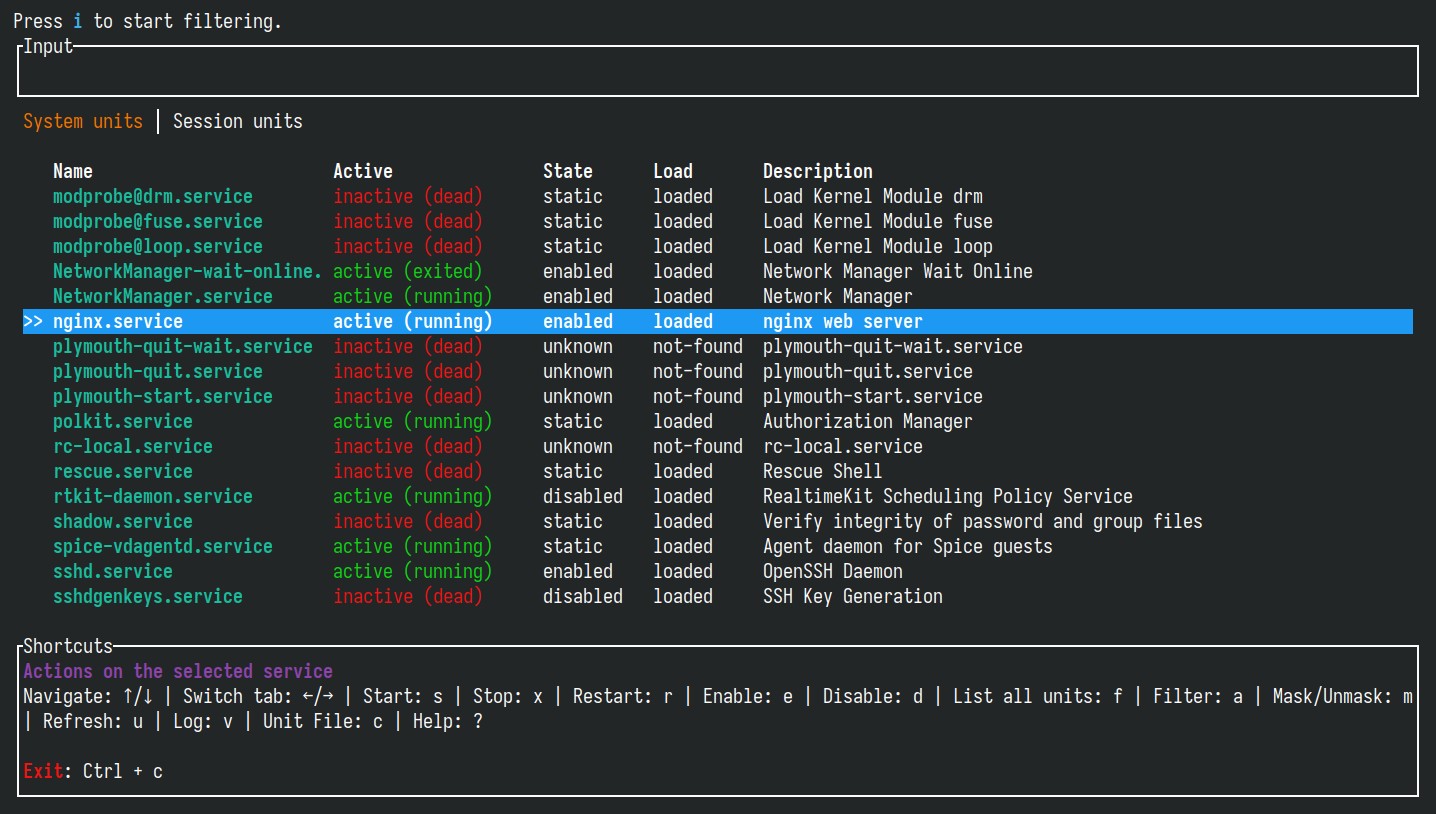
The interface is keyboard-driven and designed for fast navigation. Units can be filtered and searched, and both system-wide and user session units are accessible. On top of that, a dedicated view allows inspection of unit properties, while integrated log access lets you review journal entries without switching to a separate command.
In the Reddit discussion, the maintainer confirmed that several requested capabilities are planned for future releases. These include the ability to create new systemd services directly from within the interface, rather than only managing existing ones, as well as expanded support for handling systemd timers alongside regular services.
Finally, I’d like to add that all my tests with systemd-manager-tui met expectations. The tool performed exactly as intended and reliably. So, I recommend you give it a try yourself. systemd-manager-tui provides RPM and DEB packages for installation, available on the project’s GitHub page. Arch users can install it from AUR.
You can also download the precompiled binary, make it executable, and run it directly from the command line.
For more information, see the tool’s webpage on crates.io. You can also check out our article on ISD, a tool with a similar concept and functionality to systemd-manager-tui.



The best way to control systemd is to get rid of it.
There are plenty of solid distributions (Devuan, Artix, Void, Chimera, Gobo, Gentoo, Slackware,…) offering alternatives, with dinit possibly growing as the new best init system.
Good day! I notice whenever see an article mentioning systemd it draws wrath from some. Yet I literally never have any issues with it, my Fedora system is extremely stable, fast, and just plain works. For example, setup Syncthing podman using systemd startup, was straight forward never an issue, not even the once
What exactly are issues that would be better with those alternatives? They are all better in which way? Or just easier for some skills?
I see the many complaints, yet I never see real world cases that affect me, maybe can help!
Any case, this tool looks very cool and I need check it out 🙂
For me it’s not about issues, it’s ideological.
It stems from the consistent effort of Red Hat to control every bit of the Linux stack and lock you into their software.
And what better example than the systemd octopus, stretching its tentacles everywhere it can as deep as possible so that you get locked into ever freeing yourself of even parts of it.
Then you end up with getting GDM dependent on it with less choice for users, then the Plasma Login manager, etc… It always works like this with Red Hat, and they plan their octopus in that way. And people are dumb and buy into it until the day their ecosystem is entirely locked and controlled by one company reducing choice as much as their billion dollars could.
To the point when something useful for part of the users like XLibre, the indoctrinated kool-aid drinkers will start bashing it rather than seeing the potential for people left behind with use cases that require it. And I’m using wayland (sadly another of their pet projects), so I’m not saying this against wayland itself. But Red Hat is an extremely toxic company for the Linux ecosystem. They will go to great length to force their solution, make it the only one that can exist and to reduce choice in the process.
What better start to avoid this than a systemd-free system, and cutting off all those Red Hat tentacles grabbing you by the balls.
Thanks & great point, Wayland works absolutely fantastic for me also! Just like the systemd!
But I agree, had many more squirrely stability issues with the x11, happy to moved forward from that mess! Where possible I use the nice Flatseal and disable X11 whenever possible, so much nicer for me
Don’t mind VoltaFlake, they just seem to love to hate systemd.
Don’t mind Ricardo snowflake.
I gave it a try on a Manjaro/Plasma laptop running Wayland. IT looked good at first, but locked up or appeared to later. I had to kill it, and after I did the terminal was totally mucked. I had to start a new terminal (which was fine, so the issue it caused was ONLY to that running session) to clean up and uninstall.
From what I could see it should be very useful, once it is finished. I do not think it is quite ready for prime time yet.
If your terminal ever gets corrupted, just type “reset”. That will fix it. You might not see what you’re typing, but it will work.