
Klassik is a new open-source project that brings the classic KDE 3 desktop experience back to life on top of the modern KDE Plasma 6 stack.
Importantly, rather than simply applying a KDE 3-inspired theme to Plasma, the project goes further by recreating several of the desktop’s original components using current technologies. Klassik is built with Qt 6 and Qt Quick and supports features such as Wayland and fractional scaling.
For some historical context, KDE 3 debuted with KDE 3.0 on April 3, 2002. The series remained active for more than six years, with its final official maintenance release, KDE 3.5.10, arriving on August 26, 2008.
Back to Klassik, the project currently includes recreations of several familiar KDE 3 panel components, including the K Menu application launcher, Quicklaunch, task manager, lock and logout buttons, and digital and analog clocks.
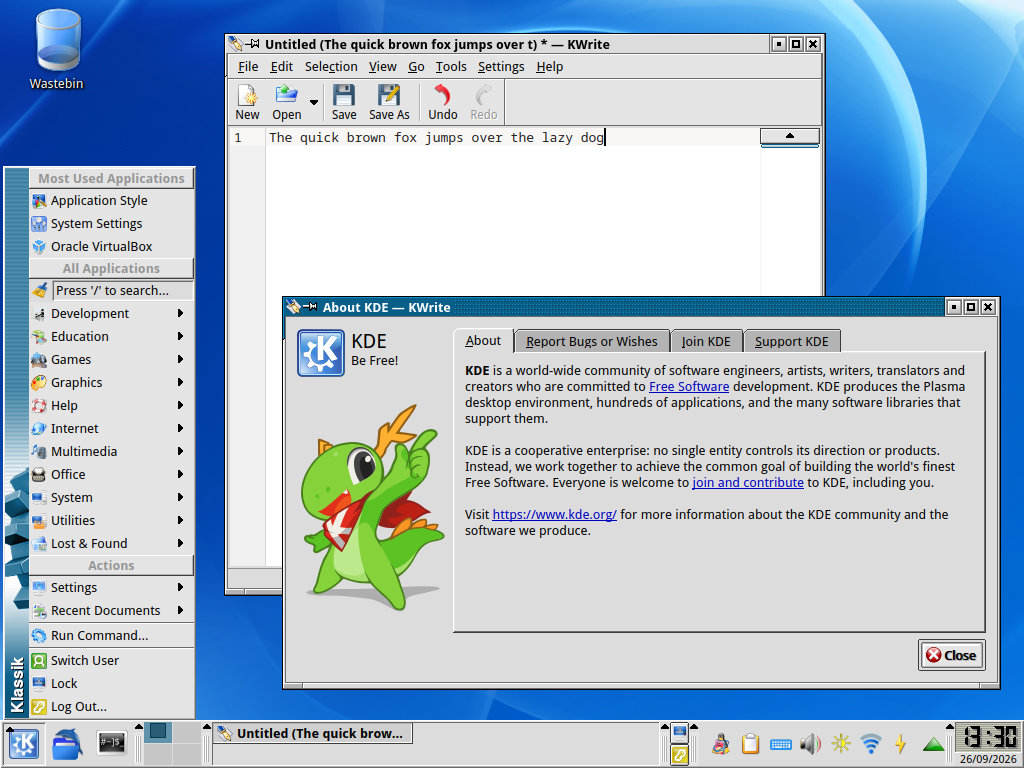
These applets are written in C++ and QML and use QStyle and QPainter for rendering to match the original KDE 3 appearance as closely as possible. Klassik also provides its own KDE 3-style panel containment, including support for custom panel background images.
Moreover, the default KDE 2/3 QStyle application theme has been rewritten for Qt 6, while old KWin window decorations are being ported to the modern KDecoration3 API. Currently, the KDE 2 decoration is included.
Klassik also ships with several color schemes originally available in KDE 3, along with a collection of wallpapers from the same era. Combined, these pieces allow Plasma 6 to reproduce much more of the old KDE desktop than a conventional Global Theme could provide.
Under the hood, this remains a modern Plasma environment. Building Klassik requires Qt 6, KDE Frameworks 6, and KDE Plasma 6 libraries, including PlasmaQuick, KSysGuard, and KDecoration3. In other words, the KDE 3 appearance just sits on top of today’s KDE technologies.
Installation involves cloning the project’s GitHub repository, checking out the latest tagged release, compiling it with CMake, and installing it system-wide. Once installed, Klassik can be selected from System Settings under Colors & Themes > Global Theme.
The developer specifically recommends using the latest tagged release rather than the master branch, as the latter frequently contains unfinished features that may cause problems.
For additional details, see the project’s GitHub repo.
Image credits: Klassik





Omg, ‘Back to the Future’… !